Z-index manual
Z-index
How does Z-Index work, both in terms of settings of your builder and with CSS. It is also discussed why Z-Index sometimes does not seem to work, or at least not as you think it should have worked … and how you can avoid common mistakes.
What does Z-Index do?
Z-Index is used to control the Z follow-up of positioned HTML elements. It regulates the stacked layers of HTML elements. To determine which object (which layer) comes above or below another object (low), set the Z-index attribute of your element or block with a number.
How do you use the Z index
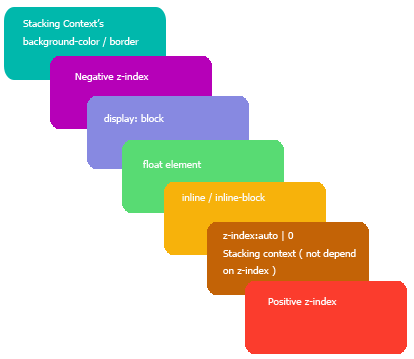
An element or block without set Z-Index behaves like Z-index 0. The ranking ‘what goes over what goes’ is determined by the structure of the page (more on that). By adjusting the Z index you can deviate from this. A block with a 2 Z index is on top of a block with Z-index 1. You can also give elements and blocks a negative Z index. See the illustration below.
Z-Index does not work on every element or block!
Positioned as relative, absolutely or fixed
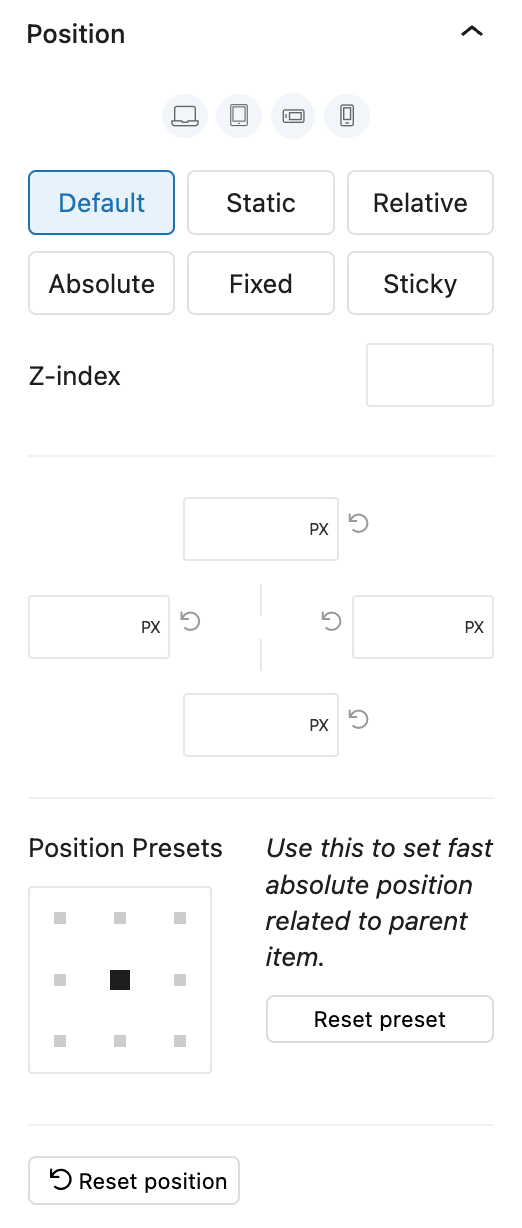
Each block or element has a CSS position characteristic. In several builders, that tab is also called ‘position’. The positions are:
- default (standard for that block or element)
- static
- relatieve
- absolute
- fixed
- sticky
You can subdivide these positions into 2 types:
- Position in relation to the layout
- position in relation to the browser window
Position in relation to the layout
- relative
- absolute
are both positons within de lay-out.
Z-index only has an effect with these positions.
Z-index only has an effect with these positions.
Position in relation to browser window
- statisch
- fixed
- sticky
His positions compared to your browser window (canvas).
The use of Z index has no effect on these positions.
The use of Z index has no effect on these positions.
Z-index: order of elements, parent and transform
Before we continue with the details; There are some factors to take into account. They are not difficult, but important.
Order of elements
Even if you have not set anything in terms of Z index, there are elements or blocks that are automatically shown on top or on the bottom; This is due to the order within the page. Suppose you first show a text on your page. Just below is the HTML (block or element) and it gives you a negative margin. That means that an overlap will take place. But which one comes below, and which above? The new one in the order automatically comes on top of the earlier. So from top to bottom, the ‘new’ always has priority in terms of visibility. Unless there is a set Z index, but we’ll get to that.
Parent and child
There are also parent and child within elements and blocks. If you place a column or container, containing a heading and a section of text, the heading and section text are the child of the column or container. That means that if the parent has a Z index that places it under a different element or block, the children can never be higher than that. This does not mean that the use of Z index in the children makes no sense; Z-Index works excellent in ranking within the parent. You can compare this with a family: the children depend on the position/ranking of the parent (s). But the children do have a ranking.
Transformations
Transformations disrupt the natural stacking order. By transformation I mean CSS transformations, such as the transform or opacity functions. As soon as a block or element has a transformation, this behaves as Z-Index 0. That means that you often have to set the Z index to ensure that it behaves as you meant. This is also the case if the transformation is done through a class.
Do you have Z-Index problems?
Detect and remedy Z-index problems:
- Check if a position has been set, which, and whether the Z index is correct in order.
- Make sure there are no parent (parent) elements that limit the Z-index level of the underlying elements.
Z-Index is very important
It determines which object (block or element) in terms of visibility has priority over another. Which ‘over’ the other person can go, or under it.
Test on multiple widths
Always test your website with multiple window widths and on multiple devices to see if everything is going well, also in terms of Z index. Because it is precisely with a narrower window that it becomes clearly visible what can go wrong.