Dynamic Popup & Fly-out plugin
Dynamic Popup & Fly-out plugin for WordPress – Gutenberg and full site editing
Do you need to create good, fast en stable popups (modals) or fly-outs, or side-modals? The Dynamic Popup & Fly-out plugin is created by a WordPress site designer!
Can’t find a decent fly-out or popup block, or you would rather not use a builder plugin?
We have been there. Every so often you create a website that doesn’t need a bulky, overdone or expensive builder. Or you already have one and it doesn’t meet your needs. That’s why we created the Dynamic Popup & Fly-out plugin. Easy, versatile and professional.
Missing in many builders
Even blockbuilders like Stackable, GutenKit, PostX, Nexter, aBlocks and Twentig don’t have this essential functionality.
Dynamic Popup & Fly-outplugin
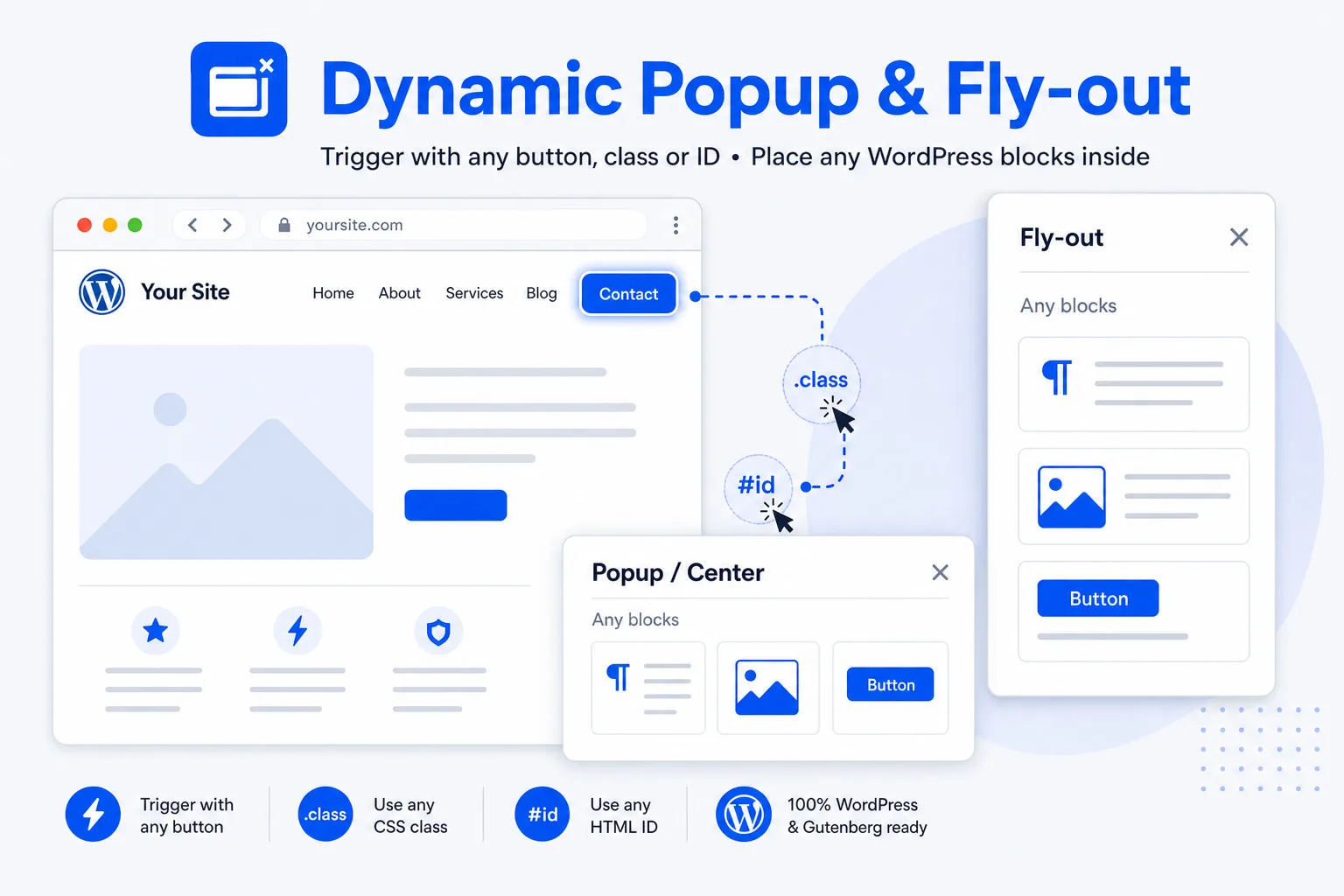
It’s a modal with full popup and fly-out functionality, and internally it gives you the options like a column: just place inside whatever you want. And importantly, you can use any element as a trigger with a .class or #ID.
Examples of Dynamic Popup & Fly-out
Dynamic Popup & Fly-out FAQs
Yes, the Dynamic Popup & Fly-out plugin is especially developed for WordPress Gutenberg. It’s even capable of containing other Gutenberg blocks.
A Dynamic Popup & Fly-out popup can be opened with a text link (heading, paragraph, etc). Just give the Dynamic Popup & Fly-out popup a class at the trigger selector field, like .open_my_popup and add the same class (without .) in the ‘Additional CSS class(es)’ field of the text you want to use a trigger. Just save the page and it works.
A Dynamic Popup & Fly-out popup can be opened with a button. Just give the Dynamic Popup & Fly-out popup a class at the trigger selector field, like .open_my_popup and add the same class (without .) in the ‘Additional CSS class(es)’ field of the button you want to use a trigger. Just save the page and it works.
A popup can be opened with an image. Just give the Dynamic Popup & Fly-out popup a class at the trigger selector field, like .open_my_popup and add the same class (without .) in the ‘Additional CSS class(es)’ field of the image you want to use a trigger. Just save the page and it works.
A fly-out can be opened from the menu. Just give the Dynamic Popup & Fly-out popup a class at the trigger selector field, like .open_my_popup and add the same class (without .) in the ‘Additional CSS class(es)’ field of the menu-item you want to use a trigger. Save the page and you’re are ready to go.
PS: In most modern themes you can place a button in the header. That works as well.
For Core Gutenberg
- Core Gutenberg doesn’t even have a popup or flyout plugin. So the advantage is obvious; you go from nothing, to a completely flexible dynamic popup & flyout block that works with custom triggers, by ID or class.
For Greenshift
- Greenshift has extensive popup and flyout possibilities. Dynamic Popup & Fly-out works a lot faster and easier however.
GenerateBlocks
- GenerateBlocks has popup and flyout functionality. But i’s not a separate block and that limits the possibilities, like opening a popup or flyout from a query.
- With Dynamic Popup & Fly-out you have those options – standard.
Twentig builder
- Twentig doesn’t have a popup or flyout plugin. So the advantage is obvious; you go from none to a completely flexible Dynamic Popup & Flyout block.
Nexter
- Nexter has a popup and flyout block, but it doesn’t work with custom triggers, only with their standard popup button. Dynamic Popup & Flyout block works with every trigger, by ID or class.
GutenKit
- Gutenkit has a flyout block (off-canvas), but it doesn’t work with custom triggers, only with their standard popup button. Dynamic Popup & Flyout block works with every trigger, by ID or class.
Yes. Our Popup & Flyout block is especially adapted for WooCommerce, so most Add-to-cart blocks will function normally ** when placed in a flyout or popup.
** the CSS including the table responsble for the rendering frontend remains intact.
- The best? There are truly very advanced popup, flyout, and off-canvas plugins available, with scripts that track visitor behavior, take into account the day of the week, that you can program in advance, and much more.
- Compared to that, Dynamic Popup & Flyout is more basic. But what we do, we do very well: placing blocks in a column-like style, choosing height, width, and design, left, right, center, etc. and you can designate any other element as a trigger. And that results in a UI that makes everything look very simple—and therefore is!
- And because we know exactly what we are doing, we can keep the block small and ultra-fast.
Yes. The close icon can be placed top left, top right or can be hidden. Every popup and flyout can still be closed by clicking on the trigger again, on the overlay (outside of the popup) or with the esc. button.
Of-course there is! There is a Guide section in the plugin itself, and complete documentation on our website.
Dynamic Popup & Fly-out
$ 29 one-time
Conclusion: good choice
- Activation on 5 websites
- Modals en popups
- Fly-out
- Every element can be a trigger (open / close)
- Works with .classes and #anchors
- Auto-open delay (can be combined with a trigger)
- Responsive
- Custom backdrop
- Use any block in the modal
- Super fast plugin — not bloated
- Perfect balance of features and simplicity
- jQuery free, no external requests
- Only ~2,9 KB
- Interested in more plugins and receive a 50% discount? Take a look at our All-in plan.

Dynamic Popup & Fly-out
$ 49 one-time
Conclusion: excellent choice
- Activation on 25 websites
- Modals en popups
- Fly-out
- Every element can be a trigger (open / close)
- Works with .classes and #anchors
- Auto-open delay (can be combined with a trigger)
- Responsive
- Custom backdrop
- Use any block in the modal
- Super fast plugin — not bloated
- Perfect balance of features and simplicity
- jQuery free, no external requests
- Only ~2,9 KB
- Interested in more plugins and receive a 50% discount? Take a look at our All-in plan.
All-in plugin pack
50% Discount
Conclusion: the best choice
- Activation on 25 websites
- Perfect with Gutenberg, Stackable, GenerateBlocks, Greenshift, GutenKit and more
- All plugins are for classic and FSE themes, except FSE Template Assigner
Select 5 or more plugins
- Dynamic OSM Maps
- Dynamic Popup & Flyout
- Dynamic Accordion
- Dynamic Video Player
- Flexible Layout Section
- FSE Template Assigner
Discount:
- Add plugins totaling at least $245 and apply the 50% discount coupon (ALL-IN-PLAN) for half off.
Test our Dynamic Popup & Fly-out plugin
The plugin has a free test mode
- The plugin shows the possibilities — popup, flyout, placement, trigger, and styling are all active.
- In the backend, you can add all the blocks you want.
- The front end has fixed content.
Popups
- Any size popup or modal
- Center top, bottom, center; anything you want
- Totally responsive with width settings for desktop, tablet, and mobile
- Width and height in px, % or auto
- Background setting
- Any trigger (.class or ID #whatyouwant) so you can use a button, text, column, or place a trigger in the menu
- The code is placed in the footer; it is more stable especially in classic themes.
- Backdrop with custom color and opacity and even a subtle blur effect
- Exit with a button, escape, click on the backdrop (outside of the modal) or the same trigger.
- The exit button has the following settings: top left, top right and hide.
- You can use any block in the popup (core and other Gutenberg builders)
- Switch the popup on / off
Fly-out or side-modal
- Any size fly-out or side-modal
- left or right
- Totally responsive with width settings for desktop, tablet, and mobile
- Width and height in px, % or auto
- Background
- Any trigger (.class or #whatyouwant) so you can use a button, text, column, or place a trigger in the menu
- The code is placed in the footer; it is more stable especially in classic themes.
- Backdrop with custom color and opacity and even a subtle blur effect
- Exit with a button, escape, click on the backdrop (outside of the modal) or the same trigger.
- The exit button has the following settings: top left, top right and hide.
- You can use any block in the fly-out (core and other Gutenberg builders)
- Switch the flyout on / off
Target by ID
- You can apply general CSS; this modifies all modals (pop-ups, fly-outs, etc.) at once.
- You can also target each modal individually. For this, you require the modal ID.
- For each modal, the ID is listed in the block settings, ready for use.
Registered custom post types
- This means you can view, create, manage, enable and disable, customize, duplicate, and delete all pop-ups and flyouts in one location.
- In the newest version you don’t need to use the popup-block anymore; all properties and assignments are hidden in the metabox below the popup or flyout you are editing.
Cache plugins
- The plugin is built in such a way that no exceptions for scripts and URLs are required for commonly used cache plugins, such as LiteSpeed, WPCompress, and FlyingPress. The plugin takes into account placed blocks such as video players and maps.
Documentation
- The plugin has extensive documentation.
- Including a step-by-step manual.
Speed-impact / size
The plugin loads only on pages with a Dynamic Popup & Fly-out assigned (with trigger enabled). No block → no extra assets.
| Asset | Unminified | Gzip (typical compression) |
|---|---|---|
frontend.js | 6,1 KB | ~1,8 KB |
frontend.css | 4,6 KB | ~1,1 KB |
| Total | ~10,7 KB | ~2,9 KB |
Practical: very lightweight (compressed only ~2,9 KB). No jQuery, no external requests. The script is located in the footer and only initializes after DOMContentLoaded. On pages without a modal: 0 KB extra.
License
- You are allowed to use the plugin on a maximum of websites, according to the purchased license.
- Always deactivate a license on an unused website; otherwise the key slot remains occupied.
- It’s a one-time payment; no yearly costs.
- You can check your available slots at: https://server.wpinsight.eu/validate-key/