Best #1 Kadence alternatives!
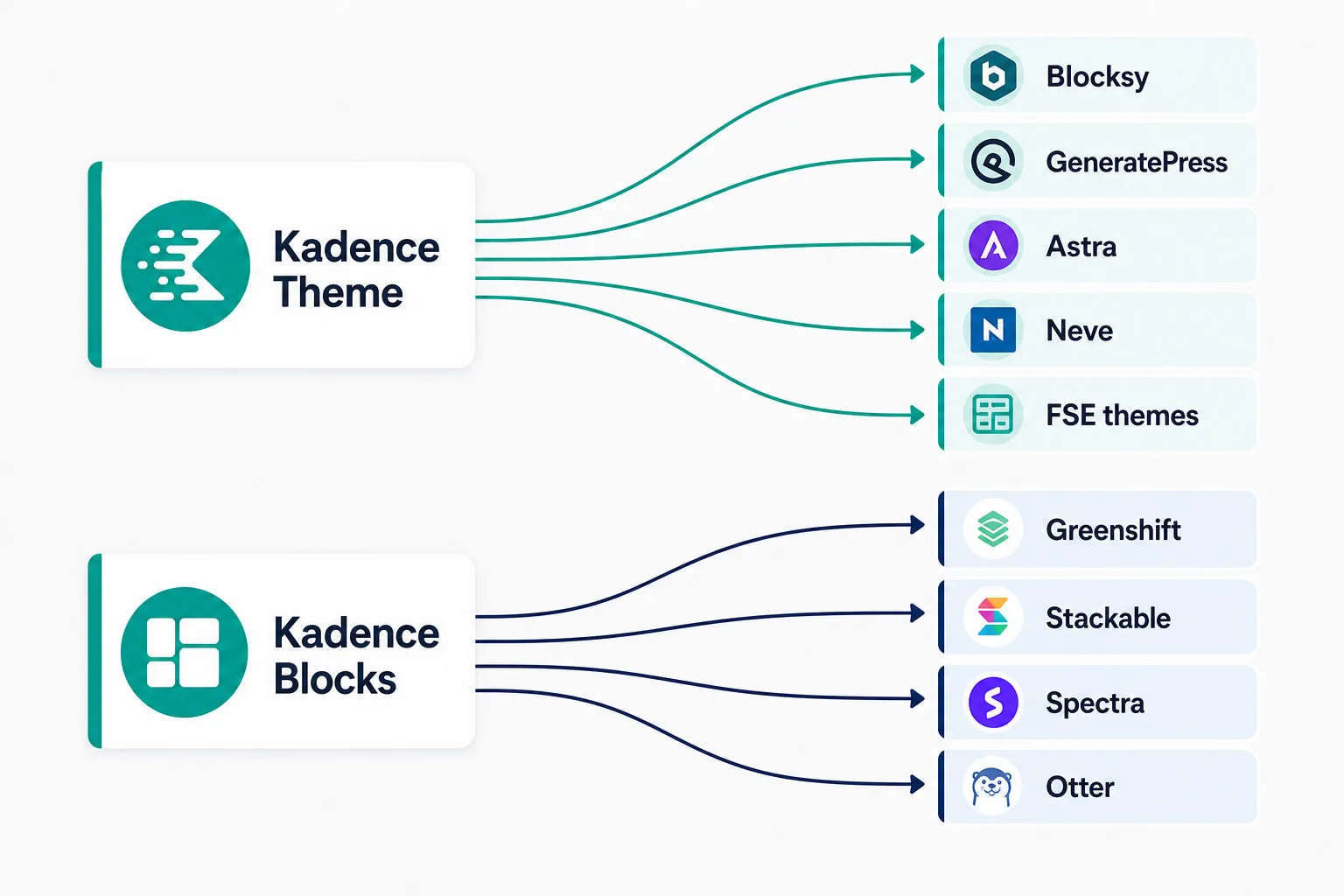
This is not a traditional comparison; these are alternatives to the combination of the Kadence theme, Kadence blocks and extras like Shop Kit. We have omitted personal preference as much as possible. For a genuine choice, the builder’s preference and the goal (who is the client and who will manage the site) ultimately play a decisive role.
At the end of this post, we do present good setups for building a website with approximately the same options as Kadence offers and we tell you why not all the mentioned themes and builders are good Kadence alternatives.
The motivation behind seeking an alternative to Kadence stems from the significant decline in its reputation since May 12, 2026. This decline isn’t due to changes in popularity or new features being introduced. On that date, the entire Kadence website went offline, and all its products became part of the Liquid Web brand, which caught many users off guard. Kadence had been acquired by Liquid Web a few years prior, but most users either didn’t know or had only a vague understanding of what this meant for them.
Major changes in the Kadence builder suite
It is not just a change of ownership that has suddenly become visible. Products have been merged or disappeared, the subscriptions offered have been adjusted, and prices have been significantly increased. In addition, the definition of the lifetime plan has been unilaterally changed.
Lifetime meant, until a few days ago, lifetime with this definition (from the Kadence website):
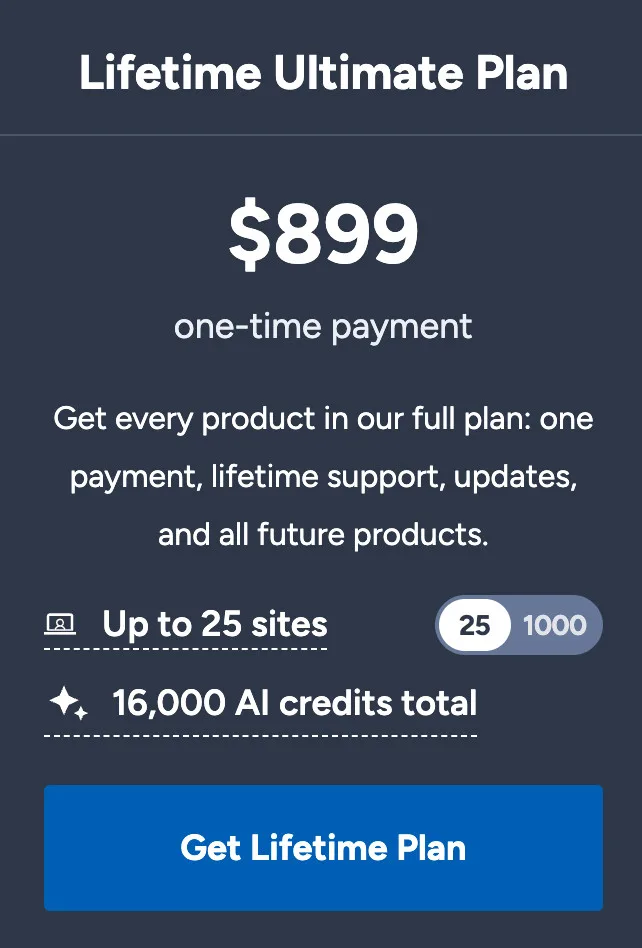
What does the Lifetime Ultimate Plan mean?
Literally, it says:
Get every product in our full plan: one payment, lifetime support, updates, and all future products.
Now everyone has a Legacy license
The transition email said, “You keep it as it is today.” In which a promise made at the time of purchase of the lifetime license is clearly broken now. Because it stated clearly, ‘and all future products‘.
The all-new Kadence product-line now offers several new products (from the perspective of a few days before May 12, 2026), that are not included.
But do they have to add everything then?
I understand that you never know exactly what your future plans are, when you make such a promise. But it is precisely that strong promise that has enabled Kadence to experience such a growth spurt in recent years. Most of those who purchased the Lifetime Ultimate Plan were professionals who, in doing so, knew for certain that they could offer their clients security and continue to build on and with Kadence in the future.
Kadence broke their promise
Yes, there is a new owner. Yet this company has been the owner for some time; it didn’t happen overnight. A promise, especially such a clear one that cannot be interpreted otherwise, ought to be kept, no matter what happens.
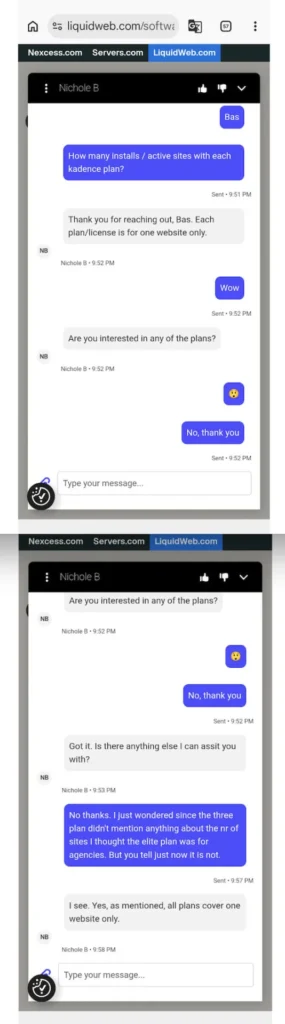
All new Kadence plans are for one website only.
- Even the agency plan of $499,- a year is for 1 website only.
- These prices are such that, in principle, I can no longer recommend Kadence or use it on a client website.
- I share the communication with support about the new plans below.
What now?
- Make sure you open a support ticket (well, as soon as that functionality is working again) and tell them that you don’t agree with this and why. Keep it civil, but be clear.
- I think it’s time for a plan B. Of course, we don’t all have to rebuild our websites from Kadence to another theme and builder immediately, but make sure that you:
- Actively explore what could be a good Kadence alternative for both the Kadence theme and the Kadence block builder.
Not because the Kadence products suddenly became bad in a single week, but because there has been a lot of turmoil at Kadence and their parent company for quite some time. The good people have left or been fired; communication between the company and the customers is virtually non-existent. The forum is run primarily by (admittedly competent) but still just volunteers, and a company that pushes through a transaction in such an amateurish manner and shows no regard for its customers is not a good omen for the future. - It’s a hard sell to clients; previously, once a website was finished, it was delivered to the client, and as long as the developer/designer handled the maintenance, the client could fall under the agency license. That is no longer possible, and the client needs to buy a license themselves for every Kadence website. That adds up to $ 499.- per year, per website.
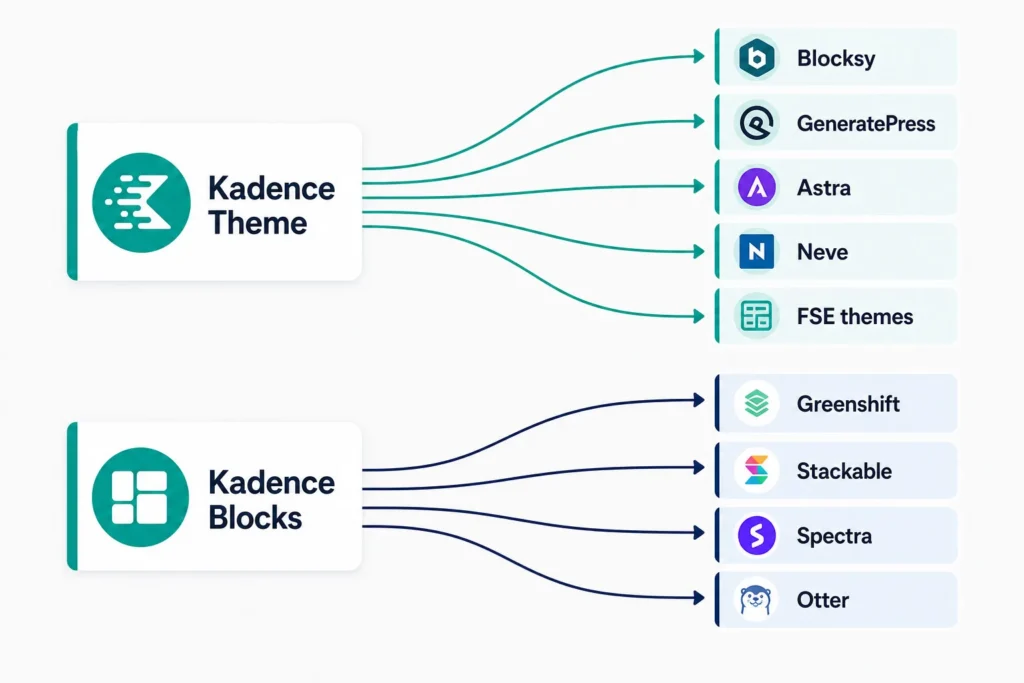
Suitable Kadence alternatives
In my selection of builders (block and non-block builders), I assume that you are looking for roughly the same functionality as what the Kadence Ultimate Plan has to offer. At the end of the article, I mention a few products that you can use to fill in the functionality you might be missing.
Non-block builders
In this section, I do not distinguish between theme and builder because it is customary to leave the provided combination intact: most non-block builders include a theme of their own.
- Divi 5. Yes, Divi has undergone a massive change in the last few months and has suddenly gone from nothing to a serious builder and theme again.
- Bricks. Bricks has become a serious player in the WordPress world. Multiple add-ons are now emerging, and for most people, it is now complete enough to build more advanced websites as well.
- Etch. I have no personal experience with Etch, but I hear good things about it from those around me. Downside: it’s super new.
- Breakdance. Great workflow. Has an enthusiastic group of users.
Block builders as a Kadence alternative
In this section, I do make a distinction between theme and builder because, even though some builders have their own theme, they can be combined more freely. The mentioned combinations of builder and theme are aimed at serving as an alternative to the pro versions of Kadence Blocks and themes.
Block builders as a Kadence blocks alternative
GenerateBlocks
- Support WooCommerce: basic.
- Header builder: yes (not 100% FSE compatible).
- Navigation block: yes, a remarkable one with the luxury of ‘classic style’ editing of the menu itself, on FSE also.
- Dynamic and custom field support: Yes, Generate Blocks (pro) excels at using dynamic values, including custom fields from just about all custom field plugins.
- Conditional display: yes.
- Query: Generate Blocks has a query block that is as good as and maybe even better than the Kadence query.
- Creating a column lay-out with 1 fixed column and a flexible one, filling the whole window: yes, easy.
- Every detail can be customized as desired, because a block—such as an accordion or tabs—also consists of sub-blocks.
- Support: good.
- More information
Disadvantages of GenerateBlocks
- No Maps block.
- No Show More/Less block.
- Accordion misses an open and close class or ID.
- Image used with a custom field shows no alt text from media.
- Giving a column (container) a URL target is not possible without coding.
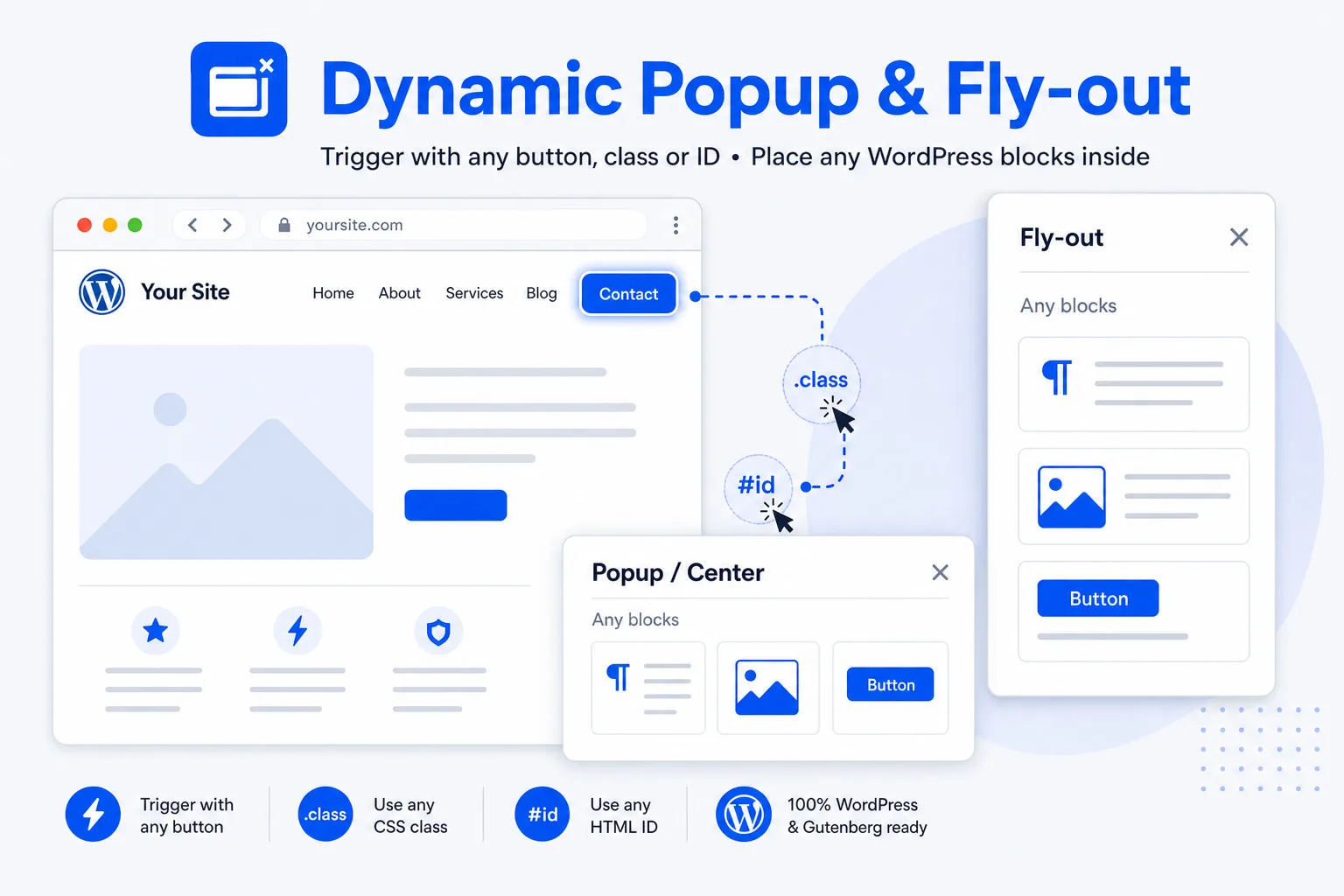
- Creating popups, modals and side-modals (overlay panels) is part of the blocks plugin but cannot be used as a sub-block, for example in a query. So opening a post from a query in a popup or side-modal, requires special coding or a plugin. Update: the extremely light Dynamic Popup & Flyout plugin is an excellent solution.
- The header block is only partly compatible with an FSE theme; for example the background is not full width.
- No dedicated WooCommerce blocks
- No WooCommerce side-cart. Solution: dedicated plugin.
Greenshift Blocks
- WooCommerce support: superb with a huge WooCommerce blocks collection.
- Template builder like Kadence Elements: yes
- Dynamic and custom field support: Yes, Greenshift (pro) is superb at using dynamic values, including custom fields from just about all custom field plugins. I haven’t found a dynamic value Greenshift wasn’t able to read and render.
- Header builder: yes
- Conditional display: yes
- Query: Greenshift Blocks has a query block that is as good, and has even more possibilities than the Kadence query.
- Creating a column lay-out with 1 fixed column and a flexible one, filling the whole window: yes, easy.
- Support: fair, better than it used to be.
- More information
Disadvantages of Greenshift blocks
- Developments in Greenshift are moving faster than most users can keep up with.
- Some features, such as animations and interaction layers, are not simple. Not so much because they are difficult, but because good explanations are often lacking.
- The navigation element is an excellent block, and there is the native navigation element. For end-users (clients) using that can be a challenge. You might consider using the Gutenberg native navigation, combined with the Classic Menu Navigation plugin (free).
- The developer has shifted focus to Greenlight, and specifically GreenlightDash (an AI development platform). Recently (September 2026), the developer even announced that further development of Greenshift has been halted in favor of their AI tools.
Stackable Blocks
- WooCommerce support medium, blocks support WooCommerce dynamically.
- Header builder: no, so you have to depend on the header building capacities of a theme of choice.
- Dynamic and custom field support: yes, Stackable (pro) is good at using dynamic values, including custom fields from just about all custom field plugins. Not like Greenshift or GenerateBlocks, but good too.
- Conditional display: yes.
- Query: not as versatile as the other options mentioned. If you need a query that works with custom fields and can extract data, Stackable is less suitable.
- Support: good.
- More information
Disadvantages of Stackable blocks
- No side-modal or popup block.
Update: the extremely light Dynamic Popup & Flyout plugin is an excellent solution. - No dedicated WooCommerce blocks (the blocks do have WooCommerce conditions).
- Image used via a custom field shows alt text from media: unknown.
- Uses the native query loop.
- Creating a column lay-out with 1 fixed column and a flexible one, filling the whole window, is not possible (works with % only).
- Map block isn’t dynamic.
- Not as complete as some other builders.
Spectra Blocks
- WooCommerce support: basic.
- Header builder: no.
- Dynamic and custom field support: yes, Spectra (pro) is good at using dynamic values, including custom fields from just about all custom field plugins. Not like Greenshift, which can read just about everything on this planet, but good too.
- Conditional display: yes
- Query: that’s a query I haven’t tested. I do know it works with dynamic fields.
- Creating a column lay-out with 1 fixed column and a flexible one, filling the whole window: unknown.
- Support: unknown.
- More information
Disadvantages of Spectra blocks
- They are in the process of updating their new version of Spectra blocks.
- Some blocks are still missing.
- Spectra blocks is not known for their efficient code and fast blocks.
- No dedicated WooCommerce blocks.
- Accordion misses a close class or ID.
- No Show More/Less block.
- Image used via a custom field shows alt text from media: unknown.
Otter Blocks
- WooCommerce support: yes, adds various WooCommerce blocks.
- Header builder: no.
- Dynamic and custom field support: yes.
- Query: that’s a query I haven’t tested. I do know it works with dynamic fields.
- Conditional display: yes.
- Creating a column lay-out with 1 fixed column and a flexible one, filling the whole window: unknown.
- Support: unknown.
- More information
Disadvantages of Otter blocks
- No Show More/Less block.
- Query builder (post block) has limited functionality.
- Image used via a custom field shows alt text from media: unknown.
- Expensive.
Gutenberg Core Blocks
- WooCommerce support: yes, adds various WooCommerce blocks.
- Header builder: yes with core, especially with an FSE theme.
- Dynamic and custom field support: most block now have block binding, so a plugin like Modern Fields makes them dynamic
- Query: simple query.
- Conditional display: with a simple plugin.
- Creating a column lay-out with 1 fixed column and a flexible one, filling the whole window: yes.
- Repeater: not without an additional plugin.
- Support: no.
- Core is only sufficiënt as a kadence replacement when using with a really good theme, like Ollie pro.
Disadvantages of Gutenberg Core blocks
- No Show More/Less block.
- Query builder (post block) has limited functionality for some demanding sites.
- No side-modal or popup block.
- No maps block.
- Tabs block very basic.
- Not a lot of dynbamic functionality; only certain blocks have (limited) block binding to connect them to custom fields.
- As a Kadence alternative only when used in combination with, for example, Ollie Pro and Modern Fields, ACF or Meta Box (using blockbinder functionality).
Other builders
The builders below I only played with; I created a few pages or a simple website, but never studied intensively. All, except Twentig, offer templates for posts and work with custom (dynamic) fields. Twentig is special in another way; Twentig blocks has given the native blocks more functionality: if you don’t use dynamic values, they are excellent blocks. Most are serious enough to consider but are not as complete as the other mentioned builders. There is more information about the mentioned ‘Other builders’ in the section ‘Why are some builders not a Kadence alternative favorite?’ at the bottom.
- PostX block builder (free and pro)
- Greenlight (free and pro)
- aBlocks block builder (free and pro) *
- Twentig blocks (free)
- Nexter blocks (free and pro)
- Essential Blocks (free and pro)
- Gutenkit blocks (free and pro)
- Unblock (pro)
Note: In March 2026, aBlocks still had no dynamic image block and the container didn’t have dynamic background functionality. Also the modal can be triggered only with a button; there is no custom trigger (like a class or #). Not everyone needs this functionality, but it can be a dealbreaker in certain designs, so test this in advance.
Most block builders are lacking one or more of these functions
- Pop-ups, modals and fly-outs, ready for the block builder and with a custom trigger (.class or #trigger)
- Video block that works with all kinds of video-sources and accepts video url’s in custom fields.
- Dynamic accordion block (using custom fields for title and content)
Further on in this article, I discuss some good alternatives for that. Some of them are really good, fast, ultralight, and have an LTD plan.
Combining Block Builders
Combining builders doesn’t apply to non-block builders. Combining two block builders however has never led to problems for me, and believe me, I tested that intensively. Furthermore, no deterioration in speed has ever been observed in those tests, as long as you use decent block builders. That gives you the opportunity to combine the best of two block builders. You think something like ‘I don’t like needing multiple plugins,’ but then you might have forgotten that if you need all of Kadence’s features, you’ll quickly end up with a minimum of 6 plugins… That’s even more than what we’re discussing here… But I’ll show you good alternatives for popups, modals, video block and a dynamic accordion block.
Themes as a Kadence alternative
Certain criteria select the themes in the list:
- Ability to create custom single-page and archive templates
- Decent userbase
- Regularly updated
- WooCommerce integration
- Clean HTML output
- Adheres more closely to WordPress guidelines, making creating PHP or custom plugins work well.
My list of Kadence theme alternatives
GeneratePress theme
- Template functionality (like Kadence elements): yes, it offers nearly the same functionality as Kadence elements and even uses the same name. Just like Kadence, it offers post templates, archive templates, and all kinds of other block templates that can be used everywhere.
- LearnDash integration: good
- Clean output: yes
- Adheres to WordPress guidelines: reasonable
- Agency usage: yes, up to your activation limit
- Speed: excellent
- Support: good
- Information
Blocksy theme
- Template functionality (like Kadence elements): The Blocksy theme has Content Blocks. Although I find the name a bit confusing, it is an exceptional replacement for Kadence elements. I tested it extensively with the single post template. A content block works perfectly with native blocks, Stackable blocks, and even the Kadence blocks. Moreover, the pop-up functionality is perfect.
- WooCommerce integration: Excellent
- LearnDash integration: Good
- Clean output: yes
- Adheres to WordPress guidelines: good
- Agency usage: yes, up to your activation limit
- Speed: good
- Support: good
- Information
Astra theme
- Template functionality (like Kadence elements): Astra offers nearly the same functionality as Kadence elements, it’s called Sitebuilder. And just like Kadence, it offers post templates, archive templates, and all kinds of other block templates that can be used everywhere.
- WooCommerce integration: Excellent
- LearnDash integration: Excellent
- Clean output: not really
- Adheres to WordPress guidelines: reasonable
- Agency usage: yes, up to your activation limit
- Speed: good
- Support: okay
- Information
Neve theme
- Template functionality (like Kadence elements): Neve offers nearly the same functionality as Kadence elements. Just like Kadence, it offers post templates, archive templates, and all kinds of other block templates that can be used everywhere.
- WooCommerce integration: the more expensive plans: yes
- LearnDash integration: the more expensive plans: yes
- Clean output: yes
- Adheres to WordPress guidelines: reasonable
- Agency usage: you do require the most expensive plan to use the theme for clients. Probably the reason some users are hesitant to use it.
- Tip: The top-tier agency plan features the Otter block builder. While some may end up paying for features they don’t require, for others, this combination can be beneficial, particularly if you’re seeking a solid alternative to Kadence.
- Support: unknown
- Speed: reasonable
- Personal note: I haven’t been able to use their template functionality with a block builder apart from their blocks.
- Information
Ollie Pro theme
- This is the only FSE theme we mention apart from the general list of FSE templates,
- Template functionality: Ollie offers templates, archive templates, and all kinds of other block templates that can be used everywhere through the default FSE template functionality.
- WooCommerce integration: yes
- Clean output: yes
- Adheres to WordPress guidelines: good
- LearnDash integration: basic, excellent integration of Sensei LMS.
- Agency usage: yes
- Support: excellent
- Speed: very fast
- Personal note: I love the Ollie theme, but it has one disadvantage if you are creating a heavier website: it doesn’t play nice with most cache plugins. I haven’t found a single cache plugin that gives actual speed improvements, not even LiteSpeed or FlyingPress.
- Information
Several FSE themes
- Template functionality (like Kadence elements): When we look at the template functionality, every FSE theme offers this standard. That is free, without any pro, premium, or otherwise paid add-on. There is one massive disadvantage however. What Kadence, Blocksy, Astra and GeneratePress themes offer is the assignment of page templates, headers, and footers. But there is a plugin, ‘Dynamic Templates & Elements that does all that. It’s an affordable LTD plugin. Created by me by the way.
- WooCommerce integration: Depends on the theme. FSE themes have the advantage that they support the direction WooCommerce itself is heading and have by default the option the create a unique single product page template.
- LearnDash integration: Depends on the theme. The free LMS Course FSE theme for example is especially developed for an LMS like LearnDash.
- Clean output: yes
- Adheres to WordPress guidelines: good, usually a lot better than classic or hybrid themes.
- WooCommerce Side-cart opens when adding a product: some themes have it, like Neve FSE, and some don’t.
- Speed: Most FSE themes, like Greenshift, Neve FSE, Ollie and Fork are very fast. I have noticed that some FSE themes are not that fast at all.
Some excellent FSE themes
If you’re looking for fast Full Site Editing (FSE) themes and don’t need features like side modals, lightbox or various built-in webhooks, you’re in luck. There are several outstanding themes available, many of which work exceptionally well with WooCommerce. I’m intentionally focusing on FSE themes here. Not only is the backend incredibly responsive, but every template is also easily customizable without the need for additional plugins, such as Kadence Element or Blocksy Content blocks. This offers professional flexibility without relying on extra plugins or premium themes.
These themes are not only high quality but also incredibly fast, even without caching. When paired with the ‘Dynamic Templates & Elements‘ plugin, you have the flexibility to create just about anything you can imagine.
- Greenshift theme ** (good and versatile theme, development slowed down)
- Ollie Pro theme *** (has a builder extension included)
- Twentig theme * (good theme, incompatible with Greenlight)
- Fork theme ** (incompatible with GenerateBlocks)
- LMS Course FSE * (not tested, but recommended by many)
- Neve FSE theme * (good and versatile theme)
- Raft Pro ** (good and versatile theme)
All FSE themes work with WooCommerce. * and ** have some lay-outs for WooCommerce. *** has excellent WooCommerce integration. Not all themes in this list have a sidecart that opens automatically when the user adds a product.
Good combinations or Block Builder and theme
- GeneratePress Blocks (pro) with the Blocksy theme (pro). I know; there is also a GeneratePress theme. For a normal (non-WooCommerce) website, that’s perfect. But as soon as you start creating WooCommerce websites, you will experience the shortcomings. Blocksy offers almost all the functionality of the Kadence theme (including their version of Elements) and is even better in the area of eCommerce.
- GeneratePress Blocks (pro) with the GeneratePress theme (pro) or any FSE theme. It offers about the same functionality as the Kadence theme and Kadence Blocks. I find both GeneratePress and Generate Blocks to be really high-quality and fast, but a bit less intuitive. I sometimes need the documentation, whereas with Blocksy or Kadence that is truly the exception.
- Greenshift blocks (pro) with the Blocksy theme (pro) or most FSE themes. Greenshift includes a lot of functionality, such as side modals often found in themes, giving you more freedom in your choice of theme. You can then base your theme selection entirely on the purpose of the website.
- Stackable Blocks (pro) with the Blocksy theme (pro) or any FSE theme. Stackable has everything for a standard website, is super stable, is friendly with most themes, and is very pleasant to work with. However, Stackable lacks some functionality such as side-modals, pop-ups, repeater blocks, lightbox, and the Map block lacks dynamic fields functionality. Functionality such as side modal and lightbox is already included by default in some themes, such as Blocky. But pop-ups, repeater blocks, lightbox are not.
- Spectra Blocks (pro) with the Astra theme (pro) or an FSE theme. Personally, I’m not wild about Astra and Spectra, but especially Astra is not a bad theme and Spectra gets the job done.
- Neve theme (pro) with any blockbuilder. Neve has Custom Layouts as an Elements replacement, and it offers most of the Kadence theme functionality.
- Ollie Pro theme with the Gutenberg blocks and Modern Fields, or with Greenshift blocks (pro)
* FSE themes do miss the functionality all the mentioned premium themes have: assigning themes, headers and footers to post types, categories, tags, etc. The reason I still mention using FSE themes as a Kadence replacement is that you can add the ‘Dynamic Templates & Elements plugin. I know, it’s developed by me but it really adds professional assignment capabilities to any FSE theme.
* Themeisle (the owner of Neve) does not allow you to use / install the Neve Pro theme on client websites, except with the most expensive plan of € 519,- a year. That is probably the reason the Neve theme is not frequently used by designers and developers. After all, as a small agency, you don’t know in advance for how many clients you will use Neve, and the agency license is one of the most expensive in the WordPress ecosystem. It is also important to know that their plans are not based on the number of websites but on more or fewer available features also.
Detailed Kadence functionalities and the Kadence alternatives
I will leave personal taste regarding the included theme and layout out of consideration. It is about functionality that Kadence has and which, certainly for a professional, requires an alternative.
Obtain Kadence-specific functionality elsewhere!
For everyday use, the above blockbuilders, themes and combinations are splendid for replacing Kadence. However, if like me, you use the Kadence functionality to its full potential, you will sometimes miss some things.
Creating a single product page for WooCommerce.
- Kadence Shop Kit is really handy. The tools provided are good and enable you to design product pages that don’t look like product pages! The disadvantage is that a part of the functionality doesn’t work on the new FSE themes, only on classic themes. Another disadvantage is that it is not possible to buy Kadence Shop Kit as a standalone product; it’s always part of a package.
Alternatives for Kadence Shop Kit
- When using an FSE theme, you probably won’t need a plugin at all to create templates: creating a single product or archive template is standard functionality in any FSE theme.
- WowStore (free here) offers more or less the same functionality as Kadence Shop Kit, including an entire WooCommerce block collection, to create a single product template for classic or hybrid themes, like Blocksy or GeneratePress.
- Shop Engine is another tool that replaces Shop Kit. It’s a WPmet product (I haven’t tested this plugin yet).
- Dynamic Templates & Elements offers WooCommerce product template overrides for classic themes and WooCommerce product template assignment for FSE themes.
WooCommerce Quickview
- Standard function in Kadence Shop Kit.
- Standard in some themes, like Greenshift FSE.
- Replacement: YITH Quickview plugin (free)
WooCommerce Side Cart
- Most themes have it built-in but do miss some extra functionality, like extra buttons, fully customizable text, etc.
- Replacement: Xootix Side Cart plugin (free) is an excellent plugin. It’s even more flexible than Kadence or Shop Kit!
Extra fields in the checkout form
If you are not using the Kadence Shop Kit plugin, you might need a good replacement to create additional fields on the checkout page. Those options are both fine and tested by me.
- Adding custom fields to the checkout page (block version): Checkout Fields for Blocks (free).
- Adding custom fields to the checkout page (classic version): Checkout Field Editor (Checkout Manager) for WooCommerce (free)
Some other products that are good as a partial Kadence alternative
Forms
- Kadence has a decent form builder. Of course it has limitations, but for most uses it’s perfect. There is a replacement that’s even better. And free.
- Jetformbuilder is a wonderful form plugin. It works with Gutenberg fields in the post editor, just like Kadence Forms, but has a lot to offer. The free version can do more than you think; it’s even capable of working with custom fields!
Popups
If you select a theme or builder without a popup block, there comes a moment you start missing decent popup functionality.
- Dynamic Popup & Flyout is an excellent plugin. Ultralight and it offers pop-ups, modals, and fly-outs. Works with custom triggers (.class and #trigger) and you can insert any Gutenberg block. It offers a lifetime license!
- Popup Kit is a good popup plugin with a lot of functionality. They offer a free (very limited) and a paid version.
Menu Management
- When you choose an FSE theme as a Kadence alternative or like to work with an FSE-focused block builder like Greenshift, you might end up with the native navigation block. Although the design capabilities are excellent, managing the menus is far from ideal. Especially for the customer or end user.
- The ideal solution for this is the plugin below; it works in combination with the native navigation block and enables you to work with classic menu management in the backend.
- Classic Menu Navigation Block (free).
Dynamic (custom) fields
- Kadence blocks (pro) work with custom fields. As soon as you work with core (native) blocks, you can no longer display custom field values. That has recently changed. The Modern Fields plugin not only offers complete custom field solutions but also makes most core blocks fully dynamic; they then work with custom fields. This means that even block builders such as Twentig and Ollie Pro, can be used professionally for dynamic websites.
Video player block
- Most Kadence alternatives don’t have a video player block or a very basic one.
- The Dynamic Video block plugin is fast, is fully configurable with a pop-up, fetches the video poster automatically, works with Bunny, Gumlet, YouTube, Vimeo and even works with custom fields. The plugin is offered with a lifetime license.
Dynamic accordion
- Well, most good builders offer a decent accordion block. Most have one big issue however; they don’t fully work with dynamic custom fields. Occasionally the content if you are lucky, but not the title.
- We developed a plugin to complete the Gutenberg core block collection and even your favorite builder. It’s called Dynamic Accordion. This dynamic accordion block is fast, easy, works with (all) custom fields and even has custom fields included in the plugin.
WooCommerce and other emails
Most people want to customize standard WooCommerce and WordPress emails. Not just the layout, but especially the text. There are several plugins that allow you to do this.
- Kadence WooCommerce Email Designer Yes, a Kadence plugin. Free and available on wordpress.org.
- Better Notifications for WP. An excellent plugin to customize the default WordPress emails and alerts.
- MailerPress. It’s not only a remarkable newsletter plugin, but it also allows you to set all kinds of automations, including WooCommerce and standard WordPress emails. They offer a free and pro version.
My favorite Kadence alternatives!
I am going to show you three perfect Kadence alternatives (for the Kadence theme and blocks). Wonderful alternatives for websites, including WooCommerce, side modals, good mobile menus, extra fields and customized labels on the checkout page, quickview and fully customized single product pages. One is a classic (hybrid) setup, the other two are FSE (full site editing) setups.






My perfect Kadence alternative setup 1
Kadence alternative FSE (full site editing)
Taking the new road, keeping Kadence functionality:
- FSE theme
- Default core Gutenberg as a builder
- Having Elements (template) functionality)
Theme
- Ollie theme (Pro)
Builder
- Default Gutenberg core blocks, extended by Ollie Pro.
- Ollie Pro does an excellent job; every block is responsive, and the group, columns, grid, and query blocks all gained professional features that are now enough for most websites.
- Query loop combined with Modern Fields offers filters based on custom fields.
- Ollie Pro adds Menu Designer, Carousel Designer, Smart Sync and Class Manager.
Dynamic (custom) fields
- Most Gutenberg blocks are fully dynamic with the (free or pro) Modern Fields or MetaBox plugin in Block binding mode.
- Ollie combined with Greenshift offers all the customfields features you’ll ever need.
Template and assigning (type, tag, etc)
- Dynamic Templates & Elements (pro)
- Or manually per template (FSE native)
Popup and side-modal
- Dynamic Popup & Flyout plugin
Video Player block
- Core video block
- Ollie Pro Video Modal (included)
- Dynamic Video Player block
Maps with markers
- Dynamic OSM Maps is a perfect maps block and it supports custom fields. API key free
Menu (navigation) builder
- Core navigation block
- Classic Menu Navigation Block (free)
Good mobile (and tablet) navigation
- Very well-integrated in Ollie Pro
- Ollie offers the Menu Designer for mobile and mega menu’s
WooCommerce custom single page
- Native FSE functionality or WowStore (pro)
WooCommerce blocks for custom product page
- Ollie offers the default WooComerce blocks and some extended bloks, like the amazing add-to-cart block
- Use WowStore (pro) or Greenshift if you need more
Extra fields checkout
- Checkout Fields for Blocks (free)
Changing text in checkout
- Native FSE blocks
Product quickview
- Not included in Ollie Pro; there are several quickview plugins, like Quick View WooCommerce (free) and many more
Side-cart (opened when adding a product)
- Integrated in Ollie
- Need more? Xootix Side Cart plugin (free)
- Ollie supports side-cart when adding a product
Forms
- JetFormBuilder (free)
Lightbox
- Ollie Pro doesn’t offer a lightbox. There are many available, like Simple Lightbox (free)
Customize WooCommerce emails
- Kadence WooCommerce Email Designer (free)
My perfect Kadence alternative setup 2
Kadence alternative FSE (full site editing)
Taking the new road, keeping Kadence functionality:
- FSE theme
- A classic style block builder
- Having Elements (template) functionality)
Theme
Builder
- GenerateBlocks (pro) or Greenshift (pro)
- If you create a website without a complex query, Twentig builder might be enough. If you need to show custom fields, use Twentig with the Modern Fields plugin (free or pro).
Dynamic (custom) fields
- GenerateBlocks is compatible with ACF, SCF, ACPT, Pods, Metabox and Modern Fields.
- Greenshift is compatible with ACF, SCF, ACPT, JetEngine, Metabox and Modern Fields.
Template and assigning (type, tag, etc)
- Dynamic Templates & Elements (pro)
- Or manually per template (FSE native)
Popup and side-modal
- GenerateBlocks: overlay panel function
- Greenshift: several blocks that can do that
- Dynamic Popup & Flyout plugin
Video Player block
- The Dynamic Video Player block is a perfect and affordable video player plugin for YouTube, Vimeo, Bunny and Gumlet
Maps with markers
- Most builders don’t have a good map block. Even the map block of kadence is just so-so.
- Dynamic OSM Maps is a perfect maps block and it supports custom fields. API key free usage
Menu (navigation) builder
- With GenerateBlocks: well-integrated navigation
- With Greenshift: Classic Menu Navigation Block (free)
Good mobile (and tablet) navigation
- GenerateBlocks: well-integrated
- Greenshift: Navigation element or Responsive Menu (free) with the native navigation block in a container to hide it on mobile and tablet
WooCommerce custom single page
- None; native FSE functionality or WowStore (pro)
WooCommerce blocks for custom product page
- Native WooComerce blocks
- GenerateBlocks: you might need WowStore (pro)
- Greenshift blocks: has all the Woo blocks you will ever need
Extra fields checkout
- Checkout Fields for Blocks (free)
Changing text in checkout
- Native FSE blocks or Say What plugin (free)
Product quickview
- Integrated in both GenerateBlocks and Greenshift
Side-cart (opened when adding a product)
- Integrated in Neve FSE
- Need more? Xootix Side Cart plugin (free)
- Both support open side-cart when adding a product
Forms
- JetFormBuilder (free)
Customize WooCommerce emails
- Kadence WooCommerce Email Designer (free)
My perfect Kadence alternative setup 3
Kadence alternative with classic themes
If you like to stay as close to Kadence as possible:
- Classic (hybrid) theme
- A classic style block builder
- Having Elements (template) functionality
Theme
- Blocksy (pro) or GeneratePress (pro)
- Both create clean HTML output
- Blocksy adheres more closely to WordPress conventions, GeneratePress has its own page and block structure.
Builder
- Greenshift (pro) or GenerateBlocks (pro)
- If you create a website without a complex query, Twentig builder might be enough. If you need to show custom fields, use Twentig with the Modern Fields plugin (free or pro).
Dynamic (custom) fields
- Greenshift is compatible with ACF, SCF, ACPT, JetEngine, Metabox and Modern Fields.
- GenerateBlocks is compatible with ACF, SCF, ACPT, Pods, Metabox and Modern Fields.
Template and assigning (type, tag, etc)
- Both Blocky and GeneratePress theme have this functionality in the pro version
Popup and side-modal
- Greenshift: has multiple blocks for that
- GenerateBlocks: overlay panel function
- Dynamic Popup & Flyout plugin
Video Player block
- The Dynamic Video Player block is a perfect and affordable video player plugin for YouTube, Vimeo, Bunny and Gumlet
Maps with markers
- Most builders don’t have a good map block. Even the map block of kadence is just so-so
- Dynamic OSM Maps is a perfect maps block and it supports custom fields. API key free usage
Menu (navigation) builder
- GenerateBlocks: well-integrated navigation
- Greenshift: Classic Menu Navigation Block (free)
Good mobile (and tablet) navigation
- Blocksy: well-integrated
- GenerateBlocks: well-integrated
WooCommerce custom single page
WooCommerce blocks for custom product page
- Native WooComerce blocks
- Greenshift blocks: has all the Woo blocks you will ever need
- GenerateBlocks: native blocks or WowStore (pro)
Extra fields checkout
- Flexible Checkout Fields for WooCommerce (free)
Changing text in checkout
- Say What plugin (free)
Product quickview
- Integrated in both Blocksy, GenerateBlocks and Greenshift
Side-cart
- Integrated in both Blocksy and GeneratePress
- Need more? Xootix Side Cart plugin (free)
- Both support open side-cart when adding a product
Forms
- JetFormBuilder (free)
Customize WooCommerce emails
- Kadence WooCommerce Email Designer (free)
Note: Neve FSE can also be replaced by the Greenshift theme. Neve FSE has an advantage over Greenshift: it offers the option to show the sidecart when adding a product. Something the Greenshift theme doesn’t have.
Number 1 Favorite Kadence Replacement
It would be ideal, for myself as a web builder and for anyone facing the same issue, if there were a single piece of advice. Unfortunately, that is not the case. The best combination of theme and builder is a matter of both personal preference and being tailored to the goal: the client and the final website.
If a website uses a limited number of custom fields and does not require advanced query loops, Ollie is by far my favorite. As soon as a website is truly almost 100% dynamic in design, GenerateBlocks or Greenshift would be a much better builder choice with any compatible theme. And if the website includes an advanced WooCommerce store with wishlists, comparisons, etc., there is really only one choice: Greenshift builder with a compatible theme.
Sometimes change is good!
I hope I have given you more insight into the possible alternatives to the Kadence theme and Kadence blocks. Even the Shop Kit plugin has alternatives! There is no need to panic; there are plenty of other themes, block builders and plugins you can use without losing functionality! And you might be in for a surprise or two; there is a chance you will like the alternatives better than what you are leaving behind.
Last updated: 26-09-2026