What is an SSL certificate?
SSL-certificate
Why is SSL safe?
- The exchange of information between the visitor’s browser and the website itself is encrypted. This means that if the visitor fills out a form or makes a payment, the information is shared only with or via the website itself. It is almost impossible to intercept that information.
- The authenticity of the website is verified. When a visitor visits the website wpnews.nl, the SSL certificate guarantees that you are actually visiting that site and not a site pretending to be wpnews.nl.
Voluntary or mandatory?
How do you know if a website has an SSL certificate?
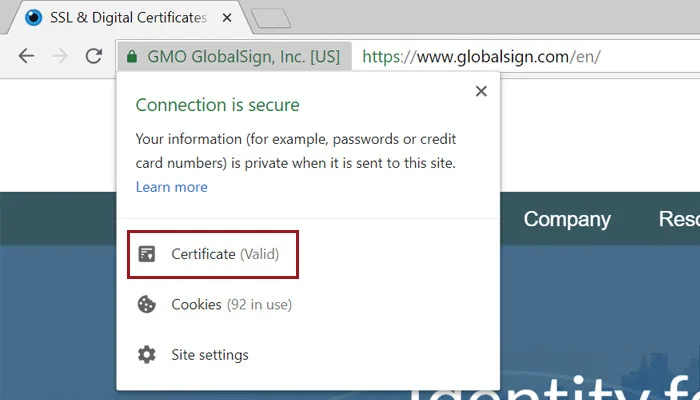
As the website administrator
Validity:
Please note that an SSL certificate is generally valid for 3 to a maximum of 12 months. Your hosting normally renews this automatically.
Does an SSL certificate belong to the site or the domain?
A website accessible under multiple domain names.
Browser error message:
If you have another domain pointing to a website, the visitor typically sees an error message. You can resolve this by having the extra domain point to the http:// address, not an https:// address. This gives the website hosting provider the opportunity to switch to the correct domain name before requesting the SSL certificate via the SSL protocol (which is not available for the extra domain name).
More gallant solution:
You can also ask the hosting to add the extra domain name to the WordPress installation and request a multi-domain certificate. Please note that this is not always free of charge.
I keep seeing an error message.
The certificate is present, yet you’re getting an error message in the browser? We would love to tell you that this isn’t possible, but… it certainly is.
Causes of error message
The certificate is present, yet you’re getting an error message in the browser? We would love to inform you that this isn’t possible, but… it certainly is.
Your certificate is still valid
If an element (page, illustration, video, or link to an article) still has an HTTP address within your site (instead of HTTPS), this will result in an error message. That is logical. The SSL certificate guarantees the visitor that it is a secure site, and as long as parts of it are still HTTP, the website is certainly not yet completely secure.
Finding the cause and the solution
Check the address for each component (illustration, video link, etc.). If something like http://wpinsight.eu/illustrationname.jpg appears somewhere, you must change that to https (with the s). If there are a lot of them, or you can’t figure it out, the simplest and fastest solution is to use a special plugin. That is Really Simple Security. This ensures that all HTTP addresses are treated as HTTPS. Another solution is to use a ‘search and replace’ plugin. We mention this last because you have to be cautious with it; always make a backup first before you start using it. With a search and replace plugin, you can issue a command to search for everything using http://yoursitename and change it to https://yoursitename. Make sure you do the same thing again with www added, so http://www.yoursitename and https://www.yoursitename.