
Dynamic Video Player Block plugin
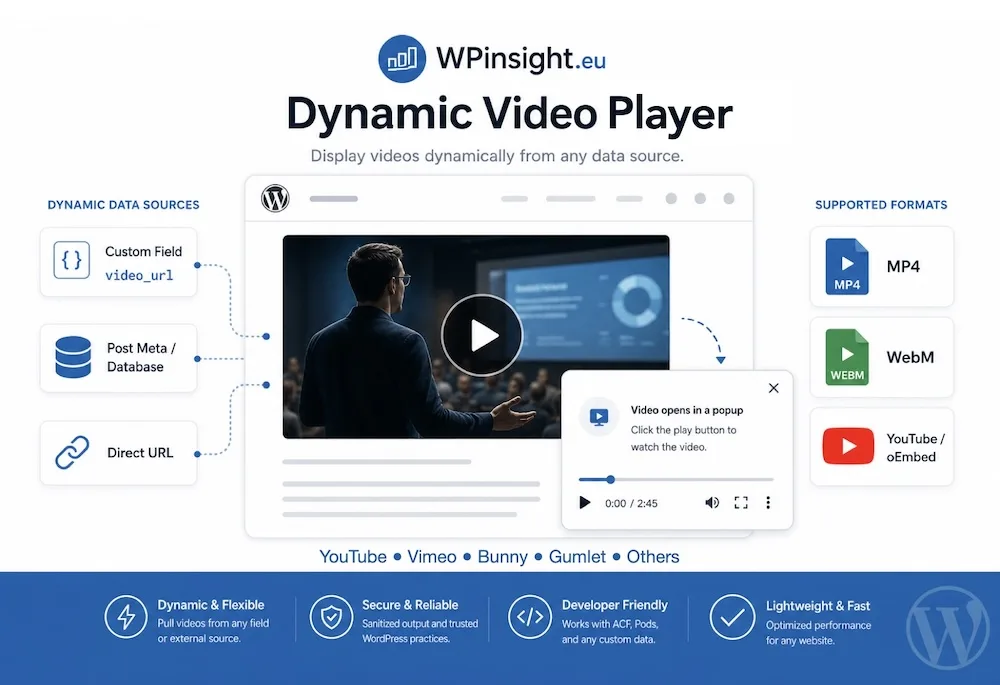
Our amazing Dynamic Video Player plugin!
A dynamic video player plugin like this is missing in many builders
Even blockbuilders like GenerateBlocks, Stackable, GutenKit, PostX, Nexter, aBlocks and Twentig don’t have this essential functionality.
An outstanding Gutenberg video player to show video on your website
- Fully prepared to work with video and poster URLs stored in custom fields
- Also works with regular video and poster URLs, and even a poster in Media.
- Combine direct URLs and custom fields; just set it, and it will be displayed.
How is the video shown
- The visitor sees a poster (still image) with a video icon overlay.
- As soon as the user clicks on it, a popup starts showing the video.
Type of video files accepted
- Direct MP4
- WebM file URL
- oEmbed URL (YouTube, Vimeo, Bunny, Livid, Gumlet, etc.)
Special features Dynamic Video Player block
MP4 video in other ratio without black bars
- MP4 files in other formats, such as square, portrait, and the like, are played without black bars!
Unique HLS handling
- HLS Playlist from Bunny stream; Bunny provides an .m3u8 stream. The disadvantage of .m3u8 is that it’s incompatible with many browsers (Chrome, Firefox, Edge, and other browsers) and is natively supported by Safari only.
- The Dynamic Video Player will analyze the .m3u8 file: if it’s provided by Bunny, it will offer you a button to migrate the video frontend to MP4 so that it will play on all browsers. If the stream is not from Bunny (or Gumlet), it will tell you to use a normal MP4 video instead.
- If the .m3u8 file comes from Gumlet, the Dynamic Video Player block will activate a helper to show the video on non-Safari browsers as well. You can even choose ‘Use HLS.js for pure HLS’.
Different poster settings
- If you don’t provide a poster file or URL (or forgot) Dynamic Video Player will show a neutral default poster in a 16:9 ratio with a video play icon.
- Poster settings include poster aspect ratio: 16:9. 4:3, 1:1, 3:4, 21:9, and circle; even if the original image is different; you can show a 16:9 image as a circle.
- Each poster format includes an option for rounded corners.
- Poster preview with dynamic preview.webp is supported.
Show a company logo on the video-poster
- Dynamic Video Player offers a wonderful customization feature: the ability to show a logo (like a company logo, training, a discount, guarantee, image of the trainer, etc.) on top of the video poster. This option is not applicable for the circular video-poster.
- You can select from those 4 locations: top-left, top-right, bottom-left, and bottom-right.
- Works with .png and .webp images with a transparent background around it.
- The width is totally adjustable, with an 80px default.
- Examples are shown on some videos on this page.
Automatically fetch the video-poster
- Dynamic Video Player block plugin has the option to automatically fetch the video-poster from Vimeo, YouTube, Bunny, Livid and Gumlet and add it as the clickable video-poster.
Trigger video popup with a class
- Most video players have a major limitation: you have to click on the video poster to start the video. Dynamic Video Player is unique: you can start any video with a class trigger. A button, image, icon, and even a text block; any block can be the trigger.
- Click on me!
Site-wide available video
- Conceal the video section in the footer or any site-wide area, and disable the video poster. Initiate the video through a trigger, like a button, an image, or even a menu item!
- You can utilize this feature within the page template or an element that includes a trigger block, along with a custom field for the source. This allows each page to showcase a distinct video while maintaining the same play trigger.
Other settings
- Auto-play on of off. Not to worry: opening the popup still requires a manual click, only then does the auto-start work. With or without sound (muted) depends on the video origin (Bunny, YouTube, Gumlet, Vimeo, Livid, etc.) and the browser settings.
Dynamic Video Player example
The video poster is automatically fetched by the Dynamic Video Player plugin.


Dynamic Video Player FAQs
Yes, the Dynamic Video Player shows YouTube video’s
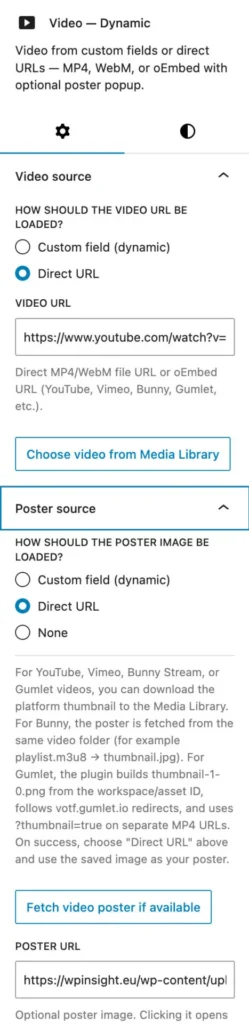
- Set source to Direct Video URL
- Provide the Youtube video address (URL)
- Poster source: select Direct URL
- Click on ‘Fetch video poster’
- After a second a button shows up: Use as poster URL: click on it.
- Save the settings and done.
I am sure there are other good players, but the Dynamic Video Player block understands how Bunny works and has a huge advantage when it comes to playing Bunny videos.
Bunny offers HLS playlists as .m3u8 streams. When Bunny hosts the video, Dynamic Video Player offers you the option to convert the video to an MP4 video in the background; a format supported by all browsers and viewable by all video players. This conversion is fully automatic and does not modify the source file.
Yes, Dynamic Video Player plugin is excellent for playing Vimeo video’s also.
- Set source to Direct Video URL
- Provide the Vimeo video address (URL)
- Poster source: select Direct URL
- Click on ‘Fetch video poster’
- After a second a button shows up: Use as poster URL: click on it.
- Save the settings and done.
When entering the necessary details to play a video on your website, you are always asked for a video poster. The video poster is the image the visitor sees before clicking on it and starting the video. This can be a URL or a file from your WordPress media.
As long as you use one of the well-known hosting providers such as YouTube, Bunny, Vimeo, Livid and Gumlet, you no longer need to create or design a video poster yourself; Dynamic Video Player retrieves it from the provider, stores it, and adds it as a video poster. Entirely automatically.
The Dynamic Video Player block plugin is especially created for WordPress Gutenberg. Some builders are capable of showing or integrating Gutenberg blocks. Try the Dynamic Video Player in demo mode first, so you know it works before you buy.
When you are the website owner, designer and editor – all in one – and it’s a normal company or organization website, you might not be using custom fields at all.
As soon as you want a page to have a specific consistent design—when working with page templates or custom post types—it is no longer possible to manually enter the necessary data for a video on a page. In that case, ‘custom fields’ are used by default. The editor fills in the required data, and the design retrieves that data and displays it to the visitor. Now you have a problem: the majority of video player plugins do not work well, or at all, with custom fields. Here too, Dynamic Video Player is your ideal tool. Dynamic Video Player block is built for custom fields!
When showing a video to the vistor without a popup, there are two major disadvantages.
- The video is played in the same format as the video poster. This means that the video will play very small, unless you had a very large (too large) video poster on your page.
- Without a popup, the video poster must have exactly the same ratio (height/width ratio) as the video. With a popup, that is not necessary; you have total design freedom.
Yes, the Dynamic Video Player plugin is able to play video’s hosted on Gumlet.
Gumlet provides video URL’s as .M3U8 and .MP4 URL. Dynamic Video Block plugin has built-in compatibility to play both the M3U8 and .MP4 streams of Gumlet.
Does that include the automatic fetching of the videoposter of Gumlet? Yes, it does.
Peg-Dash format is not supported.
Yes, the Dynamic Video Player plugin is able to play video’s hosted on Livid.
Livid provides video URL’s as embed and as watch link. The Dynamic Video Player can show the video through the watch URL.
Does that include the automatic fetching of the videoposter of Lioid? Yes, it does.
The Dynamic Video Player plugin is specialized in playing videos and streams, not in showing playlists or complete channels. There are other (more expensive and heavier codewise) video players that can do that.
DRM is handled by the providers (hosting) videoplayer. That is because they have the secret key to unlock the DRM. In short: no Dynamic Video Player plugin is not the right player to show videos with DRM.
Yes you can. The plugin has a free test mode
- The test version works backend — settings, icon color, everything is active.
- The front end has fixed content.
- Download the demo Dynamic Video Player
Is this the best video player available?
- Difficult to say. There are some amazing videoplayers in the WordPress universe. With youtube channels, video libraries and so on.
- Dynamic Video Player doesn’t have those advanced properties.
But we offer other unique features!
- Support for Bunny and Gumlet.
- Automatic fetching of the video-poster.
- Migrates Bunny m3u8 video to MP4.
- Being able to use any ratio video poster as the trigger.
- Use all kinds of custom fields as the source of the video.
- Ideal for directory websites, real-estate, rentals, therapists, dentists, etc.
- Show MP4 video in any ratio without black bars.
- Very easy setup – no stress UI.
Yes you can. Just set a class in the Popup trigger tab and set the same class in a block of your choice, like a button, text, image, and even a menu-item.
You might might want to set the video-poster to ‘none’, but you can use the poster and the class trigger at the same time.
Our Dynamic Video Player block allows you to place it in the footer (or any site-wide element). Set the video-poster to None, set a class in the Popup trigger tab and you either place the trigger in a template or in the menu.
Note: This also works with a custom field. That way you can set a different video source (url) for every post.
With the Dynamic Video Player block, you can display a logo (or another image) as a poster overlay.
It requires an image with a transparent background, such as a PNG or WEBP file. The width of the logo is adjustable.
Some examples on this page feature a logo on the poster to show what is possible.
Dynamic Video Player examples


Dynamic Video Player
$ 29 one-time
Conclusion: good choice
- Activation on 5 websites
- Works with with video and poster URLs stored in custom fields
- Works with regular video and poster URLs, and from Media.
- Show poster and opens in a popup
- Adjustable video width popup
- Direct MP4, WebM, oEmbed URL (YouTube, Vimeo, Bunny, Livid, Gumlet, etc.)
- MP4 in other ratios without black bars
- Start video with any class (without or with poster)
- Hide video block in footer and start site-wide with a class
- Migrates Bunny video to MP4
- Activates a helper for Gumlet m3u8
- Automatically fetch the video-poster from Vimeo, YouTube, Bunny, Livid or Gumlet
- Show the poster in any ratio, including a circle shape
- Show a custom logo on your poster
- Auto-play on / off
- Accessibility
- Video-Schema

Dynamic Video Player
$ 49 one-time
Conclusion: excellent choice
- Activation on 25 websites
- Works with with video and poster URLs stored in custom fields
- Works with regular video and poster URLs, and from Media.
- Show poster and opens in a popup
- Adjustable video width popup
- Direct MP4, WebM, oEmbed URL (YouTube, Vimeo, Bunny, Livid, Gumlet, etc.)
- MP4 in other ratios without black bars
- Start video with any class (without or with poster)
- Hide video block in footer and start site-wide with a class
- Migrates Bunny video to MP4
- Activates a helper for Gumlet m3u8
- Automatically fetch the video-poster from Vimeo, YouTube, Bunny, Livid or Gumlet
- Show the poster in any ratio, including a circle shape
- Show a custom logo on your poster
- Auto-play on / off
- Accessibility
- Video-Schema
All-in plugin pack
50% Discount
Conclusion: best choice
- Activation on 25 websites
- Gives Gutenberg professional features
- Perfect with Stackable, GenerateBlocks, Greenshift, GutenKit and more
- All plugins are for classic and FSE themes, except FSE Template Assigner
Select from those plugins
- Dynamic OSM Maps
- Dynamic Popup & Flyout
- Dynamic Accordion
- Dynamic Video Player
- Flexible Layout Section
- FSE Template Assigner
Discount:
- Add plugins totaling at least $245 and apply the 50% discount coupon (ALL-IN-PLAN) for half off your purchase.
Test the Dynamic Video Player plugin
The plugin has a free test mode
- The demo version works backend — all settings, icon color, fetch poster, custom logo, everything is active.
- The front end has fixed content video.
Type of custom fields (if used)
If you are using custom fields to show dynamic data, the Dynamic Video Player block works with:
- Text field
- Textarea field
- Rich text field
Flexible
- The poster (the still image) can have any ratio (height / width).
- Background color and transparency of the Play icon are fully adjustable.
- The maximum width of the video popup is adjustable. Default: 720px.
- Works with dynamic data, direct URLs , oEmbed code and media files.
Accessibility
- There is a special accessibility field to describe the function of the video.
- Using the accessibility field is good for SEO as well.
Videoschema
- The Dynamic Video Player plugin provides a video-schema to searchengines.
- It’s activated automatically for every rendering video.
- Included: name, description, thumbnailUrl, uploadDate, contentUrl (MP4/HLS) or embedUrl (YouTube/Vimeo).
Cache plugins
- The plugin is built in such a way that no exceptions for scripts and URLs are required for commonly used cache plugins, such as LiteSpeed, WPCompress, and FlyingPress. The Video Player plugin is suitable (delayed scripts) for placement in accordions, pop-ups, and the like.