
WordPress Dynamic Accordion Plugin – FAQs, Product Accordions & Content Toggles
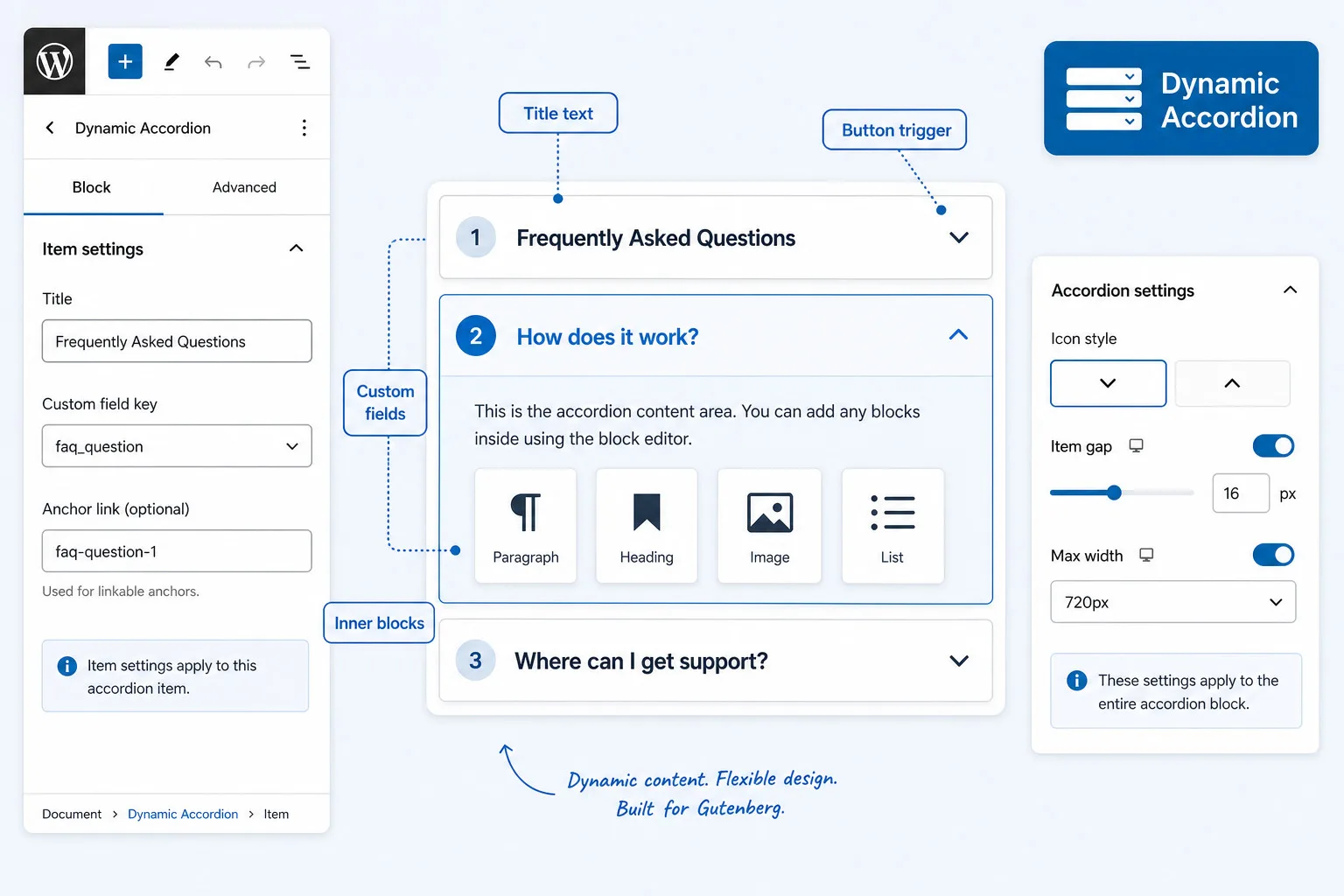
Why Use an Accordion Plugin in WordPress?
Accordions are ideal for showing visitors information in a non-intrusive way; it is there, and the visitor can decide for themselves whether to open the accordion. Especially with multiple accordions on a WordPress page, it provides much more calm and clarity.
What kind of Accordions can you create?
- Standard accordions with a title and text content. This is the simplest and most straightforward way of creating an accordion. Because our plugins work with up to three pre-designs, creating a standard accordion is effortless and fast.
- Simple dynamic accordions. Because we offer the possibility of using our own custom fields (baked in the plugin!) and there are not complicated settings, you create a dynamic accordion within seconds,
- Dynamic accordions with blocks. Dynamic accordions also support dynamic blocks. Meaning you can add blocks from GenerateBlocks, Stackable, GutenKit, PostX, etc. and even core blocks with attributes or the Modern Fields rendering blocks, image blocks or whatever you need and connect them with the appropriate custom field. Because of our UI, even this is done in an easy-no-stress workflow.
- Dynamic accordions with dynamic values. The Dynamic Accordions plugin also supports dynamic values. Just change the setting on the Settings page and the WordPress post values are available to you: post title, author, excerpt, date and main post content.
- Dynamic accordions with WooCommerce values. The Dynamic Accordions plugin also supports WooCommerce. Just change the setting on the Settings page and the WooCommerce values are available: price, regular price, sale price, SKU, short description, long description.
- Dynamic accordions for a dedicated FAQs section. The main accordions block has special FAQ settings: FAQ schema (JSON-LD), title heading, and FAQ subject / title (default page title, and can be adjusted manually). This makes it the ideal FAQ schema for search engines and AI.
- Easy-no-stress accordions. The Dynamic Accordions plugin is designed by a company with a web design background; that means that although it’s packed with professional options, it offers a clear interface and superfast workflow.
WordPress Dynamic Accordion plugin
The Dynamic Accordion block plugin you never knew you wanted
- The Dynamic Accordion plugin is very versatile, lightning fast and at the same time easy to use.
All you need as a designer without worries about the end-user
- Finding the perfect balance can be challenging when looking for an accordion plugin that meets all the necessary criteria. It should not only perform its intended functions and manage custom fields effectively but also be adaptable within a custom template.
- Additionally, it should remain user-friendly for both seasoned developers and those who may not have a lot of experience.
- The Dynamic Accordion block plugin is designed with both the practical needs of designers and developers in mind while also considering the capabilities of the average end user.
- The dynamic functionality automatically populates collapsible content sections by pulling data directly from dynamic custom fields.
- Our accordion plugin works with integrated custom fields, custom fields plugins, dynamic post data and dynamic WooCommerce data.
- Includes a Migration.md file to tell your agent how to migrate from HTML or any builder to our accordions.
- You can set 5 preset designs.
- In the accordion block you can switch between those 5 preset-styles or choose custom.
- Lifetime license available.
Features
The missing block in multiple Gutenberg builder plugins
There are many excellent block builder plugins out there. However, they frequently fall short when it comes to catering to professional developers, often lacking dynamic features like those found in Dynamic Accordion.
Accordion Blocks for Gutenberg
Complete the WordPress Gutenberg core blocks
The standard Gutenberg core blocks can be easily enhanced with a plugin like ModernFields. However, there’s a notable absence of a quality Dynamic Accordion block. That’s why we took the initiative to develop one. And this is not just any accordion block; it’s an accordion that supports inner blocks and dynamic fields.
Advanced settings of the accordion


FAQs Dynamic Accordion plugin
Absolutely, our WordPress Dynamic Accordion plugin is fully compatible with ACF fields. You can easily use ACF fields for both the accordion title and the content section. The supported ACF field types include text, textarea, rich text, and WYSIWYG fields. This makes it simple to set up an accordion with ACF.
To get started, install the Dynamic Accordion plugin along with ACF, which can be either the free or pro version. Next, create a field group in ACF and configure it so that it appears on the relevant post type—whether that’s posts, pages, or custom types. Add the necessary fields to the group, which can include options like text, textarea, rich text, WYSIWYG, or image fields.
Using our plugin, create an accordion. Navigate to the block settings and find the ‘Custom field keys’ section. Choose the appropriate field and save your changes. Repeat this process for both the title and the content sections. Once you’re done, you’re all set!
Our WordPress Dynamic Accordion plugin supports custom fields in a variety of ways.
- You can link the title and content sections directly to the integrated custom fields of the Dynamic Accordion plugin itself.
- Or you can use a custom field plugin such as ACF, SCF, Meta Box, ACPT, JetEngine, and Modern Fields.
Our WordPress Dynamic Accordion plugin supports custom posts.
That’s a key feature. Our accordion Gutenberg plugin comes with built-in support for custom fields, making it simple to integrate the block into your queries. Just insert the block, create an accordion item, and link the title and content to the relevant custom fields.
Yes, our WordPress Dynamic Accordion plugin supports custom fields from Meta Box and JetEngine. Both the Accordion title and content section support dynamic (custom) fields. Supported fields are: text, textarea, richtext, and WYSIWYG fields.
The dynamic accordion block plugin works perfectly with the Stackable builder! You only need to install the plugin and don’t need to configure anything else.
The dynamic accordion block plugin works perfectly with the GutenKit builder! You only need to install the plugin and don’t need to configure anything else.
The dynamic accordion block plugin works perfectly with GenerateBlocks! Just install the plugin and you are ready to go.
The dynamic accordion block plugin works perfectly with Twentig builder! Just install the plugin and you are ready to go.
Dynamic Accordion offers an ideal way to build dynamic accordions featuring custom fields, all while using the core Gutenberg editor. By utilizing the built-in custom fields of Dynamic Accordion, there’s no need for an additional custom fields plugin.
Dynamic Accordion includes a built-in FAQ Schema for Search Engines and AI. It structures your FAQs properly and helps search engines understand your content and improve visibility in search results.
The Dynamic Accordions plugin is fully compatible with WooCommerce. To access WooCommerce features, simply adjust the settings on the Settings page, and you will have access to key product details such as price, regular price, sale price, SKU, short description, and long description. Additionally, you can utilize this plugin to present all product FAQs to your visitors. The native custom fields in Dynamic Accordions also allow you to store product FAQs conveniently and display them to your audience.
What if I want to use values in my accordion like post title, author, excerpt, date or main post content?
Dynamic Accordion is fully compatible with the dynamic post values from WordPress. Keep in mind that showing the content of a page in an accordion isn’t always usefull and the rendering depends on the used blocks.
Yes. Dynamic Accordion allows you to include all kinds of blocks, including images, videos, products, links, shortcode and formatted text in each accordion item.
Dynamic Accordion is crafted for ease of use, making it accessible for beginners who want to create and personalize FAQs and accordions using a straightforward visual interface. At the same time, the plugin provides advanced customization options for professionals, including a comprehensive overview of classes and CSS, ensuring everything is ready for implementation.
Accordions do not negatively impact SEO; in fact, they can enhance it. Each accordion typically addresses a specific topic or question, which makes it highly beneficial for SEO and AI applications.
Note: these accordions are created with the Dynamic Accordion block – standard settings.
Dynamic Accordion
$ 29 one-time
Conclusion: good choice
- Activation on 5 websites
- Built-in custom fields
- Option to create your own presets
- Super practical user-role restriction
- Main block and sub-blocks
- Hides unused items
- Works with all custom field plugins
- Complete overview of classes and css
- Really accessibility-ready
- Integrated User-role management
- Migration.md file for AI
- Super fast plugin — not bloated
- Perfect balance of features and simplicity
- Interested in more plugins and receive a 50% discount? Take a look at our All-in plan.

Dynamic Accordion
$ 59 one-time
Conclusion: excellent choice
- Activation on 25 websites
- Built-in custom fields
- Option to create your own presets
- Super practical user-role restriction
- Main block and sub-blocks
- Hides unused items
- Works with all custom field plugins
- Complete overview of classes and css
- Really accessibility-ready
- Integrated User-role management
- Migration.md file for AI
- Super fast plugin — not bloated
- Perfect balance of features and simplicity
- Interested in more plugins and receive a 50% discount? Take a look at our All-in plan.
All-in plugin pack
50% Discount
Conclusion: best choice
- Activation on 25 websites
- Gives Gutenberg professional features
- Perfect with Stackable, GenerateBlocks, Greenshift, GutenKit and more
- All plugins are for classic and FSE themes, except FSE Template Assigner
You select 5 of these plugins
- Dynamic OSM Maps
- Dynamic Popup & Flyout
- Dynamic Accordion
- Dynamic Video Player
- Flexible Layout Section
- FSE Template Assigner
Discount:
- Add plugins totaling at least $245 and apply the 50% discount coupon (ALL-IN-PLAN) for half off.
Maybe you like to test the accordion plugin first?
The plugin has full functionality. It just shows some extra demo text in your accordions.
Technical aspects of our WordPress Accordion plugin
Restricting non-admin functionality
That’s right, you’ve understood it correctly. The settings allow you to restrict access to specific configurations for both the main accordion block and the individual accordion item settings. This feature is perfect for ensuring that clients or editors can only modify the dynamic field content, rather than having control over all the settings.
- Administrators (
manage_options) — always see everything. - Editors and other roles — restricted sidebar when the option is on.
- The settings page clearly shows what is and what’s not available in the ‘Restrict block sidebar’ mode.
Structure
Primary section and accordion item
- The accordion block features a primary section that houses individual accordion items.
- Each accordion item includes a title and a corresponding content area that can be expanded or collapsed.
- You are to type text directly in the title and the content-area of each accordion-item.
Accordion block title
The title field works in two ways
- You can input a title as simple text, which will also serve as the name for the accordion item in the Listview.
- Additionally, you have the option to connect this field to a custom field.
When you provide both a text entry and a custom field, the text you enter will serve as the name for the accordion item in the List view. Meanwhile, the frontend will showcase the value from the custom field.
Accordion content section
The content section field offers various uses.
- You can link the content field to a custom field, including text, textarea, rich text, WYSIWYG, and editor fields.
- You can also add Gutenberg core blocks such as headings, paragraphs, lists, and images.
- The content area is compatible with blocks from many popular Gutenberg block libraries, including Greenshift, Stackable, Kadence, GenerateBlocks, Twentig, and others.
- Most blocks will work flawlessly. However, some blocks may not function correctly because they are poorly coded or rely on additional scripts to render properly.
- Most form blocks are also supported. If a form does not display because its script has not been initialized, place the form block inside the first accordion item and set that item to ‘Open by default’.
- Map blocks have been intentionally excluded, as has nesting an accordion block inside another accordion block.
Dynamic Accordion with Custom Fields – No Page Builder Required
- Important for a website without a builder, but in need of a Gutenberg accordion block.
- You don’t need a page builder to use custom fields with our Dynamic Accordion block. Even on a standard WordPress installation, you can build dynamic accordions using a free custom fields plugin such as ACF, SCF, or Modern Fields.
- The content area supports text, textarea, rich text, and WYSIWYG (editor) fields, allowing you to display formatted content, including headings, lists, images, and more.
- If a custom field is assigned to the title or content field, its value automatically overrides any manually entered content. This ensures that accidentally entered text in those fields will not interfere with your dynamic setup.
Dynamic Accordion with integrated custom fields
- Dynamic Accordion has integrated custom fields, up to 30 fields, without a plugin.
- Often, that’s all you require: a custom text field for the accordion title and a rich text field for the content.
- In the Dynamic Accordion settings you can define how many custom fields you require.
- The rich text editor includes all the essentials, such as bold and italic text, text colors, H3 and H4 headings, links, and shortcode support.
- We’ve also made sure it works seamlessly with custom post types.
- To keep the plugin fast and lightweight, direct media integration is intentionally excluded. If you require advanced field types such as images, galleries, or other media fields, simply use a standard custom fields plugin like ACF, SCF, or Modern Fields—all of which are fully supported.
Only accordion-items with content are shown on the frontend
- If an accordion item contains no content, it will not be displayed on the front end. Likewise, if the title or content area is linked to a custom field that has no value, the accordion item will automatically be hidden.
- This is ideal for websites that use a predefined number of accordion items and allow end users to fill them in as needed—unused items simply remain invisible.
Settings
- Dynamic Accordion includes settings for headings, body text, border colors (normal and active), spacing, border radius, and much more.
- Each accordion item can also be assigned its own
#anchorlink. When a visitor clicks a text link or button pointing to that anchor, the page automatically scrolls to the corresponding accordion item, opens it, and reveals its content. - There is also deep linking: for example, if you assign the anchor
pricesto an accordion item, linking toyoursite.com/page#priceswill automatically open that item and scroll it into view.
Width (max)
- The accordion block takes the space you allow, usually the page width, a group block or column; whichever is smaller.
- It also has a max. width field to allow for a manual maximum width setting.
- If you need the accordions to all the space there is, just set a max. width like 2000 px.
Class targets and CSS effects
- There are multiple ways to style the dynamic accordion header tabs, icons, and backgrounds (header and content) in their normal, hover, and active states.
- You can also choose from several visual effects for opening and closing accordion items.
- To make customization easier, the plugin includes ready-to-use CSS classes that save you time, along with the CSS code for all available effects. Everything is conveniently located on the plugin’s Settings page.
Using the accordion block in a query
- Because Dynamic Accordion works with custom fields, it can also be used inside a Query Loop with custom post types.
- Simply add a Dynamic Accordion block with a single item inside your query card, then connect the title and content fields to custom fields.
- Each time a new custom post is created, an accordion item is automatically generated based on its field values.
Accessibility
- Accessibility is fully implemented.
- Each item uses <button type=”button” class=”…__trigger”> (not a <div> or plain text) and both aria-expanded and the aria-controls + panel id are included in the schema.
FAQ schema
- Most websites need a good WordPress FAQ accordion. With our plugin you can even create a dynamic FAQ block.
- Although the FAQ schema is no longer shown as a rich result in Google Search, search engines like Google and Bing—and AI systems in general—still use it as a structured source of information.
- The Dynamic Accordion block includes an option in the main settings panel to enable FAQ schema with a single click.
- This advanced feature also allows you to define a title for the entire FAQ set, such as “Frequently Asked Questions” or “Questions about our lifetime plans.” If no title is provided, the page title is used automatically.
- Only accordion items that are actually visible on the front end are included in the schema output. Each item must contain both a question (title) and an answer. The answer is converted to plain text for better readability. Empty items and entries that only contain images are automatically excluded from showing in the frontend.
Cache plugins
- The plugin is built in such a way that no exceptions for scripts and URLs are required for commonly used cache plugins, such as LiteSpeed, WPcompress, and FlyingPress. The plugin takes into account placed blocks such as video players and maps.
Documentation
- Although the plugin is very logical in structure and essentially self-explanatory, there is also extensive documentation. About the design, functionality, classes and even about effects.
Get your Dynamic Accordion license
- You are allowed to use the plugin on a maximum of websites, according to the purchased license.
- Always deactivate a license on an unused website; otherwise the key slot remains occupied.
- It’s a one-time payment; no yearly costs.
- You can check your available slots at: https://server.wpinsight.eu/validate-key/