WP Org Publisher
A perfectly good tool to upload plugins to the WordPress SVN
If you are a desktop developer, the available SVN tools are over the top for most; they are complicated, with numerous settings and you pay for countless features available on those SVN apps you are not using.
Some of us developers need a clear, user-friendly app that checks your plugin for completeness in a simple (read: uncomplicated) way and uploads the necessary files to the WordPress SVN.
A simple SVN upload tool for macOS
I developed a tool that does exactly what I require in a simple way.
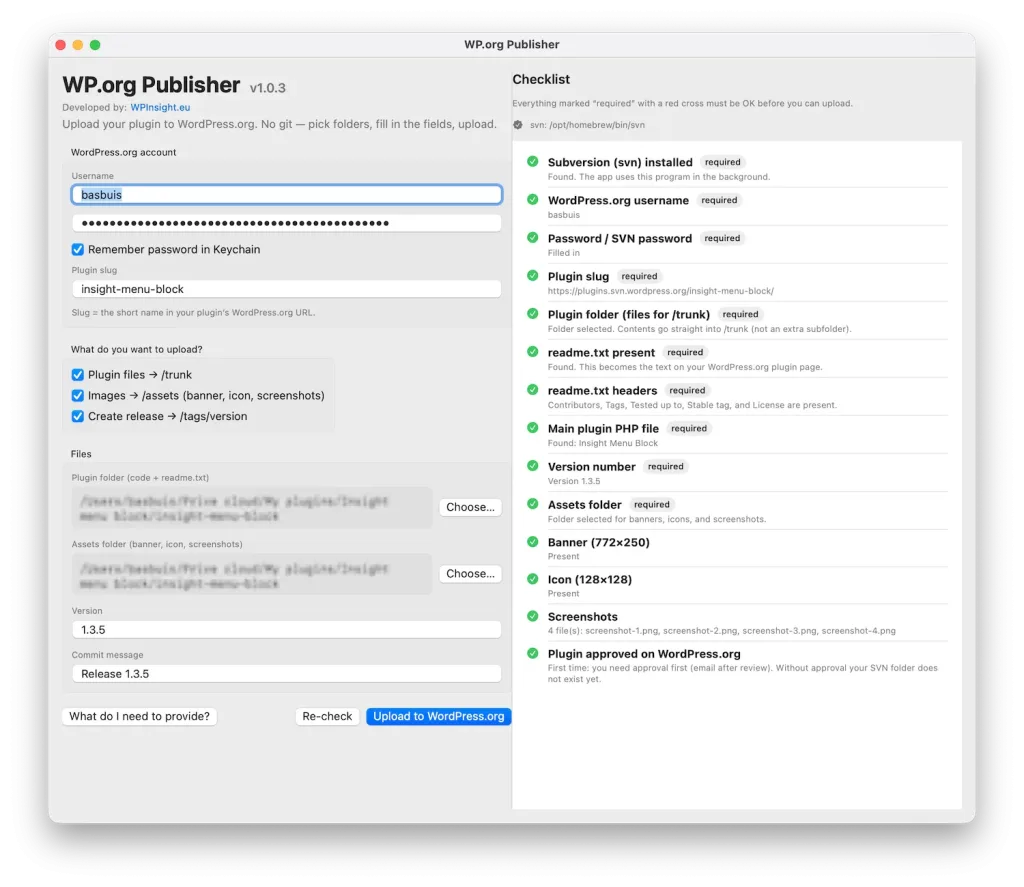
You just enter your SVN credentials, point to the right folders, and the app checks all the content. When everything is fine it shows the upload button. Upload. Done.
Help tool
There is a button at the bottom left labeled “What do I need to provide?”. This provides information on the underlying SVN software and how to install it (simple step-by-step), as well as the structure and content of your plugin folders.
Note
- No code or credentials are shared with me, Google, or anyone else, except the files you upload yourself to WordPress.org.
- WP Org Publisher is especially created to upload to the WordPress SVN; it cannot be used for other SVN libraries.
- If you are a true GitHub developer, this tool might not be for you, as it has no GitHub integration—which is precisely what we wanted to avoid.
Terms of Use
- You may download and install it for personal use.
- Redistribution is strictly prohibited.
- Selling my app is not permitted.
- It is a free app, and I do not provide any after-sales support for it!
- By downloading, you agree to the terms.
Version: 1.0.3 macOS only.