WP tools WordPress collectie + GS Filter block
Collectie belangrijke en vaak onmisbare WordPress plug-ins en online tools
-
ACF Advanced Custom Posts
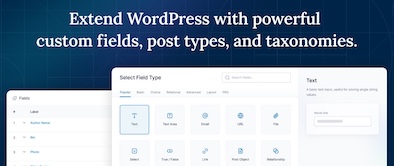
ACF custom fields allow you to quickly and easily add fields with just a few clicks of a button! Whether it’s something as simple as adding an author field to a book review post, or something more complex like the structured data of an ecommerce site or marketplace, ACF makes adding fields to the content model easy. Fields can be added anywhere in WordPress, including posts, pages, users, taxonomy terms, media, and comments. It couldn’t be easier to bring structure to the WordPress content creation experience.Voordelen Pro versie
The Pro version includes: A Repeater field that lets you create a set of subfields that can be repeated over and over again. ACF Blocks , a PHP-based framework for developing custom block types for the WordPress Block Editor. An options page to add custom admin pages to edit ACF fields. Unlock a more efficient workflow for managing field settings by reusing existing fields and field groups on demand with Clone Field.
Conclusie
If you need a custom post, like a review or whatever, ACF is an indispensable plugin. ACF is compatible with both Kadence blocks and Greenshift blocks. There are similar plugins, like MetaBox, Pods, Toolset, JetEngine, Voxel, ACPT and ASE, but so far ACF is a perfect and nice working plugin, which we work with ourselves very regularly. The free version is already sufficient for many websites. Note: if you start working with custom fields, you require a builder that supports Dynamic Fields.
Prijs pro vanaf € 49
Meer informatie?
basbuis/21-05-2025ACF Advanced Custom Posts
Creating and managing custom fields
-
Admin Columns for ACF Fields
Use this plugin to display ACF fields in the All Posts, Taxonomy, or User Table views in the WordPress admin. Simply enable the new “Admin Column” option in your ACF field settings for any regular field (see exceptions below) and optionally set the position and width of the columns. Now an additional column for your field will be displayed in any built-in or custom posts, pages, taxonomies (e.g. “All Pages”), and user views. Using filters (see below), you can fine-tune the behavior of the plugins. Works on any regular ACF field (see exceptions below). Compatible with Advanced Custom Fields 5.x and 6.x.Voordelen Pro versie
It is a free plugin. A donation is appreciated.
Conclusie
Handy plugin. Note: if you have WPASE, ‘Admin Columns for ACF Fields’ is redundant.
Meer informatie?
basbuis/21-05-2025Admin Columns for ACF Fields
Shows ACF fields in ‘All Messages’, ‘Taxonomy’ or ‘User Table’ view
-
Advanced Forms for ACF
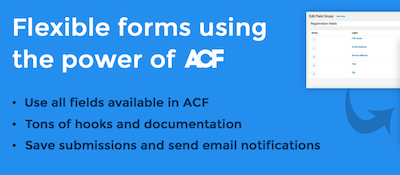
Advanced Forms is a WordPress plug-in for making front end forms using Advanced Custom Fields. It supports all ACF field types, including repeaters and flexible content fields, and offers the same interface for field processing that you already know. Note: Advanced Forms requires ACF Pro V5.7 or later.Voordelen Pro versie
Advanced Forms Pro offers even more functions for advanced use cases. You can purchase a license through Hookturn that can be used on an unlimited number of sites. They offer multiple licenses
Conclusie
Handy form builder for posts with custom (ACF) fields. The disadvantage is that ACF Pro is required.
Prijs pro vanaf € 48
Meer informatie?
basbuis/21-05-2025Advanced Forms for ACF
Advanced Forms foe front-end forms with Advanced Custom Fields PRO
-
Blocks Animation: CSS Animations for Gutenberg

With Blocks Animation you can add CSS animations to all your Gutenberg blocks elegantly. The interface for Blocks Animation feels so natural and intuitive that you don’t even notice that it has been installed. Just install it, and you will see the animation settings in all blocks, directly in the block settings sidebar. The plug-in has more than 60,000 users. It works on the basis of CSS, so it does not make your website slow.Voordelen Pro versie
It is a free plug-in.
Conclusie
To give your website more dynamics, without costs, it is an ideal plug-in. Please note: on some websites, content suddenly does not load when using this plugin.
Meer informatie?
basbuis/21-05-2025Blocks Animation: CSS Animations for Gutenberg
CSS Animations for Gutenberg Blocks
-
Checkout Field Editor for WooCommerce
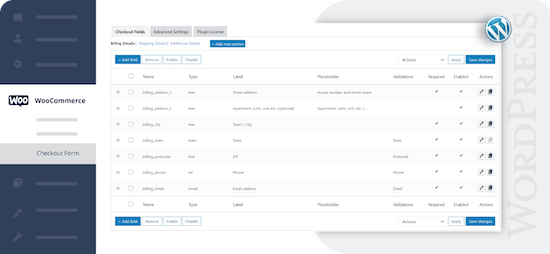
Check-out Field Editor for WooCommerce: This plug-in gives you the freedom to add, edit and remove fields on your check-out page, which ensures a tailor-made experience for customers. If you want to organize, rename or hide fields on your check-out page, this plug-in offers the flexibility you need. Speed up the checkout with a layout of one page and add adapted fields to streamline the process. 400.000 users.Voordelen Pro versie
Add custom fields and sections to your checkout page. Choose the price type for the fields from the list. View fields and sections based on specific conditions. Repeat fields and sections based on specific conditions. Manage the display of fields in e-mails and order display pages, and much more.
Conclusie
One of the best plug-ins to offer WooCommerce a more pleasant customer experience.
Prijs pro vanaf € 49
Meer informatie?
basbuis/21-05-2025Checkout Field Editor for WooCommerce
Adjust the Checkout page of WooCommerce.
-
Checkout Fields for Blocks
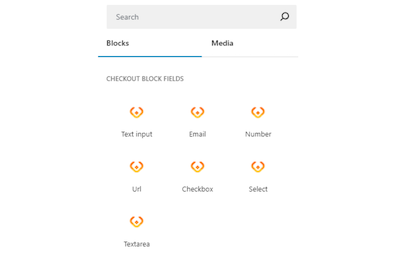
This plug-in adds extra custom fields to the WooCommerce Block Check-out (checkout form). It is not yet possible to adjust the names of existing fields, or target the invoice or address fields, but that depends on the restrictions imposed by WooCommerce. You can add a paragraph, image, or separation sign (the standard WooCommerce blocks). However, the plug-in is expanding the number of available options (fields) for the checkout form. Adding a new field is integrated in the block search bar. With Checkout Fields for Blocks, the following new fields (field types) are possible for the form. Text input – E -mail – number – URL address – Select – Select – Text box. You can also choose where you want to display the new checkout fields in WooCommerce: order confirmation, admin order, my account, order e-mail.Voordelen Pro versie
It is a free plug-in.
Conclusie
A very handy plug-in. Admittedly, it is not a Kadence Shop Kit, but this developer is one of the first to develop a good plug-in for the block version of the WooCommerce check-out page, while Shop-Kit still works on a Classic theme only. This recent plug-in therefore requires a block FSE theme. Highly recommended!
Meer informatie?
basbuis/21-05-2025Checkout Fields for Blocks
Adds extra fields to the WooCommerce Block Checkout
-
Checkview test tool
Software updates, developer changes, server problems and user errors can quietly disrupt the critical business functions of a website: lead forms and checkout. Test forms automatically to ensure that you will never miss a sale with the only automated test platform that is designed for WordPress. No-code form test solution for your WordPress forms and WOO fencing page-user-friendly testing with simple test creation and automatic interpretation of form fields in many cases-thanks to flexible monitoring of your WordPress forms you can detect bugs before your customers do-automatically the usual antiamt.Voordelen Pro versie
It is a Pro Tool.
Conclusie
It is not a cheap test tool, but a good one.
Prijs pro vanaf € 35
Meer informatie?
basbuis/21-05-2025Checkview test tool
Test your forms fully automatically
-
Crocoblock plug-ins
Crocoblock is not one plug-in, but a whole family of super-powered plug-ins. Think of custom posts, fields, forms, menus, filters, grid builder, pop-ups, WooCommerce Builder, tabs, product gallery and much more. One of their well-known plug-ins is Jetengine, for custom fields.Voordelen Pro versie
It is a Pro Service. You can buy each plug-in separately, or suddenly the whole set.
Conclusie
A must. Solid and versatile.
Prijs pro vanaf € 43
Meer informatie?
basbuis/21-05-2025Crocoblock
A ‘family’ of useful plugins
-
CSS Class Manager – An advanced autocomplete additional css class control for your blocks
Do you find it difficult to add multiple CSS classes to a WordPress block? CSS Class Manager simplifies the process with suggestions for automatic supplement and a special manager for adding, editing and organizing the classes. CSS Class Manager offers a powerful manager and an autocomplete inspector, so that users can easily add and apply CSS classes to their blocks. Advanced control over automatic supplement: Streamline The Block Style with car supply Functionality for CSS classes-Effortless class management: Easily add CSS classes, edit or remove them directly from the Interface Manager-Import and Export: Bring adapted CSS class seamlessly to guarantee consistency between projects.Voordelen Pro versie
Edi Amin offers this plug-in for free.
Conclusie
Absolute recommended. I regularly use classes, but do not remember the exact spelling of each class to be able to add it to a block. This plug-in solves that!
Meer informatie?
basbuis/21-05-2025CSS Class Manager
Gives you a handy CSS class manager
-
CubeWP
It offers an extensive functionality. More than 25 field types, conditional logic and relation fields, gallery field, repeatable field, map field, adapted user registration and profile forms, advanced adapted search forms and filters, frontend-post entry forms for post types, adaptable frontend-layouts.Voordelen Pro versie
They have annual and (now still affordable) Lifetime licenses. The Premium (Pro) version has among other things: Advanced Search Builder: Enhance your search capabilities by adding various custom fields – Advanced Filter Builder: Expand filtering options with all available custom fields. – User Signup Form Builder: Craft tailored registration forms for different user roles. – User Profile Form Builder: Create personalized profile forms for diverse user roles. – Post Types Form Builder: Develop front-end submission forms for any post type. – Single-post Template Editor: Customize post details with a drag-and-drop layout builder. – User Dashboard Builder: Easily construct custom user dashboards based on roles. – Post Loop Generator: Gain full control over post grids for unique content presentation (HTML/CSS skills required).
Conclusie
I haven’t worked with it yet, but it seems like a solid package of functions that give you many options.
Prijs pro vanaf € 39
Meer informatie?
basbuis/21-05-2025CubeWP
Extensive tool for custom fields, forms and much more
-
Custom Post Type UI
The user interface for customized message types offers a userfriendly interface for registering and managing customized message types and taxonomies for your website.Voordelen Pro versie
CPTUI extended Custom post type onion helps to create custom content types, but displaying that content can be a whole new challenge. Custom post type onion extended is made to help display the content made. Some builders and themes can display custom posts and custom fields, but often not. Then CPTUI Extended offers a solution.
Conclusie
If you want to use custom posts (so your own type of post, no standard post or page), this plug-in is ideal. This is also possible a plug-in like ACF, but we think custom post type of UI works more pleasantly for that.
Prijs pro vanaf € 26
Meer informatie?
basbuis/21-05-2025Custom Post Type UI
Creating and managing custom post types
-
Dogq test tool
Fast and user-friendly, automated test tool for web applications. With DOGQ you can effortlessly make browser tests without coding. You can automate up to 80% of your web application tests in weeks, not months. Ideal for, for example, to test your forms daily or weekly, or if they still work well.Voordelen Pro versie
It is a Pro Tool. There is already a license for 5 per month, which makes it one of the most affordable test tools.
Conclusie
Recommended.
Prijs pro vanaf € 5
Meer informatie?
basbuis/21-05-2025Dogq test tool
Automated test tool for web applications
-
Easy Code Tools
Online tools for: coding, lorem ipsum generator, coupon codes, SEO keyword generator, CSS animations, HTML Stripper, Color Picker, DMARC and DKIM Validation, Scheme Generator, and much more.Voordelen Pro versie
Conclusie
This indispensable site offers an unimaginable amount of practical tools. Save the address somewhere!
Meer informatie?
basbuis/21-05-2025Easy Code Tools
Tools to fix all your problems
-
Flip Box Block
Flip Box Block is een kleine blok plug-in voor de WordPress blokeditor, waarmee je blokken met een geanimeerde voor- en achterzijde kunt creëren: ofwel een ‘Flipbox’.Voordelen Pro versie
Het is een gratis plug-in.
Conclusie
Handige plug-in! Als we bijvoorbeeld een website ontwikkelen met Kadence, en een Flipbox nodig hebben, kunnen we deze plug-in gebruiken. Natuurlijk kunnen we ook Greenshift daarvoor toepassen, maar dan installeer je weer een complete builder plug-in erbij.
Meer informatie?
basbuis/06-03-2025Flip Box Block
Plug-in waarmee je een geanimeerde ‘Flipbox’ creërt
-
Forminator Forms
Niet uw typische formulier plugin. Forminator is de eenvoudig te gebruiken WordPress formulier plugin voor elke website en situatie. Het is de eenvoudigste manier om elk formulier te maken – contactformulier, bestelformulier, betalingsformulier, e-mailformulier, feedback widgets, interactieve polls met realtime resultaten, buzzfeed-stijl “geen fout antwoord” quizzen, service-estimators en registratieformulieren met betalingsopties zoals PayPal en Stripe. Het is de magische WordPress-formulierbouwer voor, nou ja, iedereen! Forminator’s drag and drop visuele builder maakt het eenvoudig om formulieren in te stellen en toe te voegen aan uw WordPress-website. Verzamel informatie, maak uw content interactief en genereer meer conversies met Forminator.Voordelen Pro versie
Ga een level omhoog met exclusieve Pro functies zoals Stripe formulieren, dynamische pdf-generatie en eenvoudige geolocatie en autocomplete.
Conclusie
Een handige formulier plug-in, vooral als je gebruikmaakt van custom posts en/of velden zoals ACF of een van de vele andere custom field plug-ins.
Prijs pro vanaf € 144
Meer informatie?
basbuis/10-02-2025Forminator Forms
Contactformulier, Betalingsformulier en meer – ook voor custom fields en posts
- Prev
- 1
- 2
- Next