WP tools WordPress collectie + GS Filter block
Collectie belangrijke en vaak onmisbare WordPress plug-ins en online tools
-
ACF Advanced Custom Posts
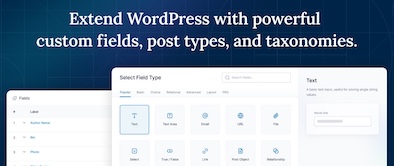
ACF custom fields allow you to quickly and easily add fields with just a few clicks of a button! Whether it’s something as simple as adding an author field to a book review post, or something more complex like the structured data of an ecommerce site or marketplace, ACF makes adding fields to the content model easy. Fields can be added anywhere in WordPress, including posts, pages, users, taxonomy terms, media, and comments. It couldn’t be easier to bring structure to the WordPress content creation experience.Voordelen Pro versie
The Pro version includes: A Repeater field that lets you create a set of subfields that can be repeated over and over again. ACF Blocks , a PHP-based framework for developing custom block types for the WordPress Block Editor. An options page to add custom admin pages to edit ACF fields. Unlock a more efficient workflow for managing field settings by reusing existing fields and field groups on demand with Clone Field.
Conclusie
If you need a custom post, like a review or whatever, ACF is an indispensable plugin. ACF is compatible with both Kadence blocks and Greenshift blocks. There are similar plugins, like MetaBox, Pods, Toolset, JetEngine, Voxel, ACPT and ASE, but so far ACF is a perfect and nice working plugin, which we work with ourselves very regularly. The free version is already sufficient for many websites. Note: if you start working with custom fields, you require a builder that supports Dynamic Fields.
Prijs pro vanaf € 49
Meer informatie?
basbuis/21-05-2025ACF Advanced Custom Posts
Creating and managing custom fields
-
Antispam Bee
Say goodbye to spam on your WordPress blog or website. Antispam Bee blocks spam reactions and trackbacks effectively, without sending captchas and without personal information to external services. It is free, advertising-free and 100% GDPR conform. Trust in approved commentators – Keep in mind the time required to comment – Responses only in a certain language – Block authors of reactions from certain countries or allow them – Treat BBCode Links as spam – Use regular expressions – Search the local spam database to people who have been marked as spammer with the Spamm with the Spamm with the Spamm with the Spamx. Days – Limit the approval of comments/Pings (other types of comments are deleted) – Select SPAM indicators to send reactions directly to removal – Optional trackbacks and pingbacks of spam detection – If necessary, check the comments on Archive pages on spam – Toon spam speed and daily updates. Has 700,000+ users.Voordelen Pro versie
It is a free plug-in. A donation is appreciated.
Conclusie
Absolutely recommended!
Meer informatie?
basbuis/21-05-2025Antispam Bee
Say goodbye to spam on your WordPress blog or website: blocks spam comments and trackbacks.
-
Betterstack – Website observation and monitoring

Checks your website every 3 minutes. Uptime, downtime, SSL connection, everything you want. If a malfunction is found, check the system first via at least 2 other locations before it warns you; To prevent false reports. The free account offers a service up to a maximum of 10 websites and has (of course) considerably fewer options than the Pro version.Voordelen Pro versie
The Pro version also concerns 10 websites (monitors), has Push notifications, checks every 30 seconds, sends screenshots of the problem, has Zapier, Slack and Rest API integration and Webhooks. In addition, the POP3/IMAP/SMTP settings are also monitored and much more.
Conclusie
One of the best websites monitor services.
Prijs pro vanaf € 29
Meer informatie?
basbuis/21-05-2025Betterstack
Monitors Uptime and SSL from your websites
-
Block Manager
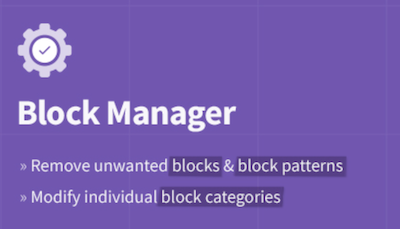
The Block Manager is an intuitive tool for site managers to show or hide blocks and block patterns. It also offers functionality for updating the category of individual blocks to organize the operator’s editing experience. Blocks: Switch off the display of blocks in the block adder and the Blokeditor worldwide. Patterns: Remove unwanted block patterns with one click on the button. Block categories: Organize the Blok Intremer by updating the category of each block. Search and filter: quickly find blocks and patterns with the search function in the sidebar. Include blocks: choose the blocks that you actually want to record on the site by removing the vast majority of useless options.Voordelen Pro versie
It’s a free plug-in
Conclusie
If you have multiple plug-ins who all offer blocks, it quickly becomes a mess. This plug-in allows you to organize everything.
Meer informatie?
basbuis/21-05-2025Block Manager
Turn on and off Gutenberg as desired
-
Blockera – Advanced Mode for Block Editor
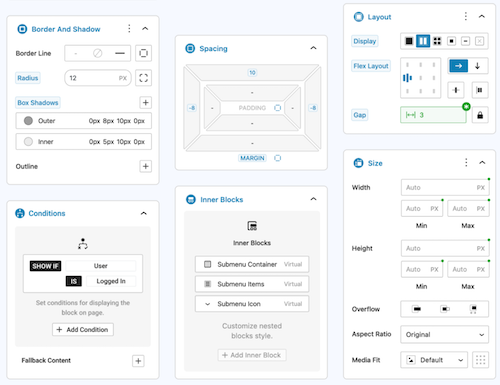
Blockera is the advanced mode for the WordPress Block editor, which extends the functionality of the standard Gutenberg (Core) blocks into a powerful page builder. Every block suddenly has: responsive breakpoints, professional margin and padding, block states, mesh gradies, flex layout, effects, sticky, shadow, custom variables, conditions, overflow, and much more. The standard Gutenberg Builder can suddenly be more than many builders!Voordelen Pro versie
The Pro version can do much more.
Conclusie
Absolute recommended. The version with all the advantages mentioned is free, highly recommended!
Meer informatie?
basbuis/21-05-2025Blockera – Advanced Mode for Block Editor
Turns Gutenberg (block editor) into an advanced editor
-
BlockMeister – Block Pattern Builder

With Blockmeister, making adapted block patterns becomes simple. The patterns can be designed as you design a blog post or a page with the Block editor. You can assign any (adapted) category or keywords. This way, your patterns are categorized in a way that makes sense to your users and makes keywords easier to find a pattern. Your custom patterns are available via the Block Pattern tab in the Insertpanel. Functions: visual design of adapted block patterns using the pattern builder – Make an adapted pattern of one or more selected blocks in the post -editor – Import patterns that are made/shared by trusted Pro users [new in 3.0]Voordelen Pro versie
If you want more functions, such as: group locking, clones, activating or deactivating individual patterns, exporting, importing, determining which core/third-party patronage sets may be loaded, set block styles and more, there are premium versions:
Conclusie
Recommended
Meer informatie?
basbuis/21-05-2025Blockmeister
With Blockmeister, making adapted block patterns is easy
-
Cloudflare WordPress Plugin
The free plug-in from Cloudflare for WordPress speeds up the loading speed of pages, improves SEO and protects against DDOS attacks and WordPress specific vulnerabilities. The WordPress plug-in for Cloudflare offers all the benefits of Cloudflare, with an installation with one click from settings specially developed for the WordPress platform.Voordelen Pro versie
The Pro version of Cloudflare is not a cheap service. It is usually used by larger companies. That seems faint, but it is not too bad … they are also more often the target of targeted attacks.
Conclusie
Recommended!
Meer informatie?
basbuis/21-05-2025Cloudflare WordPress Plugin
Speeds up the loading speed, improves SEO and protects against DDOS attacks
-
Custom Fonts – Host Your Fonts Locally

Improved speed and performance – With the custom fonts plug-in you can upload your own fonts or choose from an extensive collection of Google Fonts. These are all hosted directly on your own web server. By hosting fonts locally, you can considerably improve the performance of the website. Because the fonts are loaded directly from your server, external requests are reduced, so that the loading times of the page are considerably shortened. The plug-in is maintained by the makers of the Astra theme and has more than 300,000 users.Voordelen Pro versie
It is a free plug-in.
Conclusie
If your own theme or page builder does not offer the option to host Fonts locally, this is recommended!
Meer informatie?
basbuis/21-05-2025Custom Fonts – Host Your Fonts Locally
Improve the speed of your site and eliminate privacy problems
-
DBlocks Finder – Blocks and Synced Patterns
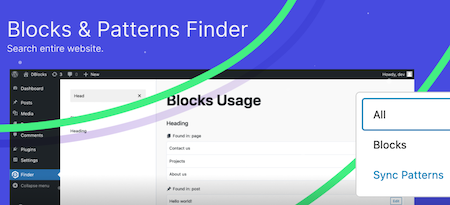
DBLOCKS Finder is a powerful and user-friendly plugin, designed to find and manage Gutenberg blocks and synchronized patterns within a WordPress site. With the intuitive interface you can easily navigate through all registered blocks and view their use in your messages and templates. Integration with Admin Menu: Integrates seamlessly with the WordPress-Admin panel and offers a special menu for quick access to block management. Dynamic block overview: View all registered Gutenberg blocks, including their titles and user statistics. How it works: Plugin scans all public messages and pages and show which blocks on which message or which page is used. Each message type is displayed in a separate group with the same icons as in the sidebar menuVoordelen Pro versie
It’s a free plug-in
Conclusie
Ideal to know which blocks are of which block collection.
Meer informatie?
basbuis/21-05-2025DBlocks Finder – Blocks and Synced Patterns
Find and manage Gutenberg blocks and patterns on a WordPress site
-
Disable User Login
With this plug-in you can disable specific user accounts via a profile setting. After installation and activation, a check box appears in the user profile settings (only for administrators). When this is checked, the user’s account is switched off and they cannot log in to the account. If they try to log in, they are immediately logged in and forwarded to the login page with a message that their account has been switched off. This can be useful in a number of situations: you want freelance writers still to appear in the authors’ profession, but you do not want them to be able to log in. – You have former employees who have written messages and you do not want to delete them or assign their messages to other users, but you want them to be displayed in the ‘authors’ box. – You work on a site for a customer who has an account, but you don’t want him to log in and/or make changes during development. – You have a customer who has an unpaid invoice.Voordelen Pro versie
It is a free plug-in.
Conclusie
Recommended!
Meer informatie?
basbuis/21-05-2025Disable User Login
WordPress user (temporarily) switch off
-
Divi builder
Divi. It was the Builder who made it possible for me to create a website the way I wanted, in 2014. Otherwise I would probably not have switched from Dreamweaver to WordPress at that time. Divi has been no longer a serious option for a few years. Old -fashioned, painfully slow, buggy and works with almost nothing. The old Divi only works well with Divi. All my Divi websites were converted years ago, first to elementor, later to Kadence (Gutenberg). But … the new divi. I have already made a test several times with the upcoming Divi 5.0 version. Divi 5 is the next evolution of Divi’s visual builder, rebuilt from the ground, incredibly fast, with completely renewed onion. Indeed, it is no longer similar to the old Divi. I tend to give the upcoming version the status ‘serious Builder’ again. There is still something missing, such as CSS-Grid, column order on mobile, vertical lines, and not all options are available yet at the tablet and mobile view. But what I worked with was an Alpha version. Nothing beta yet, and it was already promising.Voordelen Pro versie
Divi is only available as a paid version. You also have two choices: Divi or Divi Pro. The latter has considerably more cloud storage, add-ons credit and divi-ai. Keep in mind that you also pay an amount per year for the extra cloud services at the Lifetime Pro version.
Conclusie
I am still a bit careful, but I think the upcoming version 5 is a very serious builder. If this new version is finally off, we still have to test how this version deals with Gutenberg blocks and other plug-ins such as geodirectory and Learndash, but the prospects are good. Divi sometimes seems to be less, but it works very easily, making templates works perfectly, and it is one of the few builders where almost everything is possible in terms of WooCommerce. In addition, a huge range of (good) Divi add-ons is available.
Prijs pro vanaf € 89
Meer informatie?
basbuis/21-05-2025Divi builder
Website and pagebuilder
-
DIY dreamsite templates
Launch your site quickly with DIY dream sites user -friendly WordPress themes and affordable templates (designs). They have put all the time, thoughts and strategy in every draft decision, so that you don’t have to do that yourself. All you have to do is choose your favorite design, follow the tutorials to install and adjust it. And you can launch your website! All you need for these designs is a WordPress install with the Kadence Block Builder (Free Version of Pro).Voordelen Pro versie
It is a Pro Service. They offer complete website layouts, which you can adjust, and very extensive block collections. You can purchase a complete website template from 199, a block collection from 25.,- for a month.
Conclusie
If you are looking for inspiration and convenience (why do it difficult if it is also easy and professional) this is ideal.
Prijs pro vanaf € 25
Meer informatie?
basbuis/21-05-2025DIYdreamsite
Make your dream WordPress website
-
Flip Box Block
Flip Box Block is een kleine blok plug-in voor de WordPress blokeditor, waarmee je blokken met een geanimeerde voor- en achterzijde kunt creëren: ofwel een ‘Flipbox’.Voordelen Pro versie
Het is een gratis plug-in.
Conclusie
Handige plug-in! Als we bijvoorbeeld een website ontwikkelen met Kadence, en een Flipbox nodig hebben, kunnen we deze plug-in gebruiken. Natuurlijk kunnen we ook Greenshift daarvoor toepassen, maar dan installeer je weer een complete builder plug-in erbij.
Meer informatie?
basbuis/06-03-2025Flip Box Block
Plug-in waarmee je een geanimeerde ‘Flipbox’ creërt
-
FluentAuth security
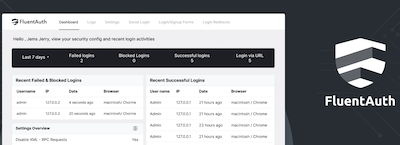
Verbeter de beveiliging van uw website met Login/Signup Security, Two-Factor Email Authentication, Login/Logout Redirects, Social Logins, Gedetailleerde Audit Logs en Meer. FluentAuth is de lichtste en razendsnelle beveiligingsplugin voor WordPress. Twee-factorauthenticatie voor inloggen Magische login via e-mail – Sociaal inloggen / Registreren – Beperk inlogpogingen – Dynamische inlog-omleidingen – Gedetailleerde auditlogboeken – Verbetering van de kernbeveiliging – Beveiligings-e-mailmeldingen – Supersnelle oplossing – Beperk /wp-admin voor gebruikersrollen op laag niveau.Voordelen Pro versie
Het is een gratis plug-in.
Conclusie
Heel handige plug-in!
Meer informatie?
basbuis/06-03-2025FluentAuth security
Beveiliging, magic login via e-mail, twee-factorauthenticatie
-
Font Squirrel – Font Generator
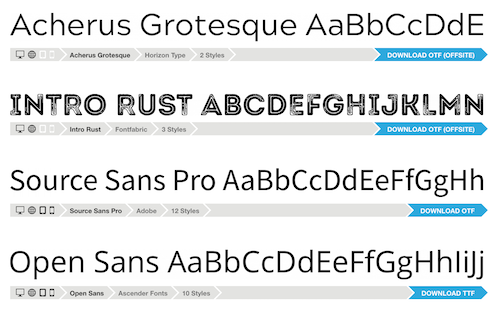
Font Squirrel – Font Generator heeft een grote collectie (meestal gratis) fonts / lettertypes. Deze zijn wel bruimbaar voor grafisch werk (het zijn ttf bestanden) maar vaak niet geschikt voor omzetting naar webfonts. Wat Font Squirrel – Font Generator echter heel goed doet, is de functie waarin je een font upload (vaak een ttf ofwel truetype file) bijvoorbeeld van Google fonts, en daar weer een web font van maakt, dus een woff of woff2 bestand. Een woff bestand is veel kleiner dan een ttf bestand en maakt je website dus sneller. Een woff lettertype bestand is gemiddeld 60 tot 80% kleiner.Voordelen Pro versie
Het is een gratis online tool.
Conclusie
Heel handige lettertype / font tool. Aanrader!
Meer informatie?
basbuis/06-03-2025Font Squirrel – Font Generator
Genereer de juiste fonts voor je website
- Prev
- 1
- 2
- 3
- Next