WP tools WordPress collectie + GS Filter block

Collectie belangrijke en vaak onmisbare WordPress plug-ins en online tools

De collectie WordPress tools (plug-ins, thema’s, online en meer) heeft een filter zodat je bijvoorbeeld de thema’s, builders, SEO of WooCommerce plug-ins makkelijk kunt opzoeken. Mis je iets? Vul het suggestieformulier in!
Filters

52 wp-tools found

Categories
Search
  • ACF Advanced Custom Posts

    , , , ,
    ACF-advanced-custom-fields
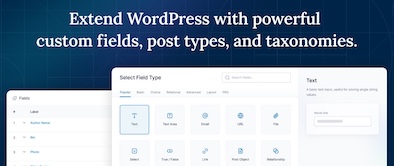
    ACF custom fields allow you to quickly and easily add fields with just a few clicks of a button! Whether it’s something as simple as adding an author field to a book review post, or something more complex like the structured data of an ecommerce site or marketplace, ACF makes adding fields to the content model easy. Fields can be added anywhere in WordPress, including posts, pages, users, taxonomy terms, media, and comments. It couldn’t be easier to bring structure to the WordPress content creation experience.

    Voordelen Pro versie

    The Pro version includes: A Repeater field that lets you create a set of subfields that can be repeated over and over again. ACF Blocks , a PHP-based framework for developing custom block types for the WordPress Block Editor. An options page to add custom admin pages to edit ACF fields. Unlock a more efficient workflow for managing field settings by reusing existing fields and field groups on demand with Clone Field.

    Conclusie

    If you need a custom post, like a review or whatever, ACF is an indispensable plugin. ACF is compatible with both Kadence blocks and Greenshift blocks. There are similar plugins, like MetaBox, Pods, Toolset, JetEngine, Voxel, ACPT and ASE, but so far ACF is a perfect and nice working plugin, which we work with ourselves very regularly. The free version is already sufficient for many websites. Note: if you start working with custom fields, you require a builder that supports Dynamic Fields.


    Prijs pro vanaf € 49

    Meer informatie?

    basbuis/
    21-05-2025

    ACF Advanced Custom Posts

    , , , ,
    Creating and managing custom fields
    ACF-advanced-custom-fields
  • Add to Cart Redirect for WooCommerce

    , ,
    add-to-cart-redirect-woocommerce
    Sends visitor after adding to cart directly to checkout, or to terms and conditions, or a mandatory form, or automatically adds a gift. Note: this plugin is, as far as I know, not suitable to send the visitor after adding to cart directly to an external product or checkout page.

    Voordelen Pro versie

    It’s a pro plugin.

    Conclusie

    Handy plugin for WooCommerce


    Prijs pro vanaf € 29

    Meer informatie?

    basbuis/
    21-05-2025

    Add to Cart Redirect for WooCommerce

    , ,
    Sends visitor to… after adding to cart
    add-to-cart-redirect-woocommerce
  • Autocomplete WooCommerce Orders

    , , ,
    Autocomplete WooCommerce Orders
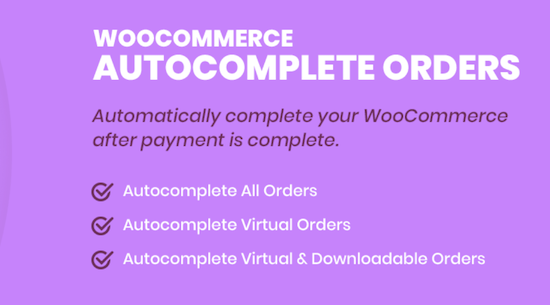
    Improve the efficiency of your WooCommerce store with the plug-in autocomplete WooCommerce orders. Set orders automatically to “completed” upon confirmation of the payment, streamline your sales process and lower the administrative overhead. Ideal for stores that process virtual goods, subscriptions or physical products.

    Voordelen Pro versie

    The premium version of the WooCommerce Autocomplete Orders Plug-in offers you a wide range of additional functions with which you have full control over the process of automatic supplement of orders. Replenes orders automatically for the direct bank transfer payment method – automatically supplement orders for payment method Check – Subscribe orders automatically for the payment method in cash on delivery – Automatic supplement of orders for braking ranks with downloadable products. They offer different licenses, including Lifetime.

    Conclusie

    Many WooCommerce websites handle the orders without using the WOO functionality. Then it is very nice that this plug-in (after receipt of the payment) sets the order completed. Also ideal when it comes to an affiliate system. Tip: The maker has many more (WooCommerce) plug-ins.


    Prijs pro vanaf € 19

    Meer informatie?

    basbuis/
    21-05-2025

    Autocomplete WooCommerce Orders

    , , ,
    Set WooCommerce orders automatically on “completed” when the payment is confirmed
    Autocomplete WooCommerce Orders
  • Back In Stock Notifications for WooCommerce

    , ,
    Back In Stock Notifications for WooCommerce
    A 100% free plugin for WooCommerce® with which your customers stay informed of the products they love. At the same time you get valuable insights into the demand for products or services. From an e-commerce perspective, products that are not in stock can lead to missing turnover and frustrated customers. Gives: More conversion: By inviting customers to register for reports, you put interest in action even when the stock levels fluctuate. – Insight into the question: the Bisn dashboard provides insight into the most sought after and most arrears, so that you can make data-based decisions about your inventory and marketing. – Customer-oriented involvement: Keep customers informed with a personalized e-mail when the product they love is available again.

    Voordelen Pro versie

    This plug-in is completely free of charge.

    Conclusie

    If it occasionally happens that a product or service is not available in a WooCommerce store, this is an absolute must!


    Meer informatie?

    basbuis/
    21-05-2025

    Back In Stock Notifications for WooCommerce

    , ,
    Back In Stock Notifications for WooCommerce
    Back In Stock Notifications for WooCommerce
  • Better Notifications for WP

    , , , ,
    bnfw - better notifications WordPress
    Better Notifications for WP (BNFW) is a simple but powerful plug-in with which you can adjust the e-mail reports that WordPress sends using a WYSIWYG editor and shortcodes to insert data such as date, user, e-mail, etc. All standard WordPress e-mail notifications are available for adjusting, as well as a lot of new ones. You can choose to send notifications to individual users, multiple users, or all users in a user role.

    Voordelen Pro versie

    You can also expand the notifications with the premium add-ons of BNFW. Think of having each user manage their own notifications, conditional notifications, use of ACF fields, grouping users, remembering when there is a response, use on a multisite, send to any e-mail address (even without WordPress account) and even more. You can purchase the add-ons separately, or as a bundle.

    Conclusie

    If you want to improve or expand the WordPress reports (even if you have already installed WooCommerce), this plug-in is actually indispensable.


    Prijs pro vanaf € 59

    Meer informatie?

    basbuis/
    21-05-2025

    Better Notifications for WP

    , , , ,
    Improves the e-mails that WordPress sends
    bnfw - better notifications WordPress
  • Block Manager

    , , ,
    Block Manager plug-i
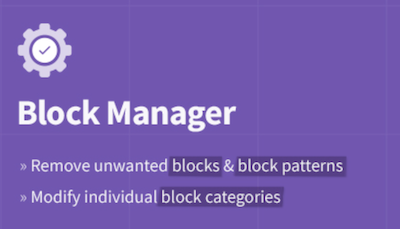
    The Block Manager is an intuitive tool for site managers to show or hide blocks and block patterns. It also offers functionality for updating the category of individual blocks to organize the operator’s editing experience. Blocks: Switch off the display of blocks in the block adder and the Blokeditor worldwide. Patterns: Remove unwanted block patterns with one click on the button. Block categories: Organize the Blok Intremer by updating the category of each block. Search and filter: quickly find blocks and patterns with the search function in the sidebar. Include blocks: choose the blocks that you actually want to record on the site by removing the vast majority of useless options.

    Voordelen Pro versie

    It’s a free plug-in

    Conclusie

    If you have multiple plug-ins who all offer blocks, it quickly becomes a mess. This plug-in allows you to organize everything.


    Meer informatie?

    basbuis/
    21-05-2025

    Block Manager

    , , ,
    Turn on and off Gutenberg as desired
    Block Manager plug-i
  • Blockera – Advanced Mode for Block Editor
    , , , ,
    Blockera builder WordPress
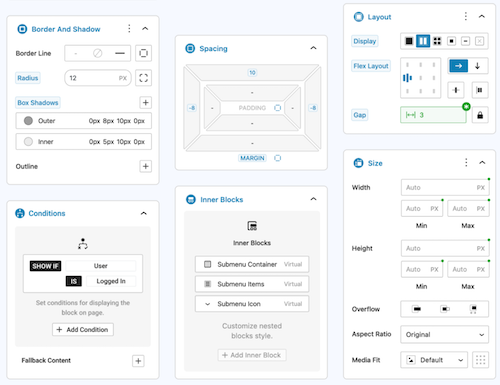
    Blockera is the advanced mode for the WordPress Block editor, which extends the functionality of the standard Gutenberg (Core) blocks into a powerful page builder. Every block suddenly has: responsive breakpoints, professional margin and padding, block states, mesh gradies, flex layout, effects, sticky, shadow, custom variables, conditions, overflow, and much more. The standard Gutenberg Builder can suddenly be more than many builders!

    Voordelen Pro versie

    The Pro version can do much more.

    Conclusie

    Absolute recommended. The version with all the advantages mentioned is free, highly recommended!


    Meer informatie?

    basbuis/
    21-05-2025

    Blockera – Advanced Mode for Block Editor

    , , , ,
    Turns Gutenberg (block editor) into an advanced editor
    Blockera builder WordPress
  • BlockMeister – Block Pattern Builder

    , , , ,
    BlockMeister – Block Pattern Builder
    With Blockmeister, making adapted block patterns becomes simple. The patterns can be designed as you design a blog post or a page with the Block editor. You can assign any (adapted) category or keywords. This way, your patterns are categorized in a way that makes sense to your users and makes keywords easier to find a pattern. Your custom patterns are available via the Block Pattern tab in the Insertpanel. Functions: visual design of adapted block patterns using the pattern builder – Make an adapted pattern of one or more selected blocks in the post -editor – Import patterns that are made/shared by trusted Pro users [new in 3.0]

    Voordelen Pro versie

    If you want more functions, such as: group locking, clones, activating or deactivating individual patterns, exporting, importing, determining which core/third-party patronage sets may be loaded, set block styles and more, there are premium versions:

    Conclusie

    Recommended


    Meer informatie?

    basbuis/
    21-05-2025

    Blockmeister

    , , , ,
    With Blockmeister, making adapted block patterns is easy
    BlockMeister – Block Pattern Builder
  • Checkout Field Editor for WooCommerce

    , , , ,
    woocommerce-checkout-field-editor
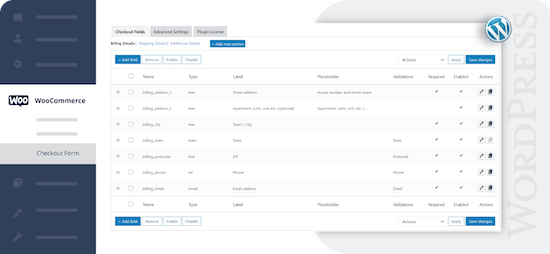
    Check-out Field Editor for WooCommerce: This plug-in gives you the freedom to add, edit and remove fields on your check-out page, which ensures a tailor-made experience for customers. If you want to organize, rename or hide fields on your check-out page, this plug-in offers the flexibility you need. Speed ​​up the checkout with a layout of one page and add adapted fields to streamline the process. 400.000 users.

    Voordelen Pro versie

    Add custom fields and sections to your checkout page. Choose the price type for the fields from the list. View fields and sections based on specific conditions. Repeat fields and sections based on specific conditions. Manage the display of fields in e-mails and order display pages, and much more.

    Conclusie

    One of the best plug-ins to offer WooCommerce a more pleasant customer experience.


    Prijs pro vanaf € 49

    Meer informatie?

    basbuis/
    21-05-2025

    Checkout Field Editor for WooCommerce

    , , , ,
    Adjust the Checkout page of WooCommerce.
    woocommerce-checkout-field-editor
  • Checkout Fields for Blocks

    , , , ,
    Checkout Fields for Blocks
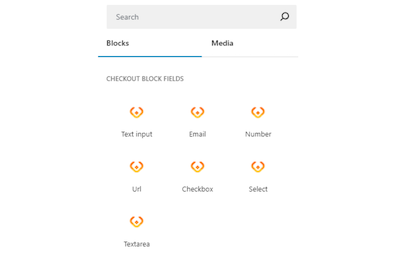
    This plug-in adds extra custom fields to the WooCommerce Block Check-out (checkout form). It is not yet possible to adjust the names of existing fields, or target the invoice or address fields, but that depends on the restrictions imposed by WooCommerce. You can add a paragraph, image, or separation sign (the standard WooCommerce blocks). However, the plug-in is expanding the number of available options (fields) for the checkout form. Adding a new field is integrated in the block search bar. With Checkout Fields for Blocks, the following new fields (field types) are possible for the form. Text input – E -mail – number – URL address – Select – Select – Text box. You can also choose where you want to display the new checkout fields in WooCommerce: order confirmation, admin order, my account, order e-mail.

    Voordelen Pro versie

    It is a free plug-in.

    Conclusie

    A very handy plug-in. Admittedly, it is not a Kadence Shop Kit, but this developer is one of the first to develop a good plug-in for the block version of the WooCommerce check-out page, while Shop-Kit still works on a Classic theme only. This recent plug-in therefore requires a block FSE theme. Highly recommended!


    Meer informatie?

    basbuis/
    21-05-2025

    Checkout Fields for Blocks

    , , , ,
    Adds extra fields to the WooCommerce Block Checkout
    Checkout Fields for Blocks
  • Coupon Affiliates – Affiliate Plugin for WooCommerce

    , , , , ,
    Coupon Affiliates WooCommerce plugin
    With Coupon Affiliates you can easily set up an affiliate program for WooCommerce based on coupons, with which you generate more traffic and increase your sales. With this plug-in you also give your affiliates access to a user-friendly affiliate dashboard for their discount coupons. Here you can view statistics about the use of discount coupons, recent orders, deserved committee, referring URLs and more.

    Voordelen Pro versie

    The Pro version includes: Multi-level affiliates, advanced management reports and analyzes, affiliate e-mail reports, advanced registration functions, creatives section again with downloadable banners, campaigns and much more! There is a pro version for 1 site and for 10 websites.

    Conclusie

    If you want to set up a simple and well-arranged affiliate program, which is not based on website links, but on WooCommerce coupons (often works better at business to private individual), this plug-in is ideal for WooCommerce coupons.


    Prijs pro vanaf € 150

    Meer informatie?

    basbuis/
    21-05-2025

    Coupon Affiliates WooCommerce

    , , , , ,
    An affiliate system based on WooCommerce coupons
    Coupon Affiliates WooCommerce plugin
  • Crocoblock plug-ins

    , , , , ,
    Crocoblock
    Crocoblock is not one plug-in, but a whole family of super-powered plug-ins. Think of custom posts, fields, forms, menus, filters, grid builder, pop-ups, WooCommerce Builder, tabs, product gallery and much more. One of their well-known plug-ins is Jetengine, for custom fields.

    Voordelen Pro versie

    It is a Pro Service. You can buy each plug-in separately, or suddenly the whole set.

    Conclusie

    A must. Solid and versatile.


    Prijs pro vanaf € 43

    Meer informatie?

    basbuis/
    21-05-2025

    Crocoblock

    , , , , ,
    A ‘family’ of useful plugins
    Crocoblock
  • DBlocks Finder – Blocks and Synced Patterns
    , , ,
    DBlocks Finder
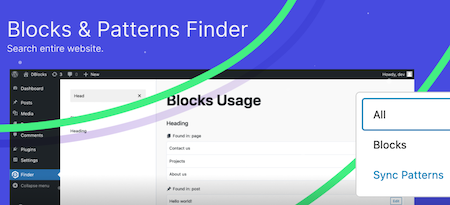
    DBLOCKS Finder is a powerful and user-friendly plugin, designed to find and manage Gutenberg blocks and synchronized patterns within a WordPress site. With the intuitive interface you can easily navigate through all registered blocks and view their use in your messages and templates. Integration with Admin Menu: Integrates seamlessly with the WordPress-Admin panel and offers a special menu for quick access to block management. Dynamic block overview: View all registered Gutenberg blocks, including their titles and user statistics. How it works: Plugin scans all public messages and pages and show which blocks on which message or which page is used. Each message type is displayed in a separate group with the same icons as in the sidebar menu

    Voordelen Pro versie

    It’s a free plug-in

    Conclusie

    Ideal to know which blocks are of which block collection.


    Meer informatie?

    basbuis/
    21-05-2025

    DBlocks Finder – Blocks and Synced Patterns

    , , ,
    Find and manage Gutenberg blocks and patterns on a WordPress site
    DBlocks Finder
  • Divi builder

    , , ,
    Divi builder
    Divi. It was the Builder who made it possible for me to create a website the way I wanted, in 2014. Otherwise I would probably not have switched from Dreamweaver to WordPress at that time. Divi has been no longer a serious option for a few years. Old -fashioned, painfully slow, buggy and works with almost nothing. The old Divi only works well with Divi. All my Divi websites were converted years ago, first to elementor, later to Kadence (Gutenberg). But … the new divi. I have already made a test several times with the upcoming Divi 5.0 version. Divi 5 is the next evolution of Divi’s visual builder, rebuilt from the ground, incredibly fast, with completely renewed onion. Indeed, it is no longer similar to the old Divi. I tend to give the upcoming version the status ‘serious Builder’ again. There is still something missing, such as CSS-Grid, column order on mobile, vertical lines, and not all options are available yet at the tablet and mobile view. But what I worked with was an Alpha version. Nothing beta yet, and it was already promising.

    Voordelen Pro versie

    Divi is only available as a paid version. You also have two choices: Divi or Divi Pro. The latter has considerably more cloud storage, add-ons credit and divi-ai. Keep in mind that you also pay an amount per year for the extra cloud services at the Lifetime Pro version.

    Conclusie

    I am still a bit careful, but I think the upcoming version 5 is a very serious builder. If this new version is finally off, we still have to test how this version deals with Gutenberg blocks and other plug-ins such as geodirectory and Learndash, but the prospects are good. Divi sometimes seems to be less, but it works very easily, making templates works perfectly, and it is one of the few builders where almost everything is possible in terms of WooCommerce. In addition, a huge range of (good) Divi add-ons is available.


    Prijs pro vanaf € 89

    Meer informatie?

    basbuis/
    21-05-2025

    Divi builder

    , , ,
    Website and pagebuilder
    Divi builder
  • DIY dreamsite templates

    , , ,
    DIY website templates
    Launch your site quickly with DIY dream sites user -friendly WordPress themes and affordable templates (designs). They have put all the time, thoughts and strategy in every draft decision, so that you don’t have to do that yourself. All you have to do is choose your favorite design, follow the tutorials to install and adjust it. And you can launch your website! All you need for these designs is a WordPress install with the Kadence Block Builder (Free Version of Pro).

    Voordelen Pro versie

    It is a Pro Service. They offer complete website layouts, which you can adjust, and very extensive block collections. You can purchase a complete website template from 199, a block collection from 25.,- for a month.

    Conclusie

    If you are looking for inspiration and convenience (why do it difficult if it is also easy and professional) this is ideal.


    Prijs pro vanaf € 25

    Meer informatie?

    basbuis/
    21-05-2025

    DIYdreamsite

    , , ,
    Make your dream WordPress website
    DIY website templates
  • 1
  • 2
  • 3
  • 4
  • Next