WP tools WordPress collectie + GS Filter block
Collectie belangrijke en vaak onmisbare WordPress plug-ins en online tools
-
ACF Advanced Custom Posts
ACF custom fields allow you to quickly and easily add fields with just a few clicks of a button! Whether it’s something as simple as adding an author field to a book review post, or something more complex like the structured data of an ecommerce site or marketplace, ACF makes adding fields to the content model easy. Fields can be added anywhere in WordPress, including posts, pages, users, taxonomy terms, media, and comments. It couldn’t be easier to bring structure to the WordPress content creation experience.Voordelen Pro versie
The Pro version includes: A Repeater field that lets you create a set of subfields that can be repeated over and over again. ACF Blocks , a PHP-based framework for developing custom block types for the WordPress Block Editor. An options page to add custom admin pages to edit ACF fields. Unlock a more efficient workflow for managing field settings by reusing existing fields and field groups on demand with Clone Field.
Conclusie
If you need a custom post, like a review or whatever, ACF is an indispensable plugin. ACF is compatible with both Kadence blocks and Greenshift blocks. There are similar plugins, like MetaBox, Pods, Toolset, JetEngine, Voxel, ACPT and ASE, but so far ACF is a perfect and nice working plugin, which we work with ourselves very regularly. The free version is already sufficient for many websites. Note: if you start working with custom fields, you require a builder that supports Dynamic Fields.
Prijs pro vanaf € 49
Meer informatie?
basbuis/21-05-2025ACF Advanced Custom Posts
Creating and managing custom fields
-
Admin Columns for ACF Fields
Use this plugin to display ACF fields in the All Posts, Taxonomy, or User Table views in the WordPress admin. Simply enable the new “Admin Column” option in your ACF field settings for any regular field (see exceptions below) and optionally set the position and width of the columns. Now an additional column for your field will be displayed in any built-in or custom posts, pages, taxonomies (e.g. “All Pages”), and user views. Using filters (see below), you can fine-tune the behavior of the plugins. Works on any regular ACF field (see exceptions below). Compatible with Advanced Custom Fields 5.x and 6.x.Voordelen Pro versie
It is a free plugin. A donation is appreciated.
Conclusie
Handy plugin. Note: if you have WPASE, ‘Admin Columns for ACF Fields’ is redundant.
Meer informatie?
basbuis/21-05-2025Admin Columns for ACF Fields
Shows ACF fields in ‘All Messages’, ‘Taxonomy’ or ‘User Table’ view
-
Advanced Forms for ACF
Advanced Forms is a WordPress plug-in for making front end forms using Advanced Custom Fields. It supports all ACF field types, including repeaters and flexible content fields, and offers the same interface for field processing that you already know. Note: Advanced Forms requires ACF Pro V5.7 or later.Voordelen Pro versie
Advanced Forms Pro offers even more functions for advanced use cases. You can purchase a license through Hookturn that can be used on an unlimited number of sites. They offer multiple licenses
Conclusie
Handy form builder for posts with custom (ACF) fields. The disadvantage is that ACF Pro is required.
Prijs pro vanaf € 48
Meer informatie?
basbuis/21-05-2025Advanced Forms for ACF
Advanced Forms foe front-end forms with Advanced Custom Fields PRO
-
All-in-One WP Migration and Backup
All-in-One WP Migration was introduced in 2013, it is one of the most trusted and used plug-ins from WordPress for easy moving of websites. All-in-One WP Migration is specially designed for non-technical users and is full of functions for beginners, with which you can migrate your WordPress website with little to no technical knowledge or experience. More than 5 million active users. The free version can only restore a website to 512 MB.Voordelen Pro versie
This offers several benefits, including the migration of websites larger than 512 MB.
Conclusie
The disadvantage of the free version is that it offers limited options. Yet it is still one of the most used migration plugins.
Prijs pro vanaf € 69
Meer informatie?
basbuis/21-05-2025All-in-One WP Migration and Backup
Migration of complete websites
-
Antispam Bee
Say goodbye to spam on your WordPress blog or website. Antispam Bee blocks spam reactions and trackbacks effectively, without sending captchas and without personal information to external services. It is free, advertising-free and 100% GDPR conform. Trust in approved commentators – Keep in mind the time required to comment – Responses only in a certain language – Block authors of reactions from certain countries or allow them – Treat BBCode Links as spam – Use regular expressions – Search the local spam database to people who have been marked as spammer with the Spamm with the Spamm with the Spamm with the Spamx. Days – Limit the approval of comments/Pings (other types of comments are deleted) – Select SPAM indicators to send reactions directly to removal – Optional trackbacks and pingbacks of spam detection – If necessary, check the comments on Archive pages on spam – Toon spam speed and daily updates. Has 700,000+ users.Voordelen Pro versie
It is a free plug-in. A donation is appreciated.
Conclusie
Absolutely recommended!
Meer informatie?
basbuis/21-05-2025Antispam Bee
Say goodbye to spam on your WordPress blog or website: blocks spam comments and trackbacks.
-
Backuply – Back-up, Restore, Migrate and Clone

Backuply is a WordPress backup plug-in with which you can back up a WordPress website. This way you prevent data loss due to servercrashes, hacks, bad updates or bad plug-ins. Backuply offers both local backups and safe cloud backups with integrations with FTP, FTPS, SFTP, Webdav, Google Drive, Microsoft Onedrive, Dropbox, Amazon S3. Recovering is simple: with one click. The plug-in has 200,000 users.Voordelen Pro versie
Automatic backups: Choose to backup a website regularly, such as daily, weekly or monthly. You can adjust the interval yourself. One-Click Restore: With Backuply, restoring your website is easy. Just click on the Restore button next to the backup that you want to recover. The full backup is downloaded and the changes are applied to the website. Selective backup: You can choose whether you only want to make backups of files, databases or full backups. Website migration: Easily migrate by repairing it via one of the cloud backup options on the new website. Website cloning: If you want to clon a website, Backuply can do that for you. Backuply restores the data, but replaces the URLs and information as on the target website. In this way, Jee can make multiple clones. Back-up to FTPS: You can back up the site to an FTPS server, i.e. FTP via SSL/TLS Backup to SFTP: Supports the SFTP protocol Backup to Dropbox Backup to Microsoft One Drive Back-up S3 Back-up S3 Backele Backele Back-up Storage media: Support added for DigitalOcean Spaces, Linode Object Storage, Vultr Object Storage and Cloudflare R2. Support for WP-Cli: You can use Backuply via WP-Cli Professional support: get professional support and more functions to back up a website with Backuply. The paid version starts at 18.00 per year, for 1 website, which includes 1 GB Cloud Storage. That goes up to 69,- for 5 websites with 25 GB, and 249 per year for unlimited websites with 100 GB storage.
Conclusie
It is one of the most reliable and most stable backup plug-ins. Definitely recommended!
Prijs pro vanaf € 18
Meer informatie?
basbuis/21-05-2025Backuply
Backup – Recovery – Migrating and Cloning a website
-
Betterstack – Website observation and monitoring

Checks your website every 3 minutes. Uptime, downtime, SSL connection, everything you want. If a malfunction is found, check the system first via at least 2 other locations before it warns you; To prevent false reports. The free account offers a service up to a maximum of 10 websites and has (of course) considerably fewer options than the Pro version.Voordelen Pro versie
The Pro version also concerns 10 websites (monitors), has Push notifications, checks every 30 seconds, sends screenshots of the problem, has Zapier, Slack and Rest API integration and Webhooks. In addition, the POP3/IMAP/SMTP settings are also monitored and much more.
Conclusie
One of the best websites monitor services.
Prijs pro vanaf € 29
Meer informatie?
basbuis/21-05-2025Betterstack
Monitors Uptime and SSL from your websites
-
Checkout Field Editor for WooCommerce
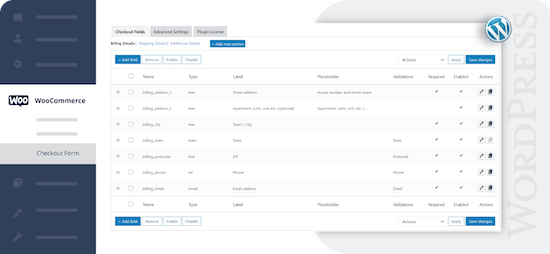
Check-out Field Editor for WooCommerce: This plug-in gives you the freedom to add, edit and remove fields on your check-out page, which ensures a tailor-made experience for customers. If you want to organize, rename or hide fields on your check-out page, this plug-in offers the flexibility you need. Speed up the checkout with a layout of one page and add adapted fields to streamline the process. 400.000 users.Voordelen Pro versie
Add custom fields and sections to your checkout page. Choose the price type for the fields from the list. View fields and sections based on specific conditions. Repeat fields and sections based on specific conditions. Manage the display of fields in e-mails and order display pages, and much more.
Conclusie
One of the best plug-ins to offer WooCommerce a more pleasant customer experience.
Prijs pro vanaf € 49
Meer informatie?
basbuis/21-05-2025Checkout Field Editor for WooCommerce
Adjust the Checkout page of WooCommerce.
-
Checkout Fields for Blocks
This plug-in adds extra custom fields to the WooCommerce Block Check-out (checkout form). It is not yet possible to adjust the names of existing fields, or target the invoice or address fields, but that depends on the restrictions imposed by WooCommerce. You can add a paragraph, image, or separation sign (the standard WooCommerce blocks). However, the plug-in is expanding the number of available options (fields) for the checkout form. Adding a new field is integrated in the block search bar. With Checkout Fields for Blocks, the following new fields (field types) are possible for the form. Text input – E -mail – number – URL address – Select – Select – Text box. You can also choose where you want to display the new checkout fields in WooCommerce: order confirmation, admin order, my account, order e-mail.Voordelen Pro versie
It is a free plug-in.
Conclusie
A very handy plug-in. Admittedly, it is not a Kadence Shop Kit, but this developer is one of the first to develop a good plug-in for the block version of the WooCommerce check-out page, while Shop-Kit still works on a Classic theme only. This recent plug-in therefore requires a block FSE theme. Highly recommended!
Meer informatie?
basbuis/21-05-2025Checkout Fields for Blocks
Adds extra fields to the WooCommerce Block Checkout
-
Cloudflare WordPress Plugin
The free plug-in from Cloudflare for WordPress speeds up the loading speed of pages, improves SEO and protects against DDOS attacks and WordPress specific vulnerabilities. The WordPress plug-in for Cloudflare offers all the benefits of Cloudflare, with an installation with one click from settings specially developed for the WordPress platform.Voordelen Pro versie
The Pro version of Cloudflare is not a cheap service. It is usually used by larger companies. That seems faint, but it is not too bad … they are also more often the target of targeted attacks.
Conclusie
Recommended!
Meer informatie?
basbuis/21-05-2025Cloudflare WordPress Plugin
Speeds up the loading speed, improves SEO and protects against DDOS attacks
-
Crocoblock plug-ins
Crocoblock is not one plug-in, but a whole family of super-powered plug-ins. Think of custom posts, fields, forms, menus, filters, grid builder, pop-ups, WooCommerce Builder, tabs, product gallery and much more. One of their well-known plug-ins is Jetengine, for custom fields.Voordelen Pro versie
It is a Pro Service. You can buy each plug-in separately, or suddenly the whole set.
Conclusie
A must. Solid and versatile.
Prijs pro vanaf € 43
Meer informatie?
basbuis/21-05-2025Crocoblock
A ‘family’ of useful plugins
-
CubeWP
It offers an extensive functionality. More than 25 field types, conditional logic and relation fields, gallery field, repeatable field, map field, adapted user registration and profile forms, advanced adapted search forms and filters, frontend-post entry forms for post types, adaptable frontend-layouts.Voordelen Pro versie
They have annual and (now still affordable) Lifetime licenses. The Premium (Pro) version has among other things: Advanced Search Builder: Enhance your search capabilities by adding various custom fields – Advanced Filter Builder: Expand filtering options with all available custom fields. – User Signup Form Builder: Craft tailored registration forms for different user roles. – User Profile Form Builder: Create personalized profile forms for diverse user roles. – Post Types Form Builder: Develop front-end submission forms for any post type. – Single-post Template Editor: Customize post details with a drag-and-drop layout builder. – User Dashboard Builder: Easily construct custom user dashboards based on roles. – Post Loop Generator: Gain full control over post grids for unique content presentation (HTML/CSS skills required).
Conclusie
I haven’t worked with it yet, but it seems like a solid package of functions that give you many options.
Prijs pro vanaf € 39
Meer informatie?
basbuis/21-05-2025CubeWP
Extensive tool for custom fields, forms and much more
-
Custom Fonts – Host Your Fonts Locally

Improved speed and performance – With the custom fonts plug-in you can upload your own fonts or choose from an extensive collection of Google Fonts. These are all hosted directly on your own web server. By hosting fonts locally, you can considerably improve the performance of the website. Because the fonts are loaded directly from your server, external requests are reduced, so that the loading times of the page are considerably shortened. The plug-in is maintained by the makers of the Astra theme and has more than 300,000 users.Voordelen Pro versie
It is a free plug-in.
Conclusie
If your own theme or page builder does not offer the option to host Fonts locally, this is recommended!
Meer informatie?
basbuis/21-05-2025Custom Fonts – Host Your Fonts Locally
Improve the speed of your site and eliminate privacy problems
-
Custom Post Type UI
The user interface for customized message types offers a userfriendly interface for registering and managing customized message types and taxonomies for your website.Voordelen Pro versie
CPTUI extended Custom post type onion helps to create custom content types, but displaying that content can be a whole new challenge. Custom post type onion extended is made to help display the content made. Some builders and themes can display custom posts and custom fields, but often not. Then CPTUI Extended offers a solution.
Conclusie
If you want to use custom posts (so your own type of post, no standard post or page), this plug-in is ideal. This is also possible a plug-in like ACF, but we think custom post type of UI works more pleasantly for that.
Prijs pro vanaf € 26
Meer informatie?
basbuis/21-05-2025Custom Post Type UI
Creating and managing custom post types
-
Disable User Login
With this plug-in you can disable specific user accounts via a profile setting. After installation and activation, a check box appears in the user profile settings (only for administrators). When this is checked, the user’s account is switched off and they cannot log in to the account. If they try to log in, they are immediately logged in and forwarded to the login page with a message that their account has been switched off. This can be useful in a number of situations: you want freelance writers still to appear in the authors’ profession, but you do not want them to be able to log in. – You have former employees who have written messages and you do not want to delete them or assign their messages to other users, but you want them to be displayed in the ‘authors’ box. – You work on a site for a customer who has an account, but you don’t want him to log in and/or make changes during development. – You have a customer who has an unpaid invoice.Voordelen Pro versie
It is a free plug-in.
Conclusie
Recommended!
Meer informatie?
basbuis/21-05-2025Disable User Login
WordPress user (temporarily) switch off
- Prev
- 1
- 2
- 3
- 4
- Next