WP tools WordPress collectie + GS Filter block
Collectie belangrijke en vaak onmisbare WordPress plug-ins en online tools
-
Advanced Query Loop plugin
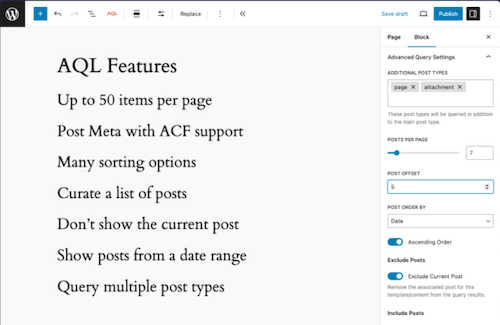
This plugin introduces a variation on the standard Gutenberg Query Loop block, with which users can perform much more complex queries with the Query Loop block, such as the number of messages to be displayed and the metadata of messages. Taxonomy queries, multiple message types, set the number of items that you want to display (maximum 50), select manually which messages you want to display or only exclude the underlying messages from the current content, excluding current posts, excluding messages per category, choose to exclude messages from a list of categories.Voordelen Pro versie
The plug-in is free.
Conclusie
An ideal expansion of the standard WordPress Gutenberg Query/Grid. Recommended if you are just a little short, but do not need frills.
Meer informatie?
basbuis/21-05-2025Advanced Query Loop
Expansion Standard Query to Advanced Query Loop
-
All-in-One WP Migration and Backup

All-in-One WP Migration was introduced in 2013, it is one of the most trusted and used plug-ins from WordPress for easy moving of websites. All-in-One WP Migration is specially designed for non-technical users and is full of functions for beginners, with which you can migrate your WordPress website with little to no technical knowledge or experience. More than 5 million active users. The free version can only restore a website to 512 MB.Voordelen Pro versie
This offers several benefits, including the migration of websites larger than 512 MB.
Conclusie
The disadvantage of the free version is that it offers limited options. Yet it is still one of the most used migration plugins.
Prijs pro vanaf € 69
Meer informatie?
basbuis/21-05-2025All-in-One WP Migration and Backup
Migration of complete websites
-
Backuply – Back-up, Restore, Migrate and Clone
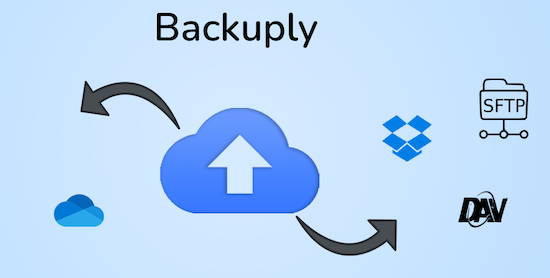
Backuply is a WordPress backup plug-in with which you can back up a WordPress website. This way you prevent data loss due to servercrashes, hacks, bad updates or bad plug-ins. Backuply offers both local backups and safe cloud backups with integrations with FTP, FTPS, SFTP, Webdav, Google Drive, Microsoft Onedrive, Dropbox, Amazon S3. Recovering is simple: with one click. The plug-in has 200,000 users.Voordelen Pro versie
Automatic backups: Choose to backup a website regularly, such as daily, weekly or monthly. You can adjust the interval yourself. One-Click Restore: With Backuply, restoring your website is easy. Just click on the Restore button next to the backup that you want to recover. The full backup is downloaded and the changes are applied to the website. Selective backup: You can choose whether you only want to make backups of files, databases or full backups. Website migration: Easily migrate by repairing it via one of the cloud backup options on the new website. Website cloning: If you want to clon a website, Backuply can do that for you. Backuply restores the data, but replaces the URLs and information as on the target website. In this way, Jee can make multiple clones. Back-up to FTPS: You can back up the site to an FTPS server, i.e. FTP via SSL/TLS Backup to SFTP: Supports the SFTP protocol Backup to Dropbox Backup to Microsoft One Drive Back-up S3 Back-up S3 Backele Backele Back-up Storage media: Support added for DigitalOcean Spaces, Linode Object Storage, Vultr Object Storage and Cloudflare R2. Support for WP-Cli: You can use Backuply via WP-Cli Professional support: get professional support and more functions to back up a website with Backuply. The paid version starts at 18.00 per year, for 1 website, which includes 1 GB Cloud Storage. That goes up to 69,- for 5 websites with 25 GB, and 249 per year for unlimited websites with 100 GB storage.
Conclusie
It is one of the most reliable and most stable backup plug-ins. Definitely recommended!
Prijs pro vanaf € 18
Meer informatie?
basbuis/21-05-2025Backuply
Backup – Recovery – Migrating and Cloning a website
-
Custom Fonts – Host Your Fonts Locally

Improved speed and performance – With the custom fonts plug-in you can upload your own fonts or choose from an extensive collection of Google Fonts. These are all hosted directly on your own web server. By hosting fonts locally, you can considerably improve the performance of the website. Because the fonts are loaded directly from your server, external requests are reduced, so that the loading times of the page are considerably shortened. The plug-in is maintained by the makers of the Astra theme and has more than 300,000 users.Voordelen Pro versie
It is a free plug-in.
Conclusie
If your own theme or page builder does not offer the option to host Fonts locally, this is recommended!
Meer informatie?
basbuis/21-05-2025Custom Fonts – Host Your Fonts Locally
Improve the speed of your site and eliminate privacy problems
-
Download plugin
This handy ‘download plugin’ can easily be plug-ins, themes, users, blog posts, pages, comments, attachments and more directly from the WordPress dashboard. Download plug-in can also download data from any plug-in that uses customized message types, including WooCommerce products, Easy Digital Downloads, Portfolio Post Types, Slider Revolution, BBPRESS, WP Job Manager, Jetpack and much more. WordPress download plug-in is a utility plug-in that does one thing and does it perfectly. It may sound simple, but this function fills a gap in the current set of WordPress plug-in functionality.Voordelen Pro versie
There is no paid version of this plug-in.
Conclusie
Very handy plugin. Recommended!
Meer informatie?
basbuis/21-05-2025Download plugin
Download plugins, posts, products, etc,
-
Filter Everything
If you show an overview of pages or other posts, you often also need a filter. Usually with check boxes, radio buttons, dropdown, or tags. The truth is that almost every builder has a filter, but that they are not always good. They only work with categories, are sometimes slow, displaying wrong posts or the pagination frequently doesn’t look like anything. The solution? A professional filter plugin. Filter Everything is not only ideal to be set, but also does not need a separate link with your query: you create a filter and indicate that it must be applied on the right page, ready. Filter Everything works perfectly with Greenshift Blocks (is also recommended by them). We have not tested the combination Filter Everything with Kadence Blocks.Voordelen Pro versie
The basic free version can only filter on regular WordPress posts, not on pages or custom posts. Then you need the Pro version of Filter Everything. You can also indicate the exact page with the Pro version where each filter must be applied; This prevents unnecessary scripts on other pages.
Conclusie
Absolute recommended. We work with both Kadence Blocks and Greenshift Blocks. Both have their own filter. However, those of Kadence and Greenshift only work with their own queries, and the latter has a basic filter, but above all, very slow. In short, Filter Everything is a perfect solution.
Prijs pro vanaf € 44
Meer informatie?
basbuis/21-05-2025Filter Everything
Filter for every Query loop
-
Font Squirrel – Font Generator
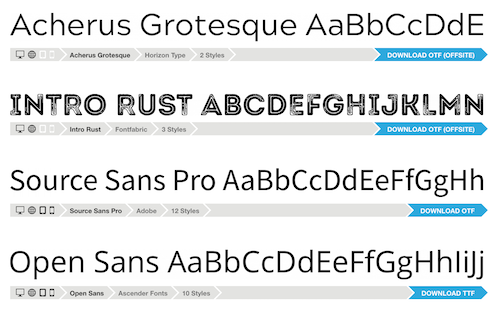
Font Squirrel – Font Generator heeft een grote collectie (meestal gratis) fonts / lettertypes. Deze zijn wel bruimbaar voor grafisch werk (het zijn ttf bestanden) maar vaak niet geschikt voor omzetting naar webfonts. Wat Font Squirrel – Font Generator echter heel goed doet, is de functie waarin je een font upload (vaak een ttf ofwel truetype file) bijvoorbeeld van Google fonts, en daar weer een web font van maakt, dus een woff of woff2 bestand. Een woff bestand is veel kleiner dan een ttf bestand en maakt je website dus sneller. Een woff lettertype bestand is gemiddeld 60 tot 80% kleiner.Voordelen Pro versie
Het is een gratis online tool.
Conclusie
Heel handige lettertype / font tool. Aanrader!
Meer informatie?
basbuis/06-03-2025Font Squirrel – Font Generator
Genereer de juiste fonts voor je website
-
FontForge Font editor
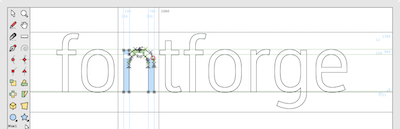
Software (mac en Windows) om een bestaand font aan te passen of alleen de karakters te behouden die je gebruikt op een website. Hiermee kun je ook een font aanzienlijk sneller laten downloaden, waardoor een website veel sneller wordt.Voordelen Pro versie
Het is een gratis tool.
Conclusie
Heel handige tool!
Meer informatie?
basbuis/13-02-2025FontForge Font editor
Past een font aan en maakt het bestand kleiner
-
Google Fonts – lettertypes
Google biedt een geweldige font collectie. Deze zijn bruikbaar voor grafisch (druk)werk en voor het internet. Deze zijn gratis beschikbaar. Als je een webbuilder gebruikt die Google fonts heeft geïntegreerd, hoef je niets te doen om deze fonts te gebruiken. Je kunt de fonts (lettertypes) ook downloden, meestal als .ttf bestand en deze hosten op je eigen server. Dat komt privacy misschien ten goede, maar de bestandsgrootte niet. Werken met de standaard manier van Google (aanroepen op een pagina) is bijna altijd de snelste manier, ook omdat Google het lettertype elke keer aanpast aan de vraag van de browser, en ongebruikte variaties niet meestuurt. EXTRA INFORMATIE OVER GEBRUIK VAN GOOGLE FONTS: https://fonts.google.com/knowledge/using_type/installing_and_managing_fontsVoordelen Pro versie
Het is een gratis dienst.
Conclusie
Aanrader. Als je zelf host, kun je bij Google Fonts downloaden en bij Font Squirrel omzetten naar het juiste bestand (woff of woff2).
Meer informatie?
basbuis/06-03-2025Google Fonts
Een geweldige collectie Web fonts
-
Imapsync
Als je besluit je hosting te verhuizen, kan dat je website betreffen, je e-mail of beide. Als je e-mail bij dezelfde hosting zit als je website en bij je nieuwe hosting ook, dan is de nieuwe hosting soms bereid om die ook voor je te verhuizen. Als je dat niet zijn, of je e-mail is ergens anders gehost, dan moet je de bestaande e-mails zelf overzetten. Dat is gelukkig heel makkelijk met deze (gratis) tool. Deze gratis tool wordt aangeboden door Vimexx.nl hosting. (1) Zorg dat je bij de nieuwe hosting e-mailadressen aanmaakt met exact dezelfde adressen. (2) Zorg dat je dezelfde forwards, aliases, autoresponders, handtekeningen, etc. creëert bij je nieuwe hosting. (3) DNS omzetten naar nieuwe hosting (MX, SPF, DKIM, DMARC). (4) wacht tot de DNS actief is (duurt 1-48 uur). (5) Migreer de e-mails. Tip: controleer eerst of je nieuwe hosting een ‘e-mail import tool’ heeft. Dan heb je deze Imapsync service misschien niet nodig.Voordelen Pro versie
Deze service heeft geen pro versie. Er bestaat wel een betaalde online dienst die hetzelfde doet. Dat is MailJerry: https://www.mailjerry.com. Deze service is gratis tot een emailbox van 250 MB, daarboven heb je een abonnement nodig om e-mails over te zetten.
Conclusie
Absolute aanrader. Ik maak hier regelmatig gebruik van.
Meer informatie?
basbuis/05-01-2025Imapsync
Verhuizen e-mail tussen 2 IMAP mappen
-
Local Google Fonts
Host de gebruikte Google lettertypen op de server en zorg dat de website voldoet aan de AVG. Ongeveer 50 miljoen websites maken gebruik van Google Fonts en in januari 2022 oordeelde een Duitse rechtbank dat het gebruik van Google Fonts een schending is van de Europese AVG (Algemene Verordening Gegevensbescherming). Daarnaast kost het tijd voor een browser om een lettertype te downloaden bij Google, en op de eigen server hosten kan je website een stuk sneller maken. Deze plug-in heeft meer dan 100.000 gebruikers.Voordelen Pro versie
Dit is een gratis plug-in.
Conclusie
Een aanrader!
Meer informatie?
basbuis/06-03-2025Local Google Fonts
Zorgt dat Google lettertypes lokaal gehost worden
-
Migrate Guru
Migrate Guru is een krachtige WordPress migratie plug-in die is ontworpen om een WordPress site naadloos over te zetten naar een nieuwe host of domein. Of je een WordPress website wilt klonen, verplaatsen of migreren, Migrate Guru zorgt voor een probleemloos proces met zijn one-click-migratie functie. – Deze plug-in ondersteunt alles-in-één WP-migraties en verwerkt grote sites tot 200 GB zonder de server over te belasten. Compatibel met elke grote webhost en uitgerust met automatisch URL-herschrijven en geserialiseerde gegevensverwerking, is het de go-to-tool voor het verplaatsen van WordPress sites naar nieuwe domeinen of hosts. – Verplaats, kloon of migreer uw WordPress site met Migrate Guru, de slimme, snelle en veilige WordPress migratie- en back-up plug-in – de plug-in heeft geen automatische back-up functie, dus ik zou het alleen gebruiken voor klonen en migratie.Voordelen Pro versie
Het is een gratis plug-in, maar met pro functionaliteit.
Conclusie
Eenvoud, snel en probleemloos. Aanrader.
Meer informatie?
basbuis/05-01-2025Migrate Guru
Migreren, back-up, klonen van een site
-
Simple Custom Post Order
Sorteer berichten (berichten of aangepaste berichttypen) met behulp van Drag and Drop. Configuratie is niet nodig. Je kunt dit rechtstreeks doen in de standaard WordPress admin. Met uitzondering van aangepaste query’s die order- of orderby-parameters gebruiken, werkt het ook met get_posts of query_posts, enzovoort. Gebruikt door meer dan 300.000 gebruikers.Voordelen Pro versie
Het is een gratis plugin.
Conclusie
Als je geen gebruik maakt van de WPASE** plug-in, en wel de volgorde van je posts wilt aanpassen, voor jezelf of omdat het je Grid beïnvloedt, is dit een ideale plug-in. ** deze functie zit al in WPASE.
Meer informatie?
basbuis/31-01-2025Simple Custom Post Order
Sorteer berichten (berichten of aangepaste berichttypen)
-
Solid Backup – NextGen
Solid Backups – NextGen is een nieuwe, cloud-first, high-performance back-upoplossing van SolidWP. Met Solid Backups – NextGen zijn uw back-ups sneller, nemen ze minder ruimte in beslag en zijn ze betrouwbaarder dan ooit. Back-ups worden veilig opgeslagen in de cloud en kunnen, wanneer nodig, pijnloos worden hersteld met één klik. Geen resource-verslindende, potentieel omslachtige plug-in-gebaseerde methoden meer, om back-ups te maken van je WordPress site. Dagelijkse, incrementele back-ups Herstellen met één klik Gedetailleerde activiteiten tijdlijn Gecentraliseerd beheer dashboard Priority Support TeamVoordelen Pro versie
Solid Backup – NextGen heeft alleen een betaalde versie.
Conclusie
Solid Backup – NextGen is niet de goedkoopste, maar biedt wel iets anders… gemak, zekerheid, geen plug-in nodig, een externe beschermde cloud van 20GB. Het is ook absoluut geen dure optie, dus wat ons betreft een heel serieuze overweging, als je site je lief is. Zeker als je houdt van een eenvoudige installatie, alle geregeld door een back-up systeem dat deel is van de StellarWP familie; bekend van LearnDash, Kadence en nog veel meer.
Prijs pro vanaf € 98
Meer informatie?
basbuis/22-10-2024Solid Backup – NextGen
Backup voor WordPress
-
The Post Grid – Shortcode, Gutenberg and Elementor
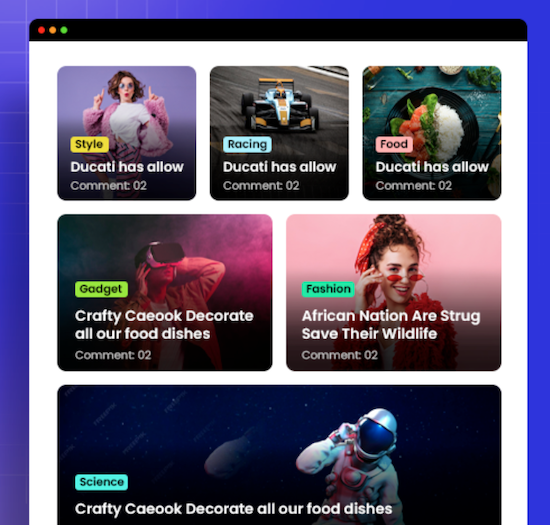
Eén van de populairste alles-in-één post grid plug-ins voor WordPress. Meer dan 100.000 gebruikers heeft deze plug-in. Niet elk thema en elke page builder heeft een goede query / post grid functie. De basis query van WordPress is heel basic, dus je wilt al veel meer. Deze plug-in stelt je in staat een mooi grid te maken om je posts (ook custom posts!) te tonen op je website. De plug-in werkt in Gutenberg, Elementor, en met shortcode. De plug-in heft veel opties: Grid Lay-out Block, List Lay-out Block, Grid Hover Lay-out block, Slider Lay-out Block en andere blokken. Alle Grid, List en Grid Hover lay-outs hebben ook een info AJAX filter.Voordelen Pro versie
De Pro versie heeft veel meer mogelijkheden, van meer invloed op het aantal posts op een pagina, tot veel meer kant-en-klare lay-outs en meer Elementor opties. Sliders, filters, en nog veel meer.
Conclusie
Als je eigen thema of builder onvoldoende mogelijkheden biedt, is dit een aanrader. Het biedt geen sub-blocks in de Gutenberg block builder, maar als je daar minder handig in bent, is dat juist een voordeel.
Prijs pro vanaf € 30
Meer informatie?
basbuis/06-03-2025The Post Grid
Grid / Query maker – veel designs mogelijk
- Prev
- 1
- 2
- Next