WP tools WordPress collectie + GS Filter block
Collectie belangrijke en vaak onmisbare WordPress plug-ins en online tools
-
All-in-One WP Migration and Backup
All-in-One WP Migration was introduced in 2013, it is one of the most trusted and used plug-ins from WordPress for easy moving of websites. All-in-One WP Migration is specially designed for non-technical users and is full of functions for beginners, with which you can migrate your WordPress website with little to no technical knowledge or experience. More than 5 million active users. The free version can only restore a website to 512 MB.Voordelen Pro versie
This offers several benefits, including the migration of websites larger than 512 MB.
Conclusie
The disadvantage of the free version is that it offers limited options. Yet it is still one of the most used migration plugins.
Prijs pro vanaf € 69
Meer informatie?
basbuis/21-05-2025All-in-One WP Migration and Backup
Migration of complete websites
-
AutomatorWP for Kadence
Discover many ways to connect Kadence Blocks with other WordPress plugins. When the user submits a form, submits a field value, and more.Voordelen Pro versie
It is a pro add-on for Automatorwp. Ideal in combination with Kadence Blocks. Automatorwp is a free plug-in; Their earnings model consists of choosing what you want to connect with, and purchase a paid add-on.
Conclusie
Heel handige plug-in.
Prijs pro vanaf € 29
Meer informatie?
basbuis/02-12-2025AutomatorWP voor Kadence
Adds Automatisingen to Kadence Block Builder
-
AutomatorWP for Sensei LMS
Discover thousands of ways to connect Sensei LMS with other WordPress plugins. Examples: When the user completes a course – when the user has achieved 5 quizzes – when the user watches a video – Add a reference to the user – Add membership to the user – Subscribe to a course – user drops for a quiz – user completes a quiz with a number percentage that is greater than or, ETC –Voordelen Pro versie
It is a pro add-on for Automatorwp. Ideal in combination with Sensei LMS. Automatorwp is a free plug-in; Their earnings model consists of choosing what you want to connect with, and purchase a paid add-on.
Conclusie
Very handy plug-in.
Prijs pro vanaf € 29
Meer informatie?
basbuis/21-05-2025AutomatorWP voor Sensei
Adds automation to Sensei LMS
-
Backuply – Back-up, Restore, Migrate and Clone
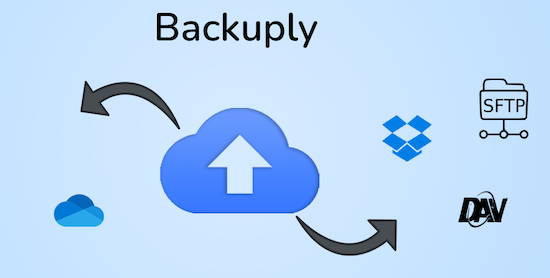
Backuply is a WordPress backup plug-in with which you can back up a WordPress website. This way you prevent data loss due to servercrashes, hacks, bad updates or bad plug-ins. Backuply offers both local backups and safe cloud backups with integrations with FTP, FTPS, SFTP, Webdav, Google Drive, Microsoft Onedrive, Dropbox, Amazon S3. Recovering is simple: with one click. The plug-in has 200,000 users.Voordelen Pro versie
Automatic backups: Choose to backup a website regularly, such as daily, weekly or monthly. You can adjust the interval yourself. One-Click Restore: With Backuply, restoring your website is easy. Just click on the Restore button next to the backup that you want to recover. The full backup is downloaded and the changes are applied to the website. Selective backup: You can choose whether you only want to make backups of files, databases or full backups. Website migration: Easily migrate by repairing it via one of the cloud backup options on the new website. Website cloning: If you want to clon a website, Backuply can do that for you. Backuply restores the data, but replaces the URLs and information as on the target website. In this way, Jee can make multiple clones. Back-up to FTPS: You can back up the site to an FTPS server, i.e. FTP via SSL/TLS Backup to SFTP: Supports the SFTP protocol Backup to Dropbox Backup to Microsoft One Drive Back-up S3 Back-up S3 Backele Backele Back-up Storage media: Support added for DigitalOcean Spaces, Linode Object Storage, Vultr Object Storage and Cloudflare R2. Support for WP-Cli: You can use Backuply via WP-Cli Professional support: get professional support and more functions to back up a website with Backuply. The paid version starts at 18.00 per year, for 1 website, which includes 1 GB Cloud Storage. That goes up to 69,- for 5 websites with 25 GB, and 249 per year for unlimited websites with 100 GB storage.
Conclusie
It is one of the most reliable and most stable backup plug-ins. Definitely recommended!
Prijs pro vanaf € 18
Meer informatie?
basbuis/21-05-2025Backuply
Backup – Recovery – Migrating and Cloning a website
-
Basti FSE WordPress theme
Basti is a block (FSE) WordPress theme for WooCommerce. Make a professional-looking webshop with fully adjustable block and page patterns. With Basti’s Full-Site Editing (FSE) support you can easily adjust all elements, including the header, the menu and the footer, directly from the page editor. Winner First Prize in the ‘Creative Web Professionals’ category at the Bluehost Creators Awards, for the Basti theme. The theme comes with 4 styles; Fashion, Marktplaats, Yoga or other courses and outdoor.Voordelen Pro versie
There is only a Pro version of the Basti theme. All plans are for a maximum of 10 websites. You can choose from an annual amount, or once as a lifetime license.
Conclusie
A FSE Block theme that is ideal for a WooCommerce online store, or a website that also has a WOO store on the same website. Recommended.
Prijs pro vanaf € 79
Meer informatie?
basbuis/21-05-2025Basti FSE WordPress theme
WordPress FSE (WooCommerce) theme
-
Block Visibility — Conditional Visibility Control for the Block Editor
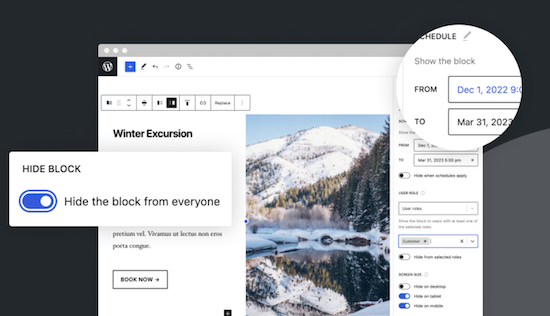
With this no-code solution you determine which blocks are visible on a website and who can see them. You can even show or hide blocks at a specific time. Show exclusive promotions to customers or members. Limit blocks to specific user roles, screen sizes, query series, WooCommerce products, EDD downloads, ACF fields, WPFUSion tags and more. Block Visibility is exclusively built for the WordPress editor (Gutenberg) and is designed to work with every WordPress block. This includes blocks that are supplied native by WordPress, but also blocks of third parties and even blocks -based widgets. This plug-in is ideal for making every submenu item in a Fse theme conditional! Note: To add conditions to Child menu items from a FSE theme, you must check ‘Full Control Mode’ in the plug-in settings. The plug-in has 30,000 users and was developed by Nick Diego.Voordelen Pro versie
There is no pro version. They do have a website for this plug-in, so it is possible that there will be a Pro version.
Conclusie
If you work with an FSE theme (the future of WordPress) this is an absolute must-have. What the plug-in ‘If menu’ does for the classic themes does this plug-in (and more) for FSE Block themes. Note: Not yet tested with the Kadence Navigation (ADV) Block.
Meer informatie?
basbuis/21-05-2025Block Visibility — Conditional Visibility Control
Conditional Visibility Blocks, also Child menu items
-
Checkout Fields for Blocks
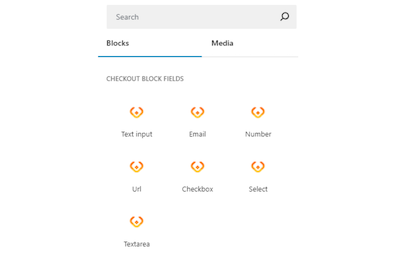
This plug-in adds extra custom fields to the WooCommerce Block Check-out (checkout form). It is not yet possible to adjust the names of existing fields, or target the invoice or address fields, but that depends on the restrictions imposed by WooCommerce. You can add a paragraph, image, or separation sign (the standard WooCommerce blocks). However, the plug-in is expanding the number of available options (fields) for the checkout form. Adding a new field is integrated in the block search bar. With Checkout Fields for Blocks, the following new fields (field types) are possible for the form. Text input – E -mail – number – URL address – Select – Select – Text box. You can also choose where you want to display the new checkout fields in WooCommerce: order confirmation, admin order, my account, order e-mail.Voordelen Pro versie
It is a free plug-in.
Conclusie
A very handy plug-in. Admittedly, it is not a Kadence Shop Kit, but this developer is one of the first to develop a good plug-in for the block version of the WooCommerce check-out page, while Shop-Kit still works on a Classic theme only. This recent plug-in therefore requires a block FSE theme. Highly recommended!
Meer informatie?
basbuis/21-05-2025Checkout Fields for Blocks
Adds extra fields to the WooCommerce Block Checkout
-
Import/Export Styles, Templates, Template Parts and Patterns
Import and export them on blocks -based theme design: global/adapted styles, templates, template parts and patterns. Easily move your custom full site editing theme design from one website to another, or from a local installation to a live site. Ideal for designers and developers who work with the Site Editor and a full-sized full site editing theme, which have edited adapted styles, templates, template parts and patterns and that design must now copy that design to a new WordPress installation. The Design Import/Export Plug-In makes this possible with minimal hassle and can also be used to regularly backup your theme (s) based on blocks. Works with every full site editing block theme. Note: This is a tool especially for FSE / Full Site Editing Themes.Voordelen Pro versie
This is a free plug-in
Conclusie
Definitely recommended! In this way you can keep the details of an FSE theme and apply it elsewhere.
Meer informatie?
basbuis/21-05-2025Design Import-Export Styles Templates Template Parts and Patterns
Import en Export of FSE Styles, Templates, Template Parts and Patterns
-
Download plugin
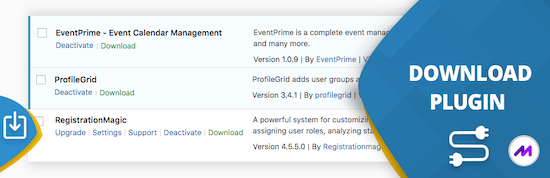
This handy ‘download plugin’ can easily be plug-ins, themes, users, blog posts, pages, comments, attachments and more directly from the WordPress dashboard. Download plug-in can also download data from any plug-in that uses customized message types, including WooCommerce products, Easy Digital Downloads, Portfolio Post Types, Slider Revolution, BBPRESS, WP Job Manager, Jetpack and much more. WordPress download plug-in is a utility plug-in that does one thing and does it perfectly. It may sound simple, but this function fills a gap in the current set of WordPress plug-in functionality.Voordelen Pro versie
There is no paid version of this plug-in.
Conclusie
Very handy plugin. Recommended!
Meer informatie?
basbuis/21-05-2025Download plugin
Download plugins, posts, products, etc,
-
FlexTable Google sheets voor WordPress
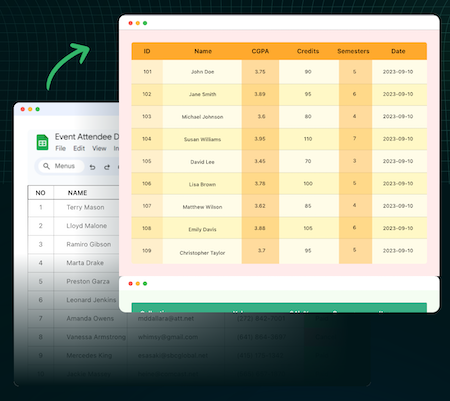
Snel. Gemakkelijk. Simpel. Houd je Google Sheets gegevens gesynchroniseerd met WordPress tabellen. Bouw en pas responsieve datatabellen in een mum van tijd aan, zonder te hoeven coderen! Plak de link naar de Google Sheet terwijl je een tabel maakt vanuit Gutenberg of Elementor. Zodra je tevreden bent met de tabel, klik je op publiceren. De volgende keer alleen updaten vanuit Google Sheet. Eén keer instellen en vergeten. Live synchronisatie van Google Sheet, voor altijd!Voordelen Pro versie
Ze hebben ook een premium plug-in, en hebben ook een lifetime licentie.
Conclusie
Aanrader! Ze doen maar één ding en biedt veel opties, incl. mooie opmaak.
Prijs pro vanaf € 55
Meer informatie?
basbuis/22-12-2024FlexTable Google sheets WordPress
Toont Google sheets op WordPress
-
Fuel WordPress thema
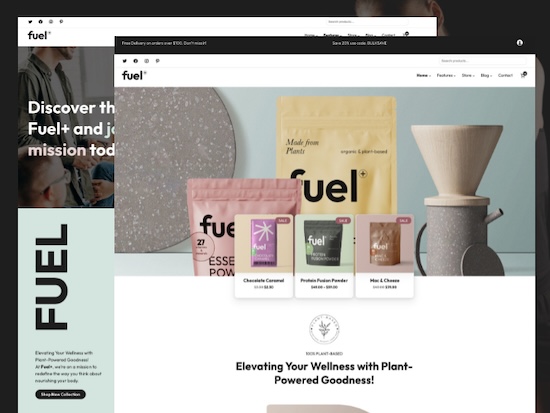
Geef een online winkel een boost met FUEL. Creëer een e-commerce met het strakke, krachtige WordPress thema dat is ontworpen om uw WooCommerce-winkel een boost te geven. Fuel is gebouwd voor snelheid, mobiele optimalisatie en naadloze aanpassing en biedt een soepele winkelervaring die conversies stimuleert. Ontdek vele verbluffende blokpatronen, handgeplukte typografie, aanpasbare headers, footers en een breed scala aan kleuropties. Fuel is een 100% WooCommerce geschikt block-thema. Ik heb het onder FSE thema’;s bneergetze, omdat het thema werkt met de Site editor. Het is echter nog geen 100% FSE thema, maar meer een hybride versie.Voordelen Pro versie
Er is alleen een Pro versie van het Fuel-thema. Alle plannen zijn voor maximaal 10 websites. Je kunt kiezen uit een jaarlijks bedrag, of eenmalig als lifetime licentie.
Conclusie
Een block thema dat ideaal is voor een WooCommerce online winkel, of een website die ook een Woo winkel heeft op dezelfde website. Aanrader.
Prijs pro vanaf € 79
Meer informatie?
basbuis/25-03-2025Fuel WordPress thema
WordPress (WooCommerce) block thema
-
Greenshift thema
Het Greenshift FSE (Full Site Editing) thema is een van de beste thema’s die ik ooit gebruikt heb. De fratsen die bijna niemand gebruikt zijn verwijderd, het biedt volledig ondersteuning voor WooCommerce en is ongelooflijk snel. Het Greenshift FSE-thema is geschikt voor WooCommerce.Voordelen Pro versie
Het thema biedt weliswaar professionele mogelijkheden, maar is geheel gratis.
Conclusie
Als je een FSE thema zoekt, is dit een absolute aanrader. Ik heb er tientallen getest, en Greenshift steekt er met kop en schouder bovenuit. Onze website wpnews.nl is geheel gebaseerd op het Greenshift FSE thema.
Prijs pro vanaf € 0
Meer informatie?
basbuis/25-03-2025Greenshift thema
Theme FSE voor WordPress
-
Greyd Suite
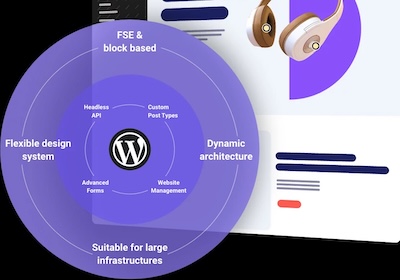
Greyd.Suite is een alles-in-één pakket voor WordPress. Het is een uitgebreid platform om je WordPress bedrijf op te schalen en het webimperium op te bouwen waar je altijd van gedroomd hebt! Het zal niet voor iedereen geschikt zijn, maar het is een thema + full site editing + custom Gutenberg block builder + custom fields + dynamische sjablonen + support + user beheer + form builder en nog meer. Greyd.Suite is een compleet ontzorg platform, de completere pakketten bieden ook een kosteloze 1:1 onboarding.Voordelen Pro versie
Het is een pro suite. Deze begint met 99,- per jaar voor één website en is opschaalbaar tot 449,- per maand voor unlimited websites.
Conclusie
Als je op zoek bent naar een compleet alles-in-een pakket (behalve natuurlijk hosting e.d.) is Greyd.Suite een aanwinst.
Prijs pro vanaf € 99
Meer informatie?
basbuis/20-12-2024Greyd Suite
Complete pakket van thema, builder en toolset
-
Imapsync
Als je besluit je hosting te verhuizen, kan dat je website betreffen, je e-mail of beide. Als je e-mail bij dezelfde hosting zit als je website en bij je nieuwe hosting ook, dan is de nieuwe hosting soms bereid om die ook voor je te verhuizen. Als je dat niet zijn, of je e-mail is ergens anders gehost, dan moet je de bestaande e-mails zelf overzetten. Dat is gelukkig heel makkelijk met deze (gratis) tool. Deze gratis tool wordt aangeboden door Vimexx.nl hosting. (1) Zorg dat je bij de nieuwe hosting e-mailadressen aanmaakt met exact dezelfde adressen. (2) Zorg dat je dezelfde forwards, aliases, autoresponders, handtekeningen, etc. creëert bij je nieuwe hosting. (3) DNS omzetten naar nieuwe hosting (MX, SPF, DKIM, DMARC). (4) wacht tot de DNS actief is (duurt 1-48 uur). (5) Migreer de e-mails. Tip: controleer eerst of je nieuwe hosting een ‘e-mail import tool’ heeft. Dan heb je deze Imapsync service misschien niet nodig.Voordelen Pro versie
Deze service heeft geen pro versie. Er bestaat wel een betaalde online dienst die hetzelfde doet. Dat is MailJerry: https://www.mailjerry.com. Deze service is gratis tot een emailbox van 250 MB, daarboven heb je een abonnement nodig om e-mails over te zetten.
Conclusie
Absolute aanrader. Ik maak hier regelmatig gebruik van.
Meer informatie?
basbuis/05-01-2025Imapsync
Verhuizen e-mail tussen 2 IMAP mappen
-
Migrate Guru
Migrate Guru is een krachtige WordPress migratie plug-in die is ontworpen om een WordPress site naadloos over te zetten naar een nieuwe host of domein. Of je een WordPress website wilt klonen, verplaatsen of migreren, Migrate Guru zorgt voor een probleemloos proces met zijn one-click-migratie functie. – Deze plug-in ondersteunt alles-in-één WP-migraties en verwerkt grote sites tot 200 GB zonder de server over te belasten. Compatibel met elke grote webhost en uitgerust met automatisch URL-herschrijven en geserialiseerde gegevensverwerking, is het de go-to-tool voor het verplaatsen van WordPress sites naar nieuwe domeinen of hosts. – Verplaats, kloon of migreer uw WordPress site met Migrate Guru, de slimme, snelle en veilige WordPress migratie- en back-up plug-in – de plug-in heeft geen automatische back-up functie, dus ik zou het alleen gebruiken voor klonen en migratie.Voordelen Pro versie
Het is een gratis plug-in, maar met pro functionaliteit.
Conclusie
Eenvoud, snel en probleemloos. Aanrader.
Meer informatie?
basbuis/05-01-2025Migrate Guru
Migreren, back-up, klonen van een site
- Prev
- 1
- 2
- Next