WP tools WordPress collectie + GS Filter block
Collectie belangrijke en vaak onmisbare WordPress plug-ins en online tools
-
ACF Advanced Custom Posts
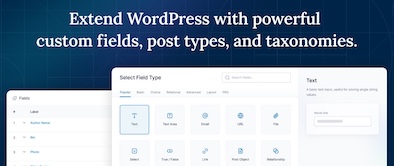
ACF custom fields allow you to quickly and easily add fields with just a few clicks of a button! Whether it’s something as simple as adding an author field to a book review post, or something more complex like the structured data of an ecommerce site or marketplace, ACF makes adding fields to the content model easy. Fields can be added anywhere in WordPress, including posts, pages, users, taxonomy terms, media, and comments. It couldn’t be easier to bring structure to the WordPress content creation experience.Voordelen Pro versie
The Pro version includes: A Repeater field that lets you create a set of subfields that can be repeated over and over again. ACF Blocks , a PHP-based framework for developing custom block types for the WordPress Block Editor. An options page to add custom admin pages to edit ACF fields. Unlock a more efficient workflow for managing field settings by reusing existing fields and field groups on demand with Clone Field.
Conclusie
If you need a custom post, like a review or whatever, ACF is an indispensable plugin. ACF is compatible with both Kadence blocks and Greenshift blocks. There are similar plugins, like MetaBox, Pods, Toolset, JetEngine, Voxel, ACPT and ASE, but so far ACF is a perfect and nice working plugin, which we work with ourselves very regularly. The free version is already sufficient for many websites. Note: if you start working with custom fields, you require a builder that supports Dynamic Fields.
Prijs pro vanaf € 49
Meer informatie?
basbuis/21-05-2025ACF Advanced Custom Posts
Creating and managing custom fields
-
All-in-One WP Migration and Backup
All-in-One WP Migration was introduced in 2013, it is one of the most trusted and used plug-ins from WordPress for easy moving of websites. All-in-One WP Migration is specially designed for non-technical users and is full of functions for beginners, with which you can migrate your WordPress website with little to no technical knowledge or experience. More than 5 million active users. The free version can only restore a website to 512 MB.Voordelen Pro versie
This offers several benefits, including the migration of websites larger than 512 MB.
Conclusie
The disadvantage of the free version is that it offers limited options. Yet it is still one of the most used migration plugins.
Prijs pro vanaf € 69
Meer informatie?
basbuis/21-05-2025All-in-One WP Migration and Backup
Migration of complete websites
-
AtlasAiDev AtlasVoice Text to Speech
Atlasvoice Text to Speech Pro (Atlasaidev) attracts the attention of your visitors. Choose from a variety of naturally sounding voices that suit your brand and the public. Involve the listeners at a deeper level with a more fascinating content experience. Effit your text-to-audio plug-in effortlessly! Advanced voice control helps you refine your content for optimum brightness. Adjust the speaking speed, the volume and the emphasis to perfectly match your intention. Integrates seamlessly with popular multilingual plug-ins such as WPML and Gtranslate. Atlasvoice offers unlimited audio downloads.Voordelen Pro versie
Most properties apply to the pro versions. The free version works, but for example with only one custom field, so a lot easier and more limited. In addition, the quality of the voice is less good. If you want to use the plug-in seriously, a Pro version is really needed. They have a plan for 1 site, 5 sites and 10 sites. They also have lifetime licenses.
Conclusie
Recommended!
Prijs pro vanaf € 59
Meer informatie?
basbuis/21-05-2025AtlasVoice Text to Speech
Ensures that visitors can listen to your posts
-
Background creator – Mesh gradient creator

Sometimes you want a background with a color or grayscale gradient. Of course you can search for an existing image. That has some disadvantages: (1) You have to be able to find the image. (2) It is usually not very original. (3) It makes the page in question very slow. ‘Mesh gradient creator’ creates a background; random or you enter the colors yourself. The result is a CSS code that you can use in your builder / Gutenberg block. The image of this post has the following colors as CSS: radial-gradient(at 21% 47%, hsla(302,97%,66%,1) 0px, transparent 50%), radial-gradient(at 92% 0%, hsla(289,61%,75%,1) 0px, transparent 50%), radial-gradient(at 95% 10%, hsla(261,91%,78%,1) 0px, transparent 50%), radial-gradient(at 52% 90%, hsla(17,92%,67%,1) 0px, transparent 50%), radial-gradient(at 60% 42%, hsla(148,98%,65%,1) 0px, transparent 50%), radial-gradient(at 12% 14%, hsla(205,77%,64%,1) 0px, transparent 50%), radial-gradient(at 6% 69%, hsla(91,64%,63%,1) 0px, transparent 50%); You process this as a complete CSS code as follows: .mesherhero { background: radial-gradient(at 40% 20%, hsla(28,100%,74%,1) 0px, transparent 50%), radial-gradient(at 80% 0%, hsla(189,100%,56%,1) 0px, transparent 50%), radial-gradient(at 0% 50%, hsla(355,100%,93%,1) 0px, transparent 50%), radial-gradient(at 80% 50%, hsla(340,100%,76%,1) 0px, transparent 50%), radial-gradient(at 0% 100%, hsla(22,100%,77%,1) 0px, transparent 50%), radial-gradient(at 80% 100%, hsla(242,100%,70%,1) 0px, transparent 50%), radial-gradient(at 0% 0%, hsla(343,100%,76%,1) 0px, transparent 50%); }Voordelen Pro versie
It is not a pro version, but the functionality is part of CSS Hero – https://csshero.org/. Note;:there are more CSS gradient generators, such as: https://gradients.app/en/newmesh
Conclusie
I’m not a huge fan of CSS Hero in general (bought it once, asked for a refund within the cooling-off period and never got it) but this feature is really useful.
Meer informatie?
basbuis/21-05-2025Background creator – Mesh gradient creator
Create beautiful gradient backgrounds with CSS
-
Backuply – Back-up, Restore, Migrate and Clone
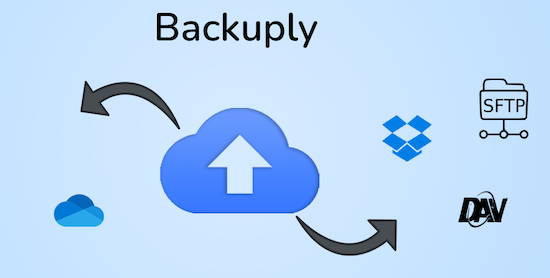
Backuply is a WordPress backup plug-in with which you can back up a WordPress website. This way you prevent data loss due to servercrashes, hacks, bad updates or bad plug-ins. Backuply offers both local backups and safe cloud backups with integrations with FTP, FTPS, SFTP, Webdav, Google Drive, Microsoft Onedrive, Dropbox, Amazon S3. Recovering is simple: with one click. The plug-in has 200,000 users.Voordelen Pro versie
Automatic backups: Choose to backup a website regularly, such as daily, weekly or monthly. You can adjust the interval yourself. One-Click Restore: With Backuply, restoring your website is easy. Just click on the Restore button next to the backup that you want to recover. The full backup is downloaded and the changes are applied to the website. Selective backup: You can choose whether you only want to make backups of files, databases or full backups. Website migration: Easily migrate by repairing it via one of the cloud backup options on the new website. Website cloning: If you want to clon a website, Backuply can do that for you. Backuply restores the data, but replaces the URLs and information as on the target website. In this way, Jee can make multiple clones. Back-up to FTPS: You can back up the site to an FTPS server, i.e. FTP via SSL/TLS Backup to SFTP: Supports the SFTP protocol Backup to Dropbox Backup to Microsoft One Drive Back-up S3 Back-up S3 Backele Backele Back-up Storage media: Support added for DigitalOcean Spaces, Linode Object Storage, Vultr Object Storage and Cloudflare R2. Support for WP-Cli: You can use Backuply via WP-Cli Professional support: get professional support and more functions to back up a website with Backuply. The paid version starts at 18.00 per year, for 1 website, which includes 1 GB Cloud Storage. That goes up to 69,- for 5 websites with 25 GB, and 249 per year for unlimited websites with 100 GB storage.
Conclusie
It is one of the most reliable and most stable backup plug-ins. Definitely recommended!
Prijs pro vanaf € 18
Meer informatie?
basbuis/21-05-2025Backuply
Backup – Recovery – Migrating and Cloning a website
-
Block Manager
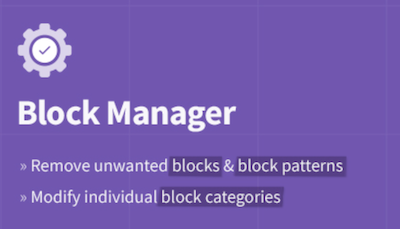
The Block Manager is an intuitive tool for site managers to show or hide blocks and block patterns. It also offers functionality for updating the category of individual blocks to organize the operator’s editing experience. Blocks: Switch off the display of blocks in the block adder and the Blokeditor worldwide. Patterns: Remove unwanted block patterns with one click on the button. Block categories: Organize the Blok Intremer by updating the category of each block. Search and filter: quickly find blocks and patterns with the search function in the sidebar. Include blocks: choose the blocks that you actually want to record on the site by removing the vast majority of useless options.Voordelen Pro versie
It’s a free plug-in
Conclusie
If you have multiple plug-ins who all offer blocks, it quickly becomes a mess. This plug-in allows you to organize everything.
Meer informatie?
basbuis/21-05-2025Block Manager
Turn on and off Gutenberg as desired
-
Blockera – Advanced Mode for Block Editor
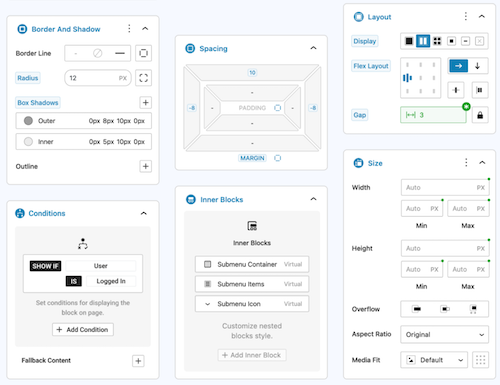
Blockera is the advanced mode for the WordPress Block editor, which extends the functionality of the standard Gutenberg (Core) blocks into a powerful page builder. Every block suddenly has: responsive breakpoints, professional margin and padding, block states, mesh gradies, flex layout, effects, sticky, shadow, custom variables, conditions, overflow, and much more. The standard Gutenberg Builder can suddenly be more than many builders!Voordelen Pro versie
The Pro version can do much more.
Conclusie
Absolute recommended. The version with all the advantages mentioned is free, highly recommended!
Meer informatie?
basbuis/21-05-2025Blockera – Advanced Mode for Block Editor
Turns Gutenberg (block editor) into an advanced editor
-
BlockMeister – Block Pattern Builder
With Blockmeister, making adapted block patterns becomes simple. The patterns can be designed as you design a blog post or a page with the Block editor. You can assign any (adapted) category or keywords. This way, your patterns are categorized in a way that makes sense to your users and makes keywords easier to find a pattern. Your custom patterns are available via the Block Pattern tab in the Insertpanel. Functions: visual design of adapted block patterns using the pattern builder – Make an adapted pattern of one or more selected blocks in the post -editor – Import patterns that are made/shared by trusted Pro users [new in 3.0]Voordelen Pro versie
If you want more functions, such as: group locking, clones, activating or deactivating individual patterns, exporting, importing, determining which core/third-party patronage sets may be loaded, set block styles and more, there are premium versions:
Conclusie
Recommended
Meer informatie?
basbuis/21-05-2025Blockmeister
With Blockmeister, making adapted block patterns is easy
-
Bookfunnel secure
An essential tool for publisher or author. Bookfunnel does several things: – Delivery of e -books if you have sold them on your own website, – Taking care of print codes, so that you can also physically sell an e -book – provide a free ‘teaser’ of your e -book, to attract readers – Send secure e -book copies to reviewers, with a unique one -time service – PDF – PDF Files and mobi files. In short: this plug-in and service allows you as an author or small publishing house teasers, e-books, to promote and deliver it to the final buyer, using a watermark.Voordelen Pro versie
It is a pro plug-in. The prices start at 20,- per year (500 downloads), 100 per year (5000 downloads and water brands) or 250 per year (unlimited downloads). Audio books can also be done, with an additional cost.
Conclusie
If you want to sell an e-book on your own website, this is recommended! Note: If you don’t have EPUB file yet, but a DOC, RTF, OTF, TXT file? See https://draft2digital.com/
Prijs pro vanaf € 20
Meer informatie?
basbuis/21-05-2025Bookfunnel secure
Promotion and sale of your e-books
-
Bunny.net
Bunny.net manages one of the fastest worldwide networks in the world. You can use their network for hosting your videos, as a CDN to speed up a slow website and as a storage medium. We use it as a hosting for all our videos. It is the best, fastest and the cheapest video hosting we have ever used. The great thing about Bunny.net is that you only have to pay for what you use. With video you pay for storage ($ 0.01 per GB / month) and for traffic. If you have hosted 100 GB of video and 50 GB of videos have been viewed in a month, the costs are $ 2.50. Bunny.net is the only serious option for hosting videos for an education system, such as Learndash or Sensei LMS.Voordelen Pro versie
It’s a pro service.
Conclusie
Absolute recommended. The best video hosting (and CDN). Ideal also if you have an LMS.
Prijs pro vanaf € 1
Meer informatie?
basbuis/21-05-2025Bunny.net
Video streaming, CDN, storage
-
CapCut videoeditor
Free all-in-one video editor with which everyone can make everything everywhere. Flexible processing, magical AI tools, team cooperation and stock materials. Make videos like never before. Smart tools to make videos easier. Automatically recognize different languages and generate very accurate subtitles. Turn each text with one click into natural sounding speech; 11 voices and 10 languages are supported. Templates to quickly make your own advertisements!Voordelen Pro versie
Capcut also has a Pro version. This has more options and allows you to use AI.
Conclusie
Absolute recommended. Canva, for example, also has a video editor, but Capcut brings your work to another dimension.
Prijs pro vanaf € 9.99
Meer informatie?
basbuis/21-05-2025CapCut videoeditor
Complete video editor – free and pro
-
Custom Fonts – Host Your Fonts Locally

Improved speed and performance – With the custom fonts plug-in you can upload your own fonts or choose from an extensive collection of Google Fonts. These are all hosted directly on your own web server. By hosting fonts locally, you can considerably improve the performance of the website. Because the fonts are loaded directly from your server, external requests are reduced, so that the loading times of the page are considerably shortened. The plug-in is maintained by the makers of the Astra theme and has more than 300,000 users.Voordelen Pro versie
It is a free plug-in.
Conclusie
If your own theme or page builder does not offer the option to host Fonts locally, this is recommended!
Meer informatie?
basbuis/21-05-2025Custom Fonts – Host Your Fonts Locally
Improve the speed of your site and eliminate privacy problems
-
DBlocks Finder – Blocks and Synced Patterns
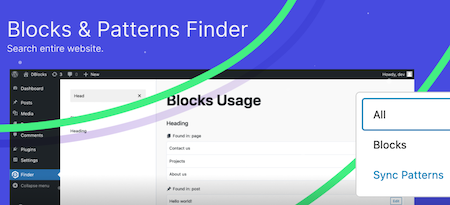
DBLOCKS Finder is a powerful and user-friendly plugin, designed to find and manage Gutenberg blocks and synchronized patterns within a WordPress site. With the intuitive interface you can easily navigate through all registered blocks and view their use in your messages and templates. Integration with Admin Menu: Integrates seamlessly with the WordPress-Admin panel and offers a special menu for quick access to block management. Dynamic block overview: View all registered Gutenberg blocks, including their titles and user statistics. How it works: Plugin scans all public messages and pages and show which blocks on which message or which page is used. Each message type is displayed in a separate group with the same icons as in the sidebar menuVoordelen Pro versie
It’s a free plug-in
Conclusie
Ideal to know which blocks are of which block collection.
Meer informatie?
basbuis/21-05-2025DBlocks Finder – Blocks and Synced Patterns
Find and manage Gutenberg blocks and patterns on a WordPress site
-
Disable Media Sizes
Easily switch off extra image formats. This plug-in offers options to eliminate the extra images that are generated by WordPress. Lightweight and safe – built with the WP API and standards – easy to use. Note: has no influence on existing images, only works if the plug-in is active, does not remove existing images, only prevents WordPress from generating extra large images, if all extra formats are disabled, only original images are uploaded.Voordelen Pro versie
It is a free plug-in, but a donation is appreciated.
Conclusie
Very handy plug-in. Note: If you use WPase: this functionality is already built-in.
Meer informatie?
basbuis/21-05-2025Disable Media Sizes
You can disable the extra images that WordPress generates.
-
Divi builder
Divi. It was the Builder who made it possible for me to create a website the way I wanted, in 2014. Otherwise I would probably not have switched from Dreamweaver to WordPress at that time. Divi has been no longer a serious option for a few years. Old -fashioned, painfully slow, buggy and works with almost nothing. The old Divi only works well with Divi. All my Divi websites were converted years ago, first to elementor, later to Kadence (Gutenberg). But … the new divi. I have already made a test several times with the upcoming Divi 5.0 version. Divi 5 is the next evolution of Divi’s visual builder, rebuilt from the ground, incredibly fast, with completely renewed onion. Indeed, it is no longer similar to the old Divi. I tend to give the upcoming version the status ‘serious Builder’ again. There is still something missing, such as CSS-Grid, column order on mobile, vertical lines, and not all options are available yet at the tablet and mobile view. But what I worked with was an Alpha version. Nothing beta yet, and it was already promising.Voordelen Pro versie
Divi is only available as a paid version. You also have two choices: Divi or Divi Pro. The latter has considerably more cloud storage, add-ons credit and divi-ai. Keep in mind that you also pay an amount per year for the extra cloud services at the Lifetime Pro version.
Conclusie
I am still a bit careful, but I think the upcoming version 5 is a very serious builder. If this new version is finally off, we still have to test how this version deals with Gutenberg blocks and other plug-ins such as geodirectory and Learndash, but the prospects are good. Divi sometimes seems to be less, but it works very easily, making templates works perfectly, and it is one of the few builders where almost everything is possible in terms of WooCommerce. In addition, a huge range of (good) Divi add-ons is available.
Prijs pro vanaf € 89
Meer informatie?
basbuis/21-05-2025Divi builder
Website and pagebuilder
- Prev
- 1
- 2
- 3
- 4
- Next