WP tools WordPress collectie + GS Filter block
Collectie belangrijke en vaak onmisbare WordPress plug-ins en online tools
-
AutomatorWP for Sensei LMS
Discover thousands of ways to connect Sensei LMS with other WordPress plugins. Examples: When the user completes a course – when the user has achieved 5 quizzes – when the user watches a video – Add a reference to the user – Add membership to the user – Subscribe to a course – user drops for a quiz – user completes a quiz with a number percentage that is greater than or, ETC –Voordelen Pro versie
It is a pro add-on for Automatorwp. Ideal in combination with Sensei LMS. Automatorwp is a free plug-in; Their earnings model consists of choosing what you want to connect with, and purchase a paid add-on.
Conclusie
Very handy plug-in.
Prijs pro vanaf € 29
Meer informatie?
basbuis/21-05-2025AutomatorWP voor Sensei
Adds automation to Sensei LMS
-
Blocks Animation: CSS Animations for Gutenberg

With Blocks Animation you can add CSS animations to all your Gutenberg blocks elegantly. The interface for Blocks Animation feels so natural and intuitive that you don’t even notice that it has been installed. Just install it, and you will see the animation settings in all blocks, directly in the block settings sidebar. The plug-in has more than 60,000 users. It works on the basis of CSS, so it does not make your website slow.Voordelen Pro versie
It is a free plug-in.
Conclusie
To give your website more dynamics, without costs, it is an ideal plug-in. Please note: on some websites, content suddenly does not load when using this plugin.
Meer informatie?
basbuis/21-05-2025Blocks Animation: CSS Animations for Gutenberg
CSS Animations for Gutenberg Blocks
-
Bunny.net
Bunny.net manages one of the fastest worldwide networks in the world. You can use their network for hosting your videos, as a CDN to speed up a slow website and as a storage medium. We use it as a hosting for all our videos. It is the best, fastest and the cheapest video hosting we have ever used. The great thing about Bunny.net is that you only have to pay for what you use. With video you pay for storage ($ 0.01 per GB / month) and for traffic. If you have hosted 100 GB of video and 50 GB of videos have been viewed in a month, the costs are $ 2.50. Bunny.net is the only serious option for hosting videos for an education system, such as Learndash or Sensei LMS.Voordelen Pro versie
It’s a pro service.
Conclusie
Absolute recommended. The best video hosting (and CDN). Ideal also if you have an LMS.
Prijs pro vanaf € 1
Meer informatie?
basbuis/21-05-2025Bunny.net
Video streaming, CDN, storage
-
CSS Class Manager – An advanced autocomplete additional css class control for your blocks
Do you find it difficult to add multiple CSS classes to a WordPress block? CSS Class Manager simplifies the process with suggestions for automatic supplement and a special manager for adding, editing and organizing the classes. CSS Class Manager offers a powerful manager and an autocomplete inspector, so that users can easily add and apply CSS classes to their blocks. Advanced control over automatic supplement: Streamline The Block Style with car supply Functionality for CSS classes-Effortless class management: Easily add CSS classes, edit or remove them directly from the Interface Manager-Import and Export: Bring adapted CSS class seamlessly to guarantee consistency between projects.Voordelen Pro versie
Edi Amin offers this plug-in for free.
Conclusie
Absolute recommended. I regularly use classes, but do not remember the exact spelling of each class to be able to add it to a block. This plug-in solves that!
Meer informatie?
basbuis/21-05-2025CSS Class Manager
Gives you a handy CSS class manager
-
Extension Plugins for Sensei
WP Plugins for You offers a whole collection of plug-in / extensions especially for Sensei LMS. Think of: Importer, Question Export Quiz Question Import, Teams, Course Export, Course Import, Chat, Export to Excel, and more.Voordelen Pro versie
They are all pro plug-ins.
Conclusie
The disadvantage is that import and export are separate plug-ins, so can also be purchased separately. But … if you need this functionality, you need it: then they are indispensable tools … and then definitely recommended.
Prijs pro vanaf € 49
Meer informatie?
basbuis/21-05-2025Extension Plugins for Sensei
Extension Plugins for Sensei LMS
-
Fluid Style accessible fluid type generator
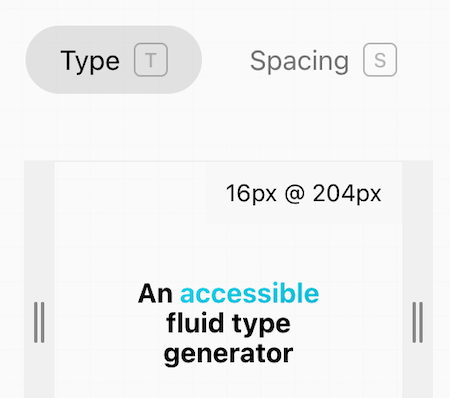
Fluid Style accessible fluid type generator doet maar één ding: je in staat stellen om je eigen clamp formule te maken. Je geeft je min. size, breakpoint, max. size en breakpoint. Vervolgens kun je met de breedte slider optisch controleren hoe de fluid maatvoering is en of deze klopt. Je kunt kiezen uit font-size of formaat (voor breedte/hoogte objecten, kolommen, etc.)Voordelen Pro versie
Het is een gratis service.
Conclusie
Heel handige online calculator die qua maatvoering ook rekening houdt met Accessibility.
Meer informatie?
basbuis/24-03-2025Fluid Style accessible fluid type generator
Clamp calculator
-
HTML & CSS cheatsheet
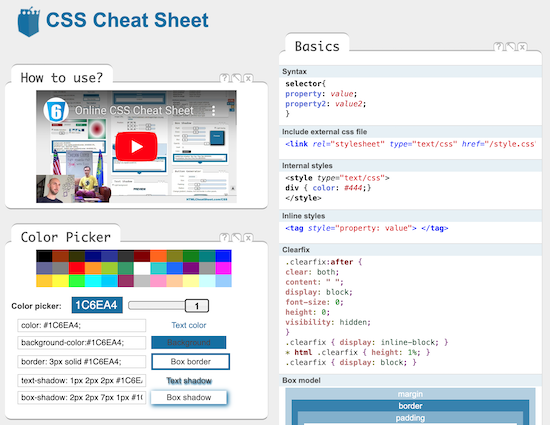
Een fantastische website met hulpmiddelen voor CSS, HTML, Open Graph, Speciale karakters, CSS Generator, JavaScript en nog veel meer. Als je je een expert bent, scheelt het je veel tijd. Als je net begint stelt het je in staat meer te begrijpen en zelfs effecten te creëren zonder dat je ze begrijpt.Voordelen Pro versie
Het is een gratis tool.
Conclusie
Absolute aanrader.
Meer informatie?
basbuis/09-12-2024HTML & CSS cheatsheet
CSS – HTML – Characters – Structure – Attributes – Tags
-
InstaWP
Instawp is a unique hosting company. They offer superior hosting, worldwide including the Netherlands, staging sites, cloning, template sites, demos and easy migration. The best thing is that all this 100% coordinated. You can migrate a website, from yourself or a client, to a staging site at Instawp, adjust to your wishes and convert it to a live site, at Instawp or any other hosting after approval! Ideal for developers, agencies, studios but also if you only have your own website.Voordelen Pro versie
They offer various Pro accounts, but you can also only host a website with them, without a Pro account. – Pro starter: 9 staging sites, 3 migrations/month, 5 templates and 5GB space. Cost? $ 90 per year. – Pro Professional: 19 Staging sites, 10 migrations/month, 15 templates, 15GB space and 1 live website. Costs: $ 190 / year. – Agency: 49 staging sites, 20 migrations/month, 40 templates, 40GB space, team management and 3 live websites. Costs: $ 490 / year. There is also a ‘hobby’ account, to try, for $ 29 per year. Live hosting 2-9 sites, $ 15 per month, per site. 10 sites? $ 11 per month, per site. With various options for heavier websites.
Conclusie
If you are a developer / web builder and want to tackle it seriously, without problems, you cannot ignore Instawp. The rates are also no reason not to do it. There is a reason that many companies work with them: Instawp: StellarWP, Kadencewp, Mediavine, Gravity, Ollie, Restrict Content, Athemes, to name some. It is my favorite (only) way to migrate a site or make a copy.
Prijs pro vanaf € 9
Meer informatie?
basbuis/21-05-2025InstaWP
Superior hosting, staging and migration
-
JohnnyVPS hosting
JohnnyVPS is een naam die je misschien niet bekend voorkomt. Het is een heel degelijk hosting bedrijf opgezet door WPJohnny, een oude rot en super WordPress expert. De hosting draait op de beste servers, met de beste software, cPanel, perfect geconfigureerd voor WP, en een lage belasting (gemiddeld 25%) zodat je site razendsnel blijft presteren. De servers staan verspreid over de hele wereld, ook in Europa.Voordelen Pro versie
Het is een pro service, dat betekent dat ze er vanuit gaan dat jij een pro bent; support over de server of een installatie die niet goed werkt geven ze graag. Een vraag over een plug-in of hoe maak ik een back-up is niet hun ding. Het is professioneel voor professionals. De prijzen voor deze echte superieure hosting zijn dan ook heel redelijk. Power hosting: 8gb snelle SSD opslag, 100,000 bezoekers/maand, cPanel, SSL certificaten, Gratis migratie, maximaal 5 sites: $ 25,- per maand. Monster hosting: 15 sites, 12 GB snelle SSD opslag, 300.000 bezoekers per maand kost $ 50,- per maand. Elk plan is inclusief gratis cache en snelheid optimalisatie voor 1 website.
Conclusie
Absolute aanrader. Ben je al zover dat je het aandurft je website(s) op een professionele server te laten draaien, dan is dit absoluut de beste keuze.
Prijs pro vanaf € 25
Meer informatie?
basbuis/02-11-2024JohnnyVPS hosting
Goede, supersnelle WordPress hostng
-
Marc Bacon Clamp Calculator
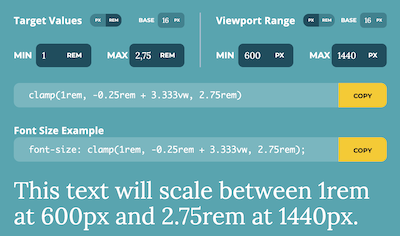
Marc Bacon Clamp Calculator doet maar één ding: je in staat stellen je target values in te stellen, de viewport range, de base, min. en max. en vervolgens toont hun calculator twee css codes: een algemeen en een ander toegespitst op font-size, welke je meteen kunt toepassen op je website.Voordelen Pro versie
Het is een gratis service.
Conclusie
Heel handige online calculator.
Meer informatie?
basbuis/24-03-2025Marc Bacon Clamp Calculator
Clamp calculator
-
Mijn.host hosting
Werken met mijn.host is een soepele en fijne ervaring. Mijn.host is perfect voor kleine tot middelgrote bedrijven die op zoek zijn naar betrouwbare, snelle en betaalbare WordPress-hosting, met service door medewerkers die weten wat ze doen. Zelfs het verhuizen van je site naar hen doen ze voor je, als je dat niet zelf kunt doen.Voordelen Pro versie
Al is hun goedkoopste optie wat basic, alles is pro. Ze bieden meerdere hosting pakketten; van 1 tot 5 of zelfs 10 websites op één account. De prijzen variëren van € 3,99 tot € 13,99 per maand. Daarnaast is het een geode partij voor het hosten van je domeinen, en ze hebben een degelijk e-mail hostingpakket. Als hun pakketten bieden: LiteSpeed cache, NVMe supersnelle opslag, gratis SSL-certificaat, onbeperkt dataverkeer, dagelijkse back-up, wildcard SSL, staging, subdomeinen en een WAF firewall. Als ik een nadeel moet bedenken, zou dat het feit zijn dat DirectAdmin en Softaculous niet tot mijn favoriete beheertools behoren, maar dat geldt helaas voor bijna alle hosting beheertools, niet alleen bij Mijn.host.
Conclusie
Mijn.host is een absolute aanrader. We zijn een tijd geleden met al onze sites naar hen verhuisd, en hebben nog geen moment spijt.
Prijs pro vanaf € 48
Meer informatie?
basbuis/02-11-2024Mijn.host
Goede WordPress hosting
-
Motion.page
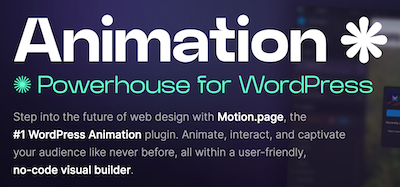
Ontdek de magie van Motion.page, de gamechanger in WordPress animatie. Met zijn gebruiksvriendelijke visuele platform is het maken van dynamische bewegingen en interacties nog nooit zo makkelijk geweest. Het maakt niet uit welke paginabuilder of thema je gebruikt. Motion.page is een onafhankelijke animatiebuilder op zichzelf, en werkt met elke paginabuilder of thema.Voordelen Pro versie
Het is een pro plug-in.
Conclusie
De plugin Motion.page is, net als de plug-in WPinteractions, een aanrader als je op eenvoudige wijze leuke en goed toepasbare animaties wilt toevoegen aan je website die je eigen builder niet heeft. WPinteractions biedt ook andere (niet geanimeerde) interacties, terwijl Motion.page alleen op ‘effecten’ gericht is.
Prijs pro vanaf € 69
Meer informatie?
basbuis/18-12-2024Motion.page animatie plugin
Animatie voor elke builder en thema
-
Post Type Switcher
Deze plug-in voegt een eenvoudige post-type dropdown toe aan de post editor interface, waarmee je elke post kunt omzetten naar een nieuw post type. Hiermee kunt u het type van de post wijzigen terwijl je de post bewerkt. Ondersteunde typen: De plug-in kan vrijwel elke combinatie van berichten, pagina’s en zelfs aangepaste (custom) berichttypen converteren. Pagina naar post – Post naar pagina – Post naar custom – Custom naar post – Custom naar custom – Pagina naar WooCommerce product. Hiermee kun je bijvoorbeeld posts omzetten van WPCourseware naar LearnDash of LifterLMS, of welke combinatie dan ook. Hou er wel rekening mee dat de plug-ins die bij het type post horen, wel beide geïnstalleerd moeten zijn; dus als je omzet van WPCourseware naar LearnDash of omgedraaid, moeten beide actief zijn op je website. De plug-in is gemaakt door Triple J Software.Voordelen Pro versie
Er is geen pro versie van. Een donatie wordt echter op prijs gesteld, voor het werk van de creatie en het onderhoud van deze nuttige plug-in.
Conclusie
Dit is een absolute aanrader. Het scheelt onvoorspelbaar veel tijd.
Meer informatie?
basbuis/06-03-2025Post Type Switcher
Zet een WordPress post om naar een ander type post
-
Post Types Order
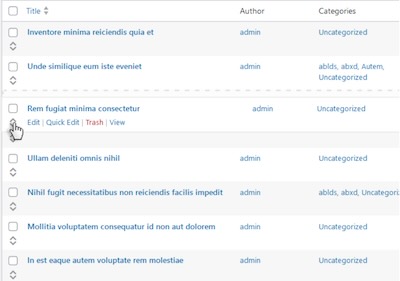
De volgorde van berichten kan nu direct worden aangepast op de standaard WordPress pagina met berichttype archieflijsten of via een speciale Re-order interface, die alle beschikbare items weergeeft. Met deze functie kunt u eenvoudig berichten opnieuw ordenen voor alle aangepaste berichttypen die u hebt gedefinieerd, inclusief de standaardberichten. Het beheren van de berichtvolgorde is nog nooit zo eenvoudig geweest.Voordelen Pro versie
De Pro versies zijn Lifetime deals! De Pro versie biedt onder aandere: * Hierarchically post types order * Manual Drag & Drop / Automatic Sorting * Specify exact area where to apply through conditionals * Advanced query interface filtering and complex sorts including multiple post types and taxonomies * Posts Order by Custom Taxonomies * Enhanced Interface, List / Grid View * Allow Interface Filters (Categories, Dates, Search etc) * Post Types Thumbnails * Advanced query usage * Multisite Network Support, WPML, Polylang, WooCommerce, WP E-Commerce, Platform Pro, Genesis etc * WPML 100% compatibility with sort synchronization across languages * Mobile Touch Drag & Drop Ready * Sort interfaces through admin and front end * Pagination for sort lists * Free Updates * Free Support. De plug-in kent meer dan 600.000 actieve gebruikers.
Conclusie
Een heel handige plug-in om de volgorde van posts aan te passen, onder andere i.v.m. het tonen van een query. Ook voor het bepalen van de volgorde van LearnDash courses en WooCommerce products werkt het perfect. Let op: WPASE heeft dezelfde functionaliteit, dus als je die al hebt aangeschaft is deze overbodig.
Prijs pro vanaf € 39
Meer informatie?
basbuis/25-03-2025Post Types Order
Volgorde van posts en pagina’s aanpassen met drag en drop
-
SelectorGadget – CSS selector finder

SelectorGadget is een open source tool die het genereren en ontdekken van CSS-selectors op ingewikkelde sites een fluitje van een cent maakt. (1) Installeer de Chrome extensie. (2) Ga naar een willekeurige pagina en start SelectorGadget. (3) Er wordt een veld geopend in de rechterbenedenhoek van de website. (4) Klik op een pagina-element dat je wilt laten matchen met uw selector (het wordt groen). (5) SelectorGadget genereert vervolgens een minimale CSS-selector voor dat element en markeert in geel alles wat overeenkomt met de selector. Klik nu op een gemarkeerd element om het uit de selector te verwijderen (rood), of klik op een niet gemarkeerd element om het toe te voegen aan de selector. Door dit proces van selecteren en afwijzen helpt SelectorGadget u de perfecte CSS-selector voor uw behoeften te vinden.Voordelen Pro versie
Het is een gratis Chrome extensie.
Conclusie
Het is echt een ideale extensie. Het scheelt heel veel tijd; je vindt de juiste CSS-selector in seconden.
Meer informatie?
basbuis/10-12-2024SelectorGadget
Maakt het makkelijk ELKE CSS selector te vinden
- Prev
- 1
- 2
- Next