WP tools WordPress collectie + GS Filter block
Collectie belangrijke en vaak onmisbare WordPress plug-ins en online tools
-
ACF Advanced Custom Posts
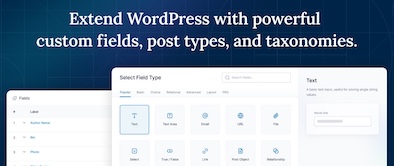
ACF custom fields allow you to quickly and easily add fields with just a few clicks of a button! Whether it’s something as simple as adding an author field to a book review post, or something more complex like the structured data of an ecommerce site or marketplace, ACF makes adding fields to the content model easy. Fields can be added anywhere in WordPress, including posts, pages, users, taxonomy terms, media, and comments. It couldn’t be easier to bring structure to the WordPress content creation experience.Voordelen Pro versie
The Pro version includes: A Repeater field that lets you create a set of subfields that can be repeated over and over again. ACF Blocks , a PHP-based framework for developing custom block types for the WordPress Block Editor. An options page to add custom admin pages to edit ACF fields. Unlock a more efficient workflow for managing field settings by reusing existing fields and field groups on demand with Clone Field.
Conclusie
If you need a custom post, like a review or whatever, ACF is an indispensable plugin. ACF is compatible with both Kadence blocks and Greenshift blocks. There are similar plugins, like MetaBox, Pods, Toolset, JetEngine, Voxel, ACPT and ASE, but so far ACF is a perfect and nice working plugin, which we work with ourselves very regularly. The free version is already sufficient for many websites. Note: if you start working with custom fields, you require a builder that supports Dynamic Fields.
Prijs pro vanaf € 49
Meer informatie?
basbuis/21-05-2025ACF Advanced Custom Posts
Creating and managing custom fields
-
Admin Columns for ACF Fields
Use this plugin to display ACF fields in the All Posts, Taxonomy, or User Table views in the WordPress admin. Simply enable the new “Admin Column” option in your ACF field settings for any regular field (see exceptions below) and optionally set the position and width of the columns. Now an additional column for your field will be displayed in any built-in or custom posts, pages, taxonomies (e.g. “All Pages”), and user views. Using filters (see below), you can fine-tune the behavior of the plugins. Works on any regular ACF field (see exceptions below). Compatible with Advanced Custom Fields 5.x and 6.x.Voordelen Pro versie
It is a free plugin. A donation is appreciated.
Conclusie
Handy plugin. Note: if you have WPASE, ‘Admin Columns for ACF Fields’ is redundant.
Meer informatie?
basbuis/21-05-2025Admin Columns for ACF Fields
Shows ACF fields in ‘All Messages’, ‘Taxonomy’ or ‘User Table’ view
-
Advanced Forms for ACF
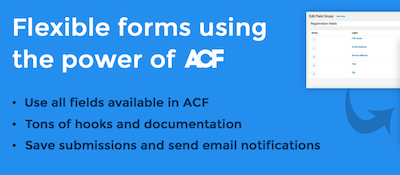
Advanced Forms is a WordPress plug-in for making front end forms using Advanced Custom Fields. It supports all ACF field types, including repeaters and flexible content fields, and offers the same interface for field processing that you already know. Note: Advanced Forms requires ACF Pro V5.7 or later.Voordelen Pro versie
Advanced Forms Pro offers even more functions for advanced use cases. You can purchase a license through Hookturn that can be used on an unlimited number of sites. They offer multiple licenses
Conclusie
Handy form builder for posts with custom (ACF) fields. The disadvantage is that ACF Pro is required.
Prijs pro vanaf € 48
Meer informatie?
basbuis/21-05-2025Advanced Forms for ACF
Advanced Forms foe front-end forms with Advanced Custom Fields PRO
-
AtlasAiDev AtlasVoice Text to Speech

Atlasvoice Text to Speech Pro (Atlasaidev) attracts the attention of your visitors. Choose from a variety of naturally sounding voices that suit your brand and the public. Involve the listeners at a deeper level with a more fascinating content experience. Effit your text-to-audio plug-in effortlessly! Advanced voice control helps you refine your content for optimum brightness. Adjust the speaking speed, the volume and the emphasis to perfectly match your intention. Integrates seamlessly with popular multilingual plug-ins such as WPML and Gtranslate. Atlasvoice offers unlimited audio downloads.Voordelen Pro versie
Most properties apply to the pro versions. The free version works, but for example with only one custom field, so a lot easier and more limited. In addition, the quality of the voice is less good. If you want to use the plug-in seriously, a Pro version is really needed. They have a plan for 1 site, 5 sites and 10 sites. They also have lifetime licenses.
Conclusie
Recommended!
Prijs pro vanaf € 59
Meer informatie?
basbuis/21-05-2025AtlasVoice Text to Speech
Ensures that visitors can listen to your posts
-
Background creator – Mesh gradient creator

Sometimes you want a background with a color or grayscale gradient. Of course you can search for an existing image. That has some disadvantages: (1) You have to be able to find the image. (2) It is usually not very original. (3) It makes the page in question very slow. ‘Mesh gradient creator’ creates a background; random or you enter the colors yourself. The result is a CSS code that you can use in your builder / Gutenberg block. The image of this post has the following colors as CSS: radial-gradient(at 21% 47%, hsla(302,97%,66%,1) 0px, transparent 50%), radial-gradient(at 92% 0%, hsla(289,61%,75%,1) 0px, transparent 50%), radial-gradient(at 95% 10%, hsla(261,91%,78%,1) 0px, transparent 50%), radial-gradient(at 52% 90%, hsla(17,92%,67%,1) 0px, transparent 50%), radial-gradient(at 60% 42%, hsla(148,98%,65%,1) 0px, transparent 50%), radial-gradient(at 12% 14%, hsla(205,77%,64%,1) 0px, transparent 50%), radial-gradient(at 6% 69%, hsla(91,64%,63%,1) 0px, transparent 50%); You process this as a complete CSS code as follows: .mesherhero { background: radial-gradient(at 40% 20%, hsla(28,100%,74%,1) 0px, transparent 50%), radial-gradient(at 80% 0%, hsla(189,100%,56%,1) 0px, transparent 50%), radial-gradient(at 0% 50%, hsla(355,100%,93%,1) 0px, transparent 50%), radial-gradient(at 80% 50%, hsla(340,100%,76%,1) 0px, transparent 50%), radial-gradient(at 0% 100%, hsla(22,100%,77%,1) 0px, transparent 50%), radial-gradient(at 80% 100%, hsla(242,100%,70%,1) 0px, transparent 50%), radial-gradient(at 0% 0%, hsla(343,100%,76%,1) 0px, transparent 50%); }Voordelen Pro versie
It is not a pro version, but the functionality is part of CSS Hero – https://csshero.org/. Note;:there are more CSS gradient generators, such as: https://gradients.app/en/newmesh
Conclusie
I’m not a huge fan of CSS Hero in general (bought it once, asked for a refund within the cooling-off period and never got it) but this feature is really useful.
Meer informatie?
basbuis/21-05-2025Background creator – Mesh gradient creator
Create beautiful gradient backgrounds with CSS
-
Basti FSE WordPress theme
Basti is a block (FSE) WordPress theme for WooCommerce. Make a professional-looking webshop with fully adjustable block and page patterns. With Basti’s Full-Site Editing (FSE) support you can easily adjust all elements, including the header, the menu and the footer, directly from the page editor. Winner First Prize in the ‘Creative Web Professionals’ category at the Bluehost Creators Awards, for the Basti theme. The theme comes with 4 styles; Fashion, Marktplaats, Yoga or other courses and outdoor.Voordelen Pro versie
There is only a Pro version of the Basti theme. All plans are for a maximum of 10 websites. You can choose from an annual amount, or once as a lifetime license.
Conclusie
A FSE Block theme that is ideal for a WooCommerce online store, or a website that also has a WOO store on the same website. Recommended.
Prijs pro vanaf € 79
Meer informatie?
basbuis/21-05-2025Basti FSE WordPress theme
WordPress FSE (WooCommerce) theme
-
Block Visibility — Conditional Visibility Control for the Block Editor
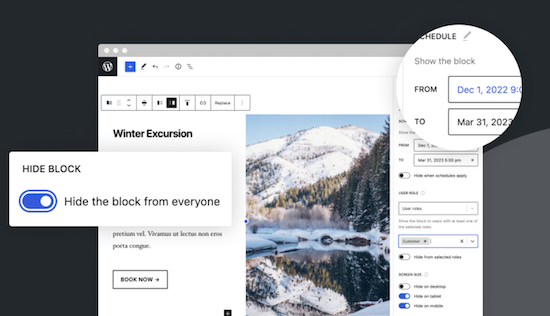
With this no-code solution you determine which blocks are visible on a website and who can see them. You can even show or hide blocks at a specific time. Show exclusive promotions to customers or members. Limit blocks to specific user roles, screen sizes, query series, WooCommerce products, EDD downloads, ACF fields, WPFUSion tags and more. Block Visibility is exclusively built for the WordPress editor (Gutenberg) and is designed to work with every WordPress block. This includes blocks that are supplied native by WordPress, but also blocks of third parties and even blocks -based widgets. This plug-in is ideal for making every submenu item in a Fse theme conditional! Note: To add conditions to Child menu items from a FSE theme, you must check ‘Full Control Mode’ in the plug-in settings. The plug-in has 30,000 users and was developed by Nick Diego.Voordelen Pro versie
There is no pro version. They do have a website for this plug-in, so it is possible that there will be a Pro version.
Conclusie
If you work with an FSE theme (the future of WordPress) this is an absolute must-have. What the plug-in ‘If menu’ does for the classic themes does this plug-in (and more) for FSE Block themes. Note: Not yet tested with the Kadence Navigation (ADV) Block.
Meer informatie?
basbuis/21-05-2025Block Visibility — Conditional Visibility Control
Conditional Visibility Blocks, also Child menu items
-
Bookfunnel secure
An essential tool for publisher or author. Bookfunnel does several things: – Delivery of e -books if you have sold them on your own website, – Taking care of print codes, so that you can also physically sell an e -book – provide a free ‘teaser’ of your e -book, to attract readers – Send secure e -book copies to reviewers, with a unique one -time service – PDF – PDF Files and mobi files. In short: this plug-in and service allows you as an author or small publishing house teasers, e-books, to promote and deliver it to the final buyer, using a watermark.Voordelen Pro versie
It is a pro plug-in. The prices start at 20,- per year (500 downloads), 100 per year (5000 downloads and water brands) or 250 per year (unlimited downloads). Audio books can also be done, with an additional cost.
Conclusie
If you want to sell an e-book on your own website, this is recommended! Note: If you don’t have EPUB file yet, but a DOC, RTF, OTF, TXT file? See https://draft2digital.com/
Prijs pro vanaf € 20
Meer informatie?
basbuis/21-05-2025Bookfunnel secure
Promotion and sale of your e-books
-
Bunny.net
Bunny.net manages one of the fastest worldwide networks in the world. You can use their network for hosting your videos, as a CDN to speed up a slow website and as a storage medium. We use it as a hosting for all our videos. It is the best, fastest and the cheapest video hosting we have ever used. The great thing about Bunny.net is that you only have to pay for what you use. With video you pay for storage ($ 0.01 per GB / month) and for traffic. If you have hosted 100 GB of video and 50 GB of videos have been viewed in a month, the costs are $ 2.50. Bunny.net is the only serious option for hosting videos for an education system, such as Learndash or Sensei LMS.Voordelen Pro versie
It’s a pro service.
Conclusie
Absolute recommended. The best video hosting (and CDN). Ideal also if you have an LMS.
Prijs pro vanaf € 1
Meer informatie?
basbuis/21-05-2025Bunny.net
Video streaming, CDN, storage
-
CapCut videoeditor
Free all-in-one video editor with which everyone can make everything everywhere. Flexible processing, magical AI tools, team cooperation and stock materials. Make videos like never before. Smart tools to make videos easier. Automatically recognize different languages and generate very accurate subtitles. Turn each text with one click into natural sounding speech; 11 voices and 10 languages are supported. Templates to quickly make your own advertisements!Voordelen Pro versie
Capcut also has a Pro version. This has more options and allows you to use AI.
Conclusie
Absolute recommended. Canva, for example, also has a video editor, but Capcut brings your work to another dimension.
Prijs pro vanaf € 9.99
Meer informatie?
basbuis/21-05-2025CapCut videoeditor
Complete video editor – free and pro
-
Checkout Field Editor for WooCommerce
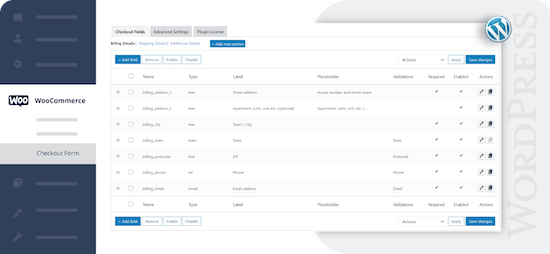
Check-out Field Editor for WooCommerce: This plug-in gives you the freedom to add, edit and remove fields on your check-out page, which ensures a tailor-made experience for customers. If you want to organize, rename or hide fields on your check-out page, this plug-in offers the flexibility you need. Speed up the checkout with a layout of one page and add adapted fields to streamline the process. 400.000 users.Voordelen Pro versie
Add custom fields and sections to your checkout page. Choose the price type for the fields from the list. View fields and sections based on specific conditions. Repeat fields and sections based on specific conditions. Manage the display of fields in e-mails and order display pages, and much more.
Conclusie
One of the best plug-ins to offer WooCommerce a more pleasant customer experience.
Prijs pro vanaf € 49
Meer informatie?
basbuis/21-05-2025Checkout Field Editor for WooCommerce
Adjust the Checkout page of WooCommerce.
-
Checkout Fields for Blocks
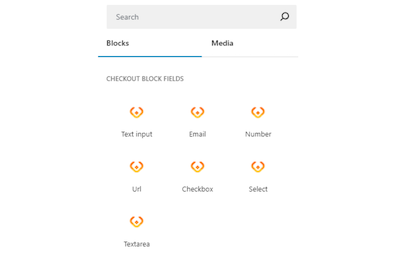
This plug-in adds extra custom fields to the WooCommerce Block Check-out (checkout form). It is not yet possible to adjust the names of existing fields, or target the invoice or address fields, but that depends on the restrictions imposed by WooCommerce. You can add a paragraph, image, or separation sign (the standard WooCommerce blocks). However, the plug-in is expanding the number of available options (fields) for the checkout form. Adding a new field is integrated in the block search bar. With Checkout Fields for Blocks, the following new fields (field types) are possible for the form. Text input – E -mail – number – URL address – Select – Select – Text box. You can also choose where you want to display the new checkout fields in WooCommerce: order confirmation, admin order, my account, order e-mail.Voordelen Pro versie
It is a free plug-in.
Conclusie
A very handy plug-in. Admittedly, it is not a Kadence Shop Kit, but this developer is one of the first to develop a good plug-in for the block version of the WooCommerce check-out page, while Shop-Kit still works on a Classic theme only. This recent plug-in therefore requires a block FSE theme. Highly recommended!
Meer informatie?
basbuis/21-05-2025Checkout Fields for Blocks
Adds extra fields to the WooCommerce Block Checkout
-
Crocoblock plug-ins
Crocoblock is not one plug-in, but a whole family of super-powered plug-ins. Think of custom posts, fields, forms, menus, filters, grid builder, pop-ups, WooCommerce Builder, tabs, product gallery and much more. One of their well-known plug-ins is Jetengine, for custom fields.Voordelen Pro versie
It is a Pro Service. You can buy each plug-in separately, or suddenly the whole set.
Conclusie
A must. Solid and versatile.
Prijs pro vanaf € 43
Meer informatie?
basbuis/21-05-2025Crocoblock
A ‘family’ of useful plugins
-
CubeWP
It offers an extensive functionality. More than 25 field types, conditional logic and relation fields, gallery field, repeatable field, map field, adapted user registration and profile forms, advanced adapted search forms and filters, frontend-post entry forms for post types, adaptable frontend-layouts.Voordelen Pro versie
They have annual and (now still affordable) Lifetime licenses. The Premium (Pro) version has among other things: Advanced Search Builder: Enhance your search capabilities by adding various custom fields – Advanced Filter Builder: Expand filtering options with all available custom fields. – User Signup Form Builder: Craft tailored registration forms for different user roles. – User Profile Form Builder: Create personalized profile forms for diverse user roles. – Post Types Form Builder: Develop front-end submission forms for any post type. – Single-post Template Editor: Customize post details with a drag-and-drop layout builder. – User Dashboard Builder: Easily construct custom user dashboards based on roles. – Post Loop Generator: Gain full control over post grids for unique content presentation (HTML/CSS skills required).
Conclusie
I haven’t worked with it yet, but it seems like a solid package of functions that give you many options.
Prijs pro vanaf € 39
Meer informatie?
basbuis/21-05-2025CubeWP
Extensive tool for custom fields, forms and much more
-
Custom Fonts – Host Your Fonts Locally

Improved speed and performance – With the custom fonts plug-in you can upload your own fonts or choose from an extensive collection of Google Fonts. These are all hosted directly on your own web server. By hosting fonts locally, you can considerably improve the performance of the website. Because the fonts are loaded directly from your server, external requests are reduced, so that the loading times of the page are considerably shortened. The plug-in is maintained by the makers of the Astra theme and has more than 300,000 users.Voordelen Pro versie
It is a free plug-in.
Conclusie
If your own theme or page builder does not offer the option to host Fonts locally, this is recommended!
Meer informatie?
basbuis/21-05-2025Custom Fonts – Host Your Fonts Locally
Improve the speed of your site and eliminate privacy problems
- Prev
- 1
- 2
- 3
- 4
- Next