WP tools WordPress collectie + GS Filter block
Collectie belangrijke en vaak onmisbare WordPress plug-ins en online tools
-
Advanced Query Loop plugin
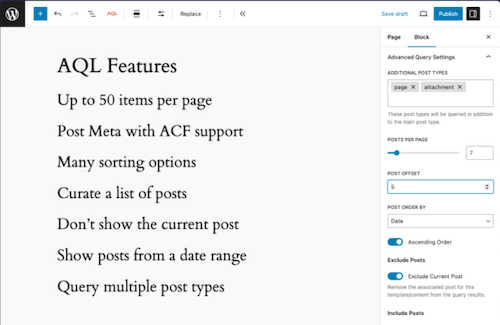
This plugin introduces a variation on the standard Gutenberg Query Loop block, with which users can perform much more complex queries with the Query Loop block, such as the number of messages to be displayed and the metadata of messages. Taxonomy queries, multiple message types, set the number of items that you want to display (maximum 50), select manually which messages you want to display or only exclude the underlying messages from the current content, excluding current posts, excluding messages per category, choose to exclude messages from a list of categories.Voordelen Pro versie
The plug-in is free.
Conclusie
An ideal expansion of the standard WordPress Gutenberg Query/Grid. Recommended if you are just a little short, but do not need frills.
Meer informatie?
basbuis/21-05-2025Advanced Query Loop
Expansion Standard Query to Advanced Query Loop
-
Block Visibility — Conditional Visibility Control for the Block Editor
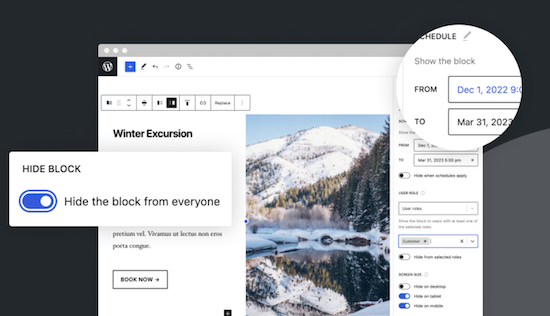
With this no-code solution you determine which blocks are visible on a website and who can see them. You can even show or hide blocks at a specific time. Show exclusive promotions to customers or members. Limit blocks to specific user roles, screen sizes, query series, WooCommerce products, EDD downloads, ACF fields, WPFUSion tags and more. Block Visibility is exclusively built for the WordPress editor (Gutenberg) and is designed to work with every WordPress block. This includes blocks that are supplied native by WordPress, but also blocks of third parties and even blocks -based widgets. This plug-in is ideal for making every submenu item in a Fse theme conditional! Note: To add conditions to Child menu items from a FSE theme, you must check ‘Full Control Mode’ in the plug-in settings. The plug-in has 30,000 users and was developed by Nick Diego.Voordelen Pro versie
There is no pro version. They do have a website for this plug-in, so it is possible that there will be a Pro version.
Conclusie
If you work with an FSE theme (the future of WordPress) this is an absolute must-have. What the plug-in ‘If menu’ does for the classic themes does this plug-in (and more) for FSE Block themes. Note: Not yet tested with the Kadence Navigation (ADV) Block.
Meer informatie?
basbuis/21-05-2025Block Visibility — Conditional Visibility Control
Conditional Visibility Blocks, also Child menu items
-
Checkview test tool
Software updates, developer changes, server problems and user errors can quietly disrupt the critical business functions of a website: lead forms and checkout. Test forms automatically to ensure that you will never miss a sale with the only automated test platform that is designed for WordPress. No-code form test solution for your WordPress forms and WOO fencing page-user-friendly testing with simple test creation and automatic interpretation of form fields in many cases-thanks to flexible monitoring of your WordPress forms you can detect bugs before your customers do-automatically the usual antiamt.Voordelen Pro versie
It is a Pro Tool.
Conclusie
It is not a cheap test tool, but a good one.
Prijs pro vanaf € 35
Meer informatie?
basbuis/21-05-2025Checkview test tool
Test your forms fully automatically
-
Dogq test tool
Fast and user-friendly, automated test tool for web applications. With DOGQ you can effortlessly make browser tests without coding. You can automate up to 80% of your web application tests in weeks, not months. Ideal for, for example, to test your forms daily or weekly, or if they still work well.Voordelen Pro versie
It is a Pro Tool. There is already a license for 5 per month, which makes it one of the most affordable test tools.
Conclusie
Recommended.
Prijs pro vanaf € 5
Meer informatie?
basbuis/21-05-2025Dogq test tool
Automated test tool for web applications
-
Filter Everything
If you show an overview of pages or other posts, you often also need a filter. Usually with check boxes, radio buttons, dropdown, or tags. The truth is that almost every builder has a filter, but that they are not always good. They only work with categories, are sometimes slow, displaying wrong posts or the pagination frequently doesn’t look like anything. The solution? A professional filter plugin. Filter Everything is not only ideal to be set, but also does not need a separate link with your query: you create a filter and indicate that it must be applied on the right page, ready. Filter Everything works perfectly with Greenshift Blocks (is also recommended by them). We have not tested the combination Filter Everything with Kadence Blocks.Voordelen Pro versie
The basic free version can only filter on regular WordPress posts, not on pages or custom posts. Then you need the Pro version of Filter Everything. You can also indicate the exact page with the Pro version where each filter must be applied; This prevents unnecessary scripts on other pages.
Conclusie
Absolute recommended. We work with both Kadence Blocks and Greenshift Blocks. Both have their own filter. However, those of Kadence and Greenshift only work with their own queries, and the latter has a basic filter, but above all, very slow. In short, Filter Everything is a perfect solution.
Prijs pro vanaf € 44
Meer informatie?
basbuis/21-05-2025Filter Everything
Filter for every Query loop
-
Great Restaurant Menu WP
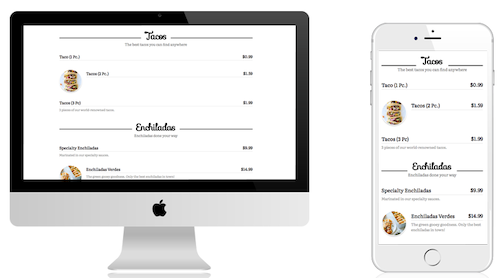
Hiermee kun je snel een menu maken voor een restaurant of andere bedrijfsactiviteit (zoals salons, sportscholen, enz.). Er worden 5 sjablonen meegeleverd en je kunt aangepaste sjablonen maken. Standaardsjablonen zijn allemaal responsief en zien er geweldig uit op desktops, tablets en mobiele apparaten. Het menu ondersteunt groepen/categorieën, subgroepen/categorieën en items. Items kunnen de itemnaam, beschrijving, afbeelding en prijs bevatten. – Met de menu-editor kunt u eenvoudig groepen en items slepen en neerzetten om ze snel en eenvoudig opnieuw te organiseren – Biedt volledige ondersteuning voor netwerk-/multisitewebsites.Voordelen Pro versie
Er is geen Pro versie van te koop.
Conclusie
Aanrader!
Meer informatie?
basbuis/20-02-2025Great Restaurant Menu WP
Prijslijsten, menu’s, etc. – ook andere branches dan de horeca
-
If Menu – Visibility control for Menus

Bepaal welke menu-items bezoekers van uw site zien, met zichtbaarheidsregels. Hier zijn een paar voorbeelden: Geef een menu-item alleen weer als User is ingelogd. Verberg een menu-item op mobiel. Alleen menu’s weergeven voor Admins and Editors. Verberg Login of Registreer links voor ingelogde Users. Alleen menu’s weergeven voor Customers met een actief membership. Toon menu’s op basis van de taal van de bezoekers. Nadat de plug-in is ingeschakeld, krijgt menu-item een nieuwe optie ‘Menu-item zichtbaarheid wijzigen’ waarmee je zichtbaarheidsregels kunt selecteren. LET OP: deze plug-in is alleen geschikt voor de classic thema;s, dus werkt niet met FSE-thema’s. Voor deze functionaliteit met een FSE-thema, raad ik deze plug-in aan: https://wpinsight.eu/wp-tool/block-visibility-conditional-visibility-control/Voordelen Pro versie
Deze plug-in kent geen pro versie; de ontwikkelaar stelt een kleine donatie wel op prijs!
Conclusie
Als je een manier zoekt om bepaalde menu-items onder bepaalde voorwaarden wel of niet te tonen, is dit de ideale plug-in. Ik gebruik de If menu plug-in regelmatig voor bijvoorbeeld leden websites, of Learndash sites met speciale menu-items voor de beheerders en leraren.
Meer informatie?
basbuis/20-02-2025If Menu – Visibility control for Menus
Instellen welk menu item wanneer zichtbaar is
-
Simple Custom Post Order
Sorteer berichten (berichten of aangepaste berichttypen) met behulp van Drag and Drop. Configuratie is niet nodig. Je kunt dit rechtstreeks doen in de standaard WordPress admin. Met uitzondering van aangepaste query’s die order- of orderby-parameters gebruiken, werkt het ook met get_posts of query_posts, enzovoort. Gebruikt door meer dan 300.000 gebruikers.Voordelen Pro versie
Het is een gratis plugin.
Conclusie
Als je geen gebruik maakt van de WPASE** plug-in, en wel de volgorde van je posts wilt aanpassen, voor jezelf of omdat het je Grid beïnvloedt, is dit een ideale plug-in. ** deze functie zit al in WPASE.
Meer informatie?
basbuis/31-01-2025Simple Custom Post Order
Sorteer berichten (berichten of aangepaste berichttypen)
-
Simple floating menu
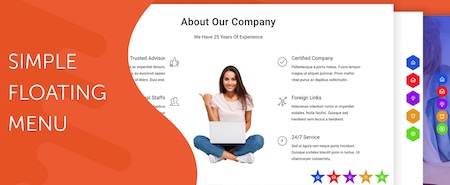
Simple Floating Menu is een gratis WordPress plug-in waarmee je een zwevend, vast menu met pictogrammen en tooltips in verschillende ontwerpen kunt toevoegen. De plug-in heeft meer dan 5000+ iconen om uit te kiezen om het zwevende menu weer te geven en je kunt onbeperkt menu-icoon knoppen toevoegen. Je kunt het menu in 8 verschillende posities weergeven met 9 verschillende knopvormen. Aangepaste pictogrammen – 5 pictogram pakketten met meer dan 10.000 pictogrammen om uit te kiezen – Onbeperkt aantal menu-items – Optie om hetzelfde tabblad of nieuw tabblad weer te geven – 8 verschillende posities om weer te geven – 9 verschillende knoopvormen om uit te kiezen – Pas de knop aan met hoogte/breedte, pictogram grootte, kleur van de knoppen en lettertypen van de tool-tip-tekst – 600+ Google lettertypen om uit te kiezen voor de tekst – Voeg interne, externe of scrollende links op één pagina toe – Instellingen exporteren/importeren om instellingen van de ene naar de andere website over te brengen.Voordelen Pro versie
Support voor alle social media platforms – Floating menu templates – navigation dots – sidepanel menu – etc.
Conclusie
Een handige plugin.
Prijs pro vanaf € 23
Meer informatie?
basbuis/20-02-2025Simple floating menu

-
The Post Grid – Shortcode, Gutenberg and Elementor
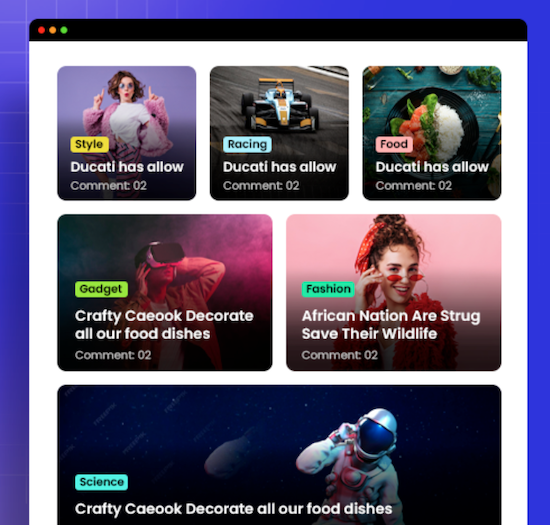
Eén van de populairste alles-in-één post grid plug-ins voor WordPress. Meer dan 100.000 gebruikers heeft deze plug-in. Niet elk thema en elke page builder heeft een goede query / post grid functie. De basis query van WordPress is heel basic, dus je wilt al veel meer. Deze plug-in stelt je in staat een mooi grid te maken om je posts (ook custom posts!) te tonen op je website. De plug-in werkt in Gutenberg, Elementor, en met shortcode. De plug-in heft veel opties: Grid Lay-out Block, List Lay-out Block, Grid Hover Lay-out block, Slider Lay-out Block en andere blokken. Alle Grid, List en Grid Hover lay-outs hebben ook een info AJAX filter.Voordelen Pro versie
De Pro versie heeft veel meer mogelijkheden, van meer invloed op het aantal posts op een pagina, tot veel meer kant-en-klare lay-outs en meer Elementor opties. Sliders, filters, en nog veel meer.
Conclusie
Als je eigen thema of builder onvoldoende mogelijkheden biedt, is dit een aanrader. Het biedt geen sub-blocks in de Gutenberg block builder, maar als je daar minder handig in bent, is dat juist een voordeel.
Prijs pro vanaf € 30
Meer informatie?
basbuis/06-03-2025The Post Grid
Grid / Query maker – veel designs mogelijk
-
WP Grid Builder
Maak geavanceerde grid (raster) lay-outs. WP Grid Builder kent realtime faceted search en filter, voor je website, custom posts, e-commerce, blog, portfolio en meer… WP Grid Builder toont elk berichttype of taxonomie term, met een intuïtieve en stijlvolle beheerdersinterface, met of zonder map weergave van Google of OpenStreetMap. WP Grid Builder is een van de beste (zo niet de beste…) plug-in voor dit doeleind. WP Grid Builder + Custom post type + Frontend formulier is een complete directory, die je helemaal naar wens kunt vormgeven.Voordelen Pro versie
Het is een Pro plug-in.
Conclusie
Absolute aanrader. Er zijn enkele builders die een query/grid met filter hebben die goed werkt, maar de meesten zijn slecht, sloom en hebben heel weinig mogelijkheden. WP Grid Builder is heel uitgebreid en heeft een map functie, die ook werkt met OpenStreetmap (geen API nodig).
Prijs pro vanaf € 49
Meer informatie?
basbuis/13-02-2025WP Grid Builder
Geavanceerde grids en queries