Kadence Header advanced Mobile
Adjust Kadence Header advanced settings for tablet and mobile
The beauty of the header adv. block, is that it is almost infinitely customizable. Icons, colors, hover colors, the direction in which the menu expands, a mobile menu that slides in from the left or right and covers part of the screen or all of it, adjusting the size of the icon; everything is possible.
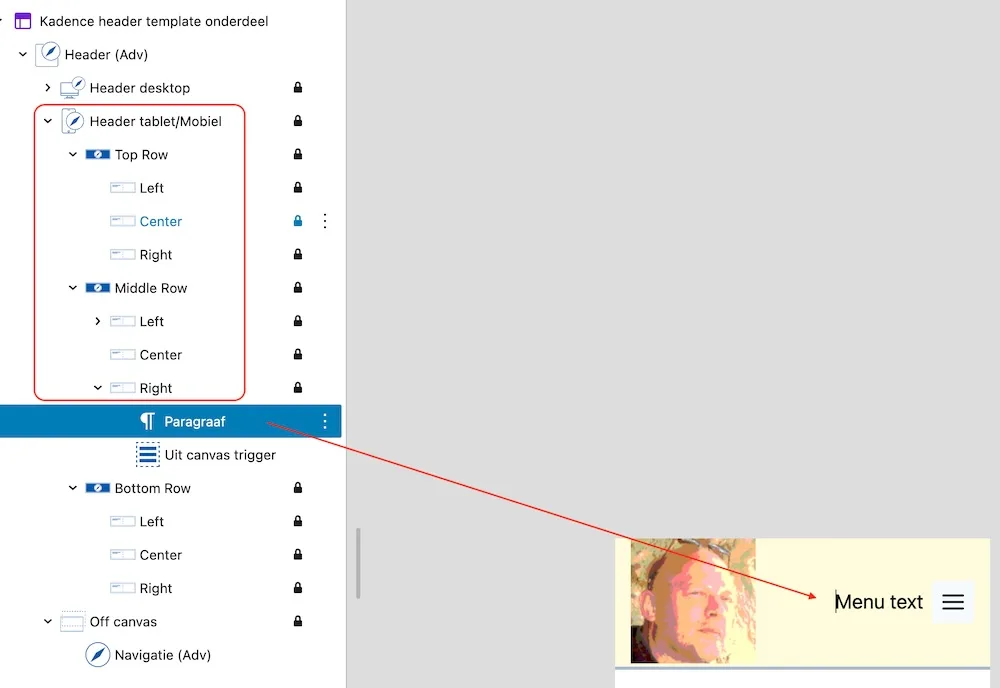
Extra text before or after the menu icon
It is sometimes useful to place text before or after the ‘hamburger’ icon. If your target audience is older or simply digitally clumsy, you can, for example, place the word ‘menu’ before it.

Make sure you use a text block where you can enter a small amount of padding at the top. Native Gutenberg cannot do this; the Kadence heading block is very suitable.
Customizing the mobile menu icon
The default icon is sometimes a bit boring or irrelevant. You can customize this entirely to your liking. Make sure you use the Visual Builder. You activate this in the header’s edit mode, and the button is located in the bottom right.