ASE plugin WordPress enhancements
The ‘Swiss pocket knife’ for all WordPress websites. Wouldn’t it be nice if you could install one plug-in that would make 10 to 30 plug-ins superfluous? That is possible with ASE. You can activate or deactivate any function, as desired.
The plug-in offers the correct settings you need for functionality, such as SMTP delivery of your e-mails, custom messages and fields and the like. Given the many functions, we as users were initially a bit worried that setting it (just like with some security plug-ins) would be an endless job; However, that is not a problem. There are many ways to adjust it as desired, not too much, and nothing is missing.
Market share of ASE plugin WordPress enhancements
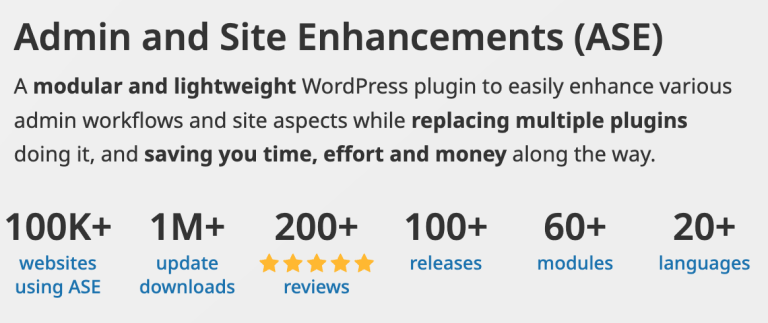
ASE plug-in is relatively new (two years), but has already proven itself. There are more than 100.000 active installations from ASE, and almost all reviews are ***** a five -star rating. The plug-in focuses on individual websites, but certainly also on developers. Licences vary from one to hundreds or even unlimited installations, allowing a developer to install the ASE plug-in on client sites.
First impression of ASE
It is precisely because the functionality of this plug-in has taken over so many basic functions, it is more important than ever that it works flawlessly. The installation went smoothly and the tests that we performed were all without any issues. We immediately set the following: SMTP, to send e-mails that actually arrive make a duplicate (copy) of a page or message Custom message types and fields organize media in categories such as images, PDF, temporary, etc. Make the management page clearer, adjust the admin menu to a specific page to prevent it in logging or logs. Taking over, everything worked directly and as promised. Even the modified message type and an adapted field group were tested in combination with Kadence Pro, and it worked very well. Sometimes even easier than ACF. For those interested: we have tested the creation of custom fields and tested custom messages in combination with the Kadence theme and Kadence Blocks Pro. It is precisely because the functionality of this plug-in has taken over so many basic functions, it is more important than ever that it works flawlessly. The installation went smoothly and the tests that we performed were all without any problems.
Developer
The developer is known as a good and solid developer; No superfluous code and the maintenance is perfect.
Costs
Free, Pro versions and costs
- They have a free version and various premium versions.
- The premium versions range from 1 to almost an unlimited number of websites
- You can choose from an annual extension or a lifelong licence.
- The costs of a Lifetime licence starts at € 39,-
- An annual licence starts at € 19,-
Functions
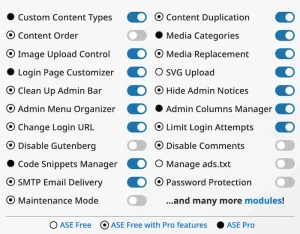
- [Pro] Custom content types.
- Easily register and edit custom post types and custom taxonomies, without writing a single line of code.
- [Pro] Create custom field groups, including repeater fields and relationships!
- Duplication of content.
- Enable duplication/cloning/copying of pages, posts and custom posts with one click.
- The associated taxonomy terms and post-meta are also duplicated.
- Content order.
- Enable custom ordering for pages, posts, and custom post types. Useful to display them in the desired order in wp-admin and on the frontend. e.g. projects, services, frequently asked questions, team members, testimonials, etc.
- [Pro] Media Categories.
- Add categories for the media library and enable drag-and-drop categorization of media items. Categories can then be used to filter media items while inserting media into the content.
- Media replacement.
- Easily replace any type of media file with a new one while retaining the existing media ID, publication date and file name. So no existing links (placements on page or download links) are broken.
- SVG upload.
- Allow some or all user roles to upload SVG files, which are then cleaned up to keep things safe.
- [Pro] AVIF upload.
- Enable uploading AVIF files to the media library.
- External permalinks.
- Make sure pages, posts, and/or custom post types have permalinks pointing to external URLs. The rel=”noopener noreferrer nofollow” attribute will also be added for improved security and SEO benefits.
- Open all external links in a new tab. Force all links to external sites to open in a new browser tab via the target=”_blank” attribute. The rel=”noopener noreferrer nofollow” attribute will also be added for improved security and SEO benefits.
- Allow custom navigation menu items to open in a new tab.
- Allow custom navigation menu items to have links that open in a new browser tab via the target=”_blank” attribute.
- The rel=”noopener noreferrer nofollow” attribute will also be added for improved security and SEO benefits.
- Automatically publish messages with a missed schedule.
- Enable publishing scheduled posts of all types, marked “missed schedule” every time the site is visited.
- Admin interface.
- Clean up admin bar: remove several elements from the admin bar.
- Remove the WordPress logo/menu.
- Remove the custom menu/link.
- Remove update counter/link.
- Delete comment counter/link.
- Delete new content menu.
- Remove the ‘Howdy’ text.
- Remove the Help tab and drawer.
- Hide admin notifications.
- Clean up admin pages by moving notices to a separate panel that’s easily accessible from the admin bar.
- Disable dashboard widgets.
- Clean up and speed up the dashboard by disabling some or all widgets completely.
- Disabled widgets will not load any elements or appear under Screen Options.
- Hide the admin bar.
- Hide it on the frontend for all or some user roles.
- Wider admin menu. Give the admin menu more space to better accommodate broader items.
- Admin menu editor/organizer.
- Adjust the order of the admin menu and optionally change the menu item title or hide some items.
- [Pro] Column management administrator.
- Manage and organize columns in the admin list for pages, posts, and custom post types.
- Improve list tables. Improve the usefulness of listing pages of different post types by adding/removing columns and elements.
- Show featured images column: in the list tables for pages and post types that support featured images.
- Show the excerpt column: in the list tables for pages and post types that support excerpt.
- Show the ID as a column or in the action rows: in the list tables for pages,
- all post types, all taxonomies, media, users, and comments.
- Show custom taxonomy drop-down filter(s): in the list tables of all post types for hierarchical taxonomies, such as post categories.
- Remove the comments’ column: in the list tables for pages, post types that support comments, and also media/attachments.
- Remove the post tags column: in the post list table.
- Log in and log out.
- Change the login URL.
- Improve site security by using a custom login URL, e.g. www.example.com/backend.
- Site identity on login page.
- Use the site icon and URL to replace the default WordPress logo with a link to WordPress.org on the login page.
- Login/logout menu.
- Enable login, logout and dynamic login/logout.
Support
In our communication with the developer, he responded quickly and adequately.
The positive
The WPASE plug-in is really an improvement. After all, that is what we want: the plug-in really replaces many other plug-ins. The plug-in itself is actively supported, and the developer listens to its customers. Some plug-ins often promise everything, but ultimately, it’s just an extra care. ASE is the way to improve your website function, without extra worries.
The negative
We have tested integration of custom fields again, and is currently not 100%.
Creating the field group and the fields works great. Showing standard text fields etc. in a template of Kadence element works as it should, but for example, the image field didn’t work as expected. The integration with builders like Bricks is fine, but the integration with the block builder and blocks from Kadence, etc. isn’t perfect and partly ineffective. We hope that this will be resolved.
All other functions of the plug-in that we tested were not just functional, but were also integrated in a perfect and logical way.
This one negative remark about the custom field has some influence on the assessment. If this is okay, the assessment in this review will immediately go from 4.5 to 5 *****.
Conclusion
Do we recommend the ASE plugin? As far as I’m concerned, it’s an absolute must-have. From now on, I install this plug-in on every new WordPress website.
Review rating
Free version: Yes
Paid version from € 19
ASE plugin WordPress enhancements
Affiliate statement:
This post may contain affiliate links. If you click through and make a purchase, I may earn a commission at no extra cost to the buyer. You might even receive an extra discount!