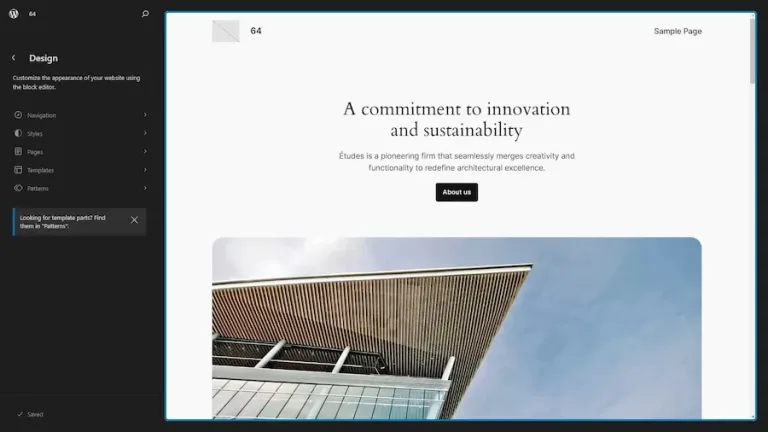
Ollie Pro theme
After more than a decade of working with classic themes, including Divi, Elementor, and Kadence, I began testing several Full Site Editing (FSE) themes. This review is entirely about the Ollie Pro theme.
FSE has advantages and disadvantages
Full site editing, Ollie and the momentum
- Although this is the direction WordPress is moving in, some FSE themes are only now beginning to mature. Fortunately, these are very valuable themes, and Ollie is one of the most promising right now.
- Most theme developers are still looking for a business model for FSE themes. This is essential; a theme only has a real future when it can generate enough revenue. Some developers appear to have created a free FSE theme merely to be “present” in the future. But often, it is actually funded by income from other (classic) products. That is not a business model.
- Recently, and I mean in mid-2026, some bigger plugin developers are also beginning to make their products genuinely compatible with FSE. It took some time, but it’s happening now.
Advantages of full site editing
- Full site editing themes are just that: full-site-editable. That means the user can change about everything.
- They’re fast. Not only on the frontend—there are also some classic themes that are fast —but the backend is where the difference is huge. I can definitely get frustrated at times by how even a classic theme like Kadence can be slow in the backend.
- The code is better. I also build plugins, and most of them need several tweaks to function smoothly with a classic theme. Every theme developer has discovered different ways to reach a specific outcome—not always poor methods; sometimes they’re even ingenious—but the fact remains that they all approach things differently. That doesn’t help the code. FSE is new and uses new ways of accomplishing tasks. This gives WordPress developers an opportunity to begin again!
Potential disadvantages of full site editing
- Users have to get used to a different workflow. The customizer, for example, is entirely absent. Now, that is actually a non-existent problem; the customizer was necessary in a classic theme because it was the only way to change certain presets within the theme. FSE is so flexible that almost anything is possible, and the customizer has therefore become redundant.
- Because some have not yet developed an FSE business model, there are a lot of free FSE themes, but just a few good professional pro versions.
- In my opinion, but please read on, Ollie Pro has solved the potential disadvantages of FSE.
What is my point of reference?
- On the one hand, I don’t necessarily want to compare Ollie to another theme, but at the same time, I do look at whether I can do the same things with it as I can with Kadence, for example.
- That means I look at ease of use, setting up a WooCommerce store with custom labels, effective queries, creating custom templates, assigning templates or headers, aligning buttons, breakpoints, responsiveness (tablet and mobile), and the like.
Okay, the Ollie Pro theme
Let’s start with the fact that although the free Ollie theme is wonderful, I tested the pro version because it really shows what the Ollie theme is capable of. The free version is an excellent theme, but the real magic happens in the pro version.
Why did I decide to test Ollie Pro?
Ollie stands out as one of the rare themes that has successfully integrated full site editing with the advantages of a traditional theme. It boasts well-crafted pages and a customizable menu designer while supporting a sustainable business model that promises ongoing development. Additionally, if you choose to use Ollie, you’ll discover that it’s not only remarkably fast but also a joy to work with.
Introduction of Ollie
Ollie has had a different approach. It offers a full site editing theme and solves the WordPress editing experience at the same time.
Ollie is more than just a theme
Ollie isn’t just a theme review; it’s important to understand that Ollie and its builder capabilities are interlinked. This isn’t merely a case of pairing a theme with a builder; they are designed to function together seamlessly. You can’t use them independently. This all-in-one solution is a key strength of Ollie, which will become clearer as you read on. The theme and builder features are crafted to complement one another perfectly.
Solving the core WordPress editing experience is no exaggeration
Responsive controls for blocks like text, headings, columns, mega menus, usable grids, improved group settings, animations, icon buttons… carousels and sliders, hover colors, smart sync, text wrap options, video modals, and a strong pattern library. And finally: a very useful class manager that even people who aren’t especially comfortable with classes can use. And if you want it, AI is fully integrated for both design and writing.
Not a sales-pitch, but a real usage report
I went through my usual routine of setting up a theme, installing a builder, and testing everything out. But this time was different. I was able to skip the builder step altogether. I simply installed the theme and created my usual setup, relying solely on core Gutenberg and the extensions that Ollie offers in their Pro plan.
Setup of Ollie
- Install the theme, answer a few questions and choose a starter theme if you like. Frankly, I usually don’t use starter themes for myself or clients but I saw some on their site and decided to give them a try. They look really good and the starter sites are designed with a keen eye for detail.
- One piece of advice: install a starter site directly at the install. I did it later and it confuses the install procedure: I got all the layouts but no images.
- I picked the eCommerce starter theme because I wanted to set up a store for testing purposes. The whole install was super easy and fast.
- As a second step I went to Admin, Appearance, and Ollie and clicked on Extensions in the menu. This shows you an overview of all the Ollie Pro extensions and you can toggle them on or off. I toggled them all on for the review.
- The text step is just below the Extensions; Site Setup Wizard. Go to Install plugins and install Ollie Menu Designer, the Icon Block, Block Visibility and WooCommerce. You might be used to other plugins for these features but I recommend using Ollie Pro’s suggestions because they’re fully integrated. Don’t change anything.
Testing the Ollie Pro features
I changed the language
Themes often make grand promises regarding language support, and I was eager to evaluate the quality of the translation. I chose Dutch for my assessment. Initially, I was impressed by how accurate the translations appeared to be. I maintained this setup for a while to thoroughly test various elements such as labels, buttons, and text to ensure they were displaying the correct language, particularly in cases like WooCommerce. Another aspect I needed to investigate was whether custom labels maintained their integrity or were overridden by the theme’s own translation files, a common issue with many themes. Overall, I found that Ollie performs exceptionally well in multiple languages.
Responsiveness
Ollie Pro promises responsive settings for:
- Font size, padding, margin, block spacing, minimum height, and text alignment directly inside the existing Typography and Dimensions panels and block toolbar.
- Block spacing – Responsive gap between child blocks.
- Minimum height – Responsive min-height for container blocks.
- Text alignment – Per-breakpoint text alignment for paragraphs and headings
The absence of this feature used to frustrate me the most in the WordPress editor. But I have to say, Ollie addressed it flawlessly. The key question is: did Ollie resolve the responsiveness issue in the core of WordPress? Absolutely. It was done perfectly—clean and functional.
Query loop
Gutenberg’s query loop is a block I have mixed feelings about. While I can adapt to the fact that some settings are found in the block settings and others in the toolbar, I find the absence of device settings and breakpoints quite limiting for creating an effective website. It’s been integrated by Ollie, which is a plus. For most general uses, the core query can be effectively utilized after making a few adjustments, unless you have very specific requirements. If you have the Modern Fields Pro plugin, you can even use the core query with filters that are based on custom field values.
For websites that require more robust query loops or complex filtering, you can easily utilize the query block offered by GenerateBlocks (available in both free and pro versions) or Greenshift (pro version only).
Columns block
While it may not be cutting-edge technology, I’ve always had an appreciation for the column block. Its simplicity and reliability remind me of those classic Lada cars from the late eighties. Now, imagine that same design being upgraded to a 2026 mid-segment vehicle. That’s a significant transformation! So, what exactly has changed?
- Stack on mobile
- Order on mobile
- Reverse direction on mobile
- Animation (some are really nice) can be set for the block or per column
- URL per column (as a target on click)
These updates indicate that the columns block will meet the needs of the majority of users. Among everyone I know who has a website, the columns block now adequately serves most of them. For a few users with more complex needs related to columns, grid, bento grid, etc. options like the flexible layout section, or container blocks from GenerateBlocks or Stackable are available.
Grid block
The core grid block had a significant drawback that deterred many professionals from utilizing it: it lacked breakpoints. Users could only set a minimum width for each grid item, which was quite limited. However, Ollie Pro introduced some essential enhancements, including breakpoints, styling options, and animations. These improvements are what truly make the grid viable for professional websites.
Carousel Designer
The Carousel Designer block isn’t called a carousel block or carousel for a reason; it truly enables you to design a 100% custom carousel or slider. It is very easy to use, extremely versatile, and works perfectly. Because it works with blocks in every slide, you can also use the carousel designer block dynamically, with the help of a custom field plugin.
Smart Sync
You may already know that some developers provide an option to copy and paste styles. This works well when you want to manually apply the look of one element to another similar one. But what if your website could “recognize” similar elements on its own, such as cards in a grid, and recommend applying your edits to the others automatically? That is what Smart Sync Ollie Pro does. You update one element and watch the same changes instantly appear on the other elements! You can enable or disable the feature for each element individually, so nothing is mandatory.
Ollie improved the navigation block
The default Gutenberg native navigation block is not bad. It might take some getting used to, though. The default version has a few drawbacks. One of the most annoying issues is that an FSE theme displays all submenus (dropdowns) in an expanded state on mobile devices. This often presents the visitor with a very long—or even seemingly endless—menu.
Ollie has introduced an improvement—small, yet highly significant: the option to display submenus in a collapsed state by default on mobile. They also ensured that the trigger isn’t limited to clicking the arrow icon; instead, the entire submenu label acts as the trigger. Een andere belangrijke verbetering is de Ollie menu designer, zie hierna.
Ollie Menu Designer
Ollie has introduced menu designer functionality that stands out due to its seamless integration with the standard navigation block. This innovative feature allows users to create a megamenu or a mobile menu using familiar Gutenberg patterns. By blending something fresh with established core elements of WordPress, Ollie ensures that everything functions smoothly and is user-friendly, making it easy for anyone to learn and utilize.
Class Manager
I have a complicated relationship with classes. On one hand, I appreciate them, depend on them, and utilize them on virtually every website. But what about the downside? Calling it hate might be too harsh; I would say I feel more irritated or annoyed. This frustration stems from the way most themes and builders manage classes and styles. The process can be unnecessarily complex, presenting a steep learning curve for many, and often results in a tangled mess. The aspects that bother me the most include:
- Creating a class happens on the Extra Classes page.
- There is never any visual feedback while editing a class.
- Adding a class to the block class field is a manual process and implies you know the exact syntax of the class, or it won’t work.
- Manually creating class values for hover, focus active, etc.
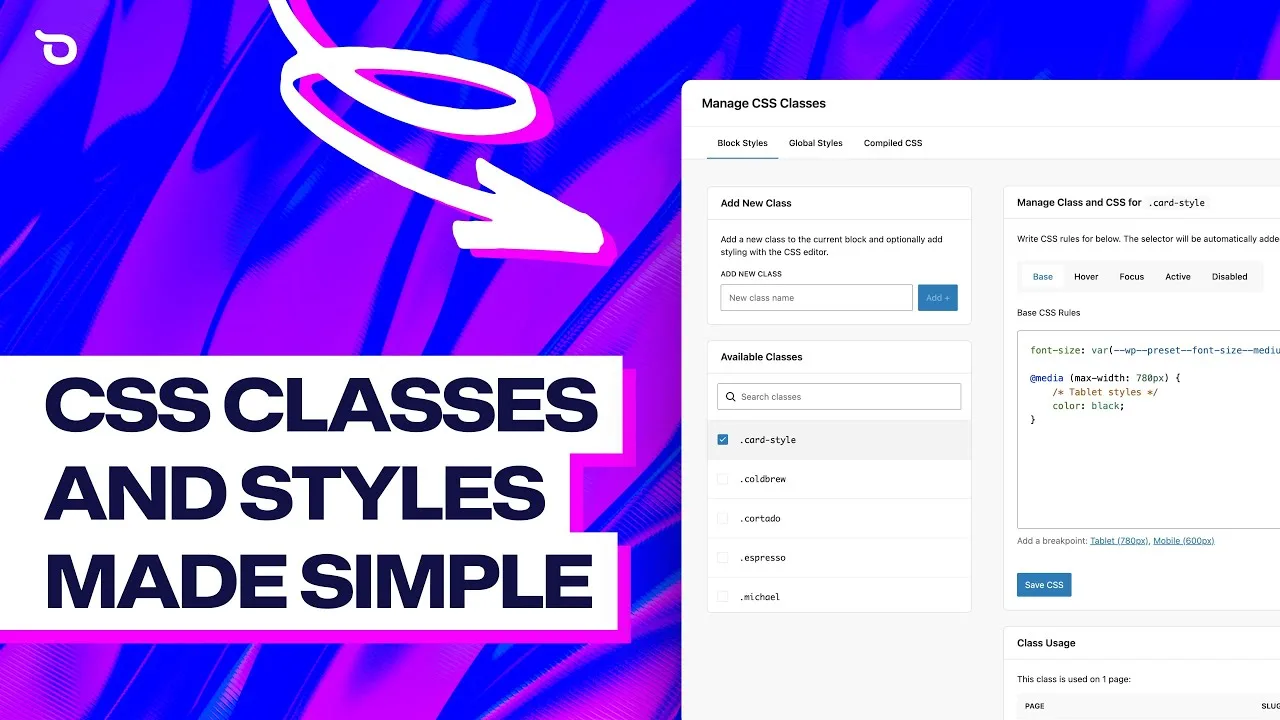
Ollie Pro did something really great… they built a Class Manager. That name, on its own, doesn’t really capture what it does. It’s not merely about organizing existing classes. It makes the old extra classes field obsolete, and you never have to return to the CSS screen to add your code. Class Manager actually manages the whole class management itself.
Class Manager has several options
- Create a class live in the block settings, even add the class values in the block settings if you like, or open the Class Manager popup.
- Connect a class to the theme of blockbuilder variables. That means that when you change the color or spacing values of the theme, all blocks where you applied that class will change accordingly—without any manual process at all.
- After saving your classes, just go to the block settings and select the class from a dropdown list. Done.
Ollie has a solid video and explains it even better. This is the first class manager I’ve enjoyed using and still enjoy.
WooCommerce & Ollie Pro
This is a significant decision for many users. I have been using Kadence Pro, which comes with numerous extra features. I’m curious if Ollie Pro can truly serve as a replacement for my previous favorite theme, Kadence Pro, and whether I can achieve the same websites with it.
By replacement, I mean creating completely customized product pages that transform into unique layouts, indistinguishable from traditional product pages. These will feature a flyout that users can expand only when they express interest, including all necessary add-to-cart information. Additionally, there will be a sidecart with personalized labels and buttons, as well as tailored labels and extra fields on the checkout page. It’s essential that this is implemented in every language required by the client.
The WooCommerce layouts
The first thing I did was look at the WooCommerce designs that Ollie Pro provides in the theme. For the product page, the product list, the sidecart, etc. To be perfectly honest, I was surprised. The layouts are beautiful, polished, and truly made with attention to detail. In fact, they are actually usable for a web designer who likes to deliver a polished site.
Shop list
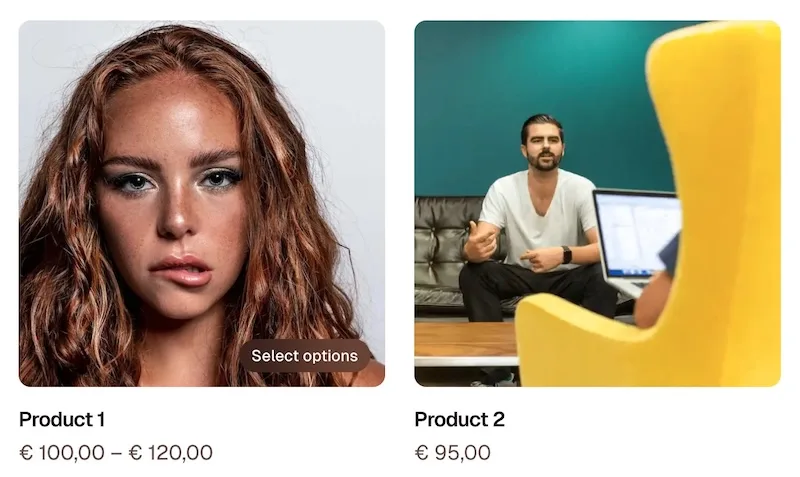
The shop list shows the product and add to buttons slightly differently than most other themes, but it is practical and well-designed:
- Hover displays ‘Add to cart’ or ‘Select options’ within the image background (also works correctly in other languages).
Add to… adds the item immediately but does not open the sidecart. It does, however, neatly display a notification that it has been added. - ‘Select options’ with a variation product opens the product page, which is logical.
Side-cart
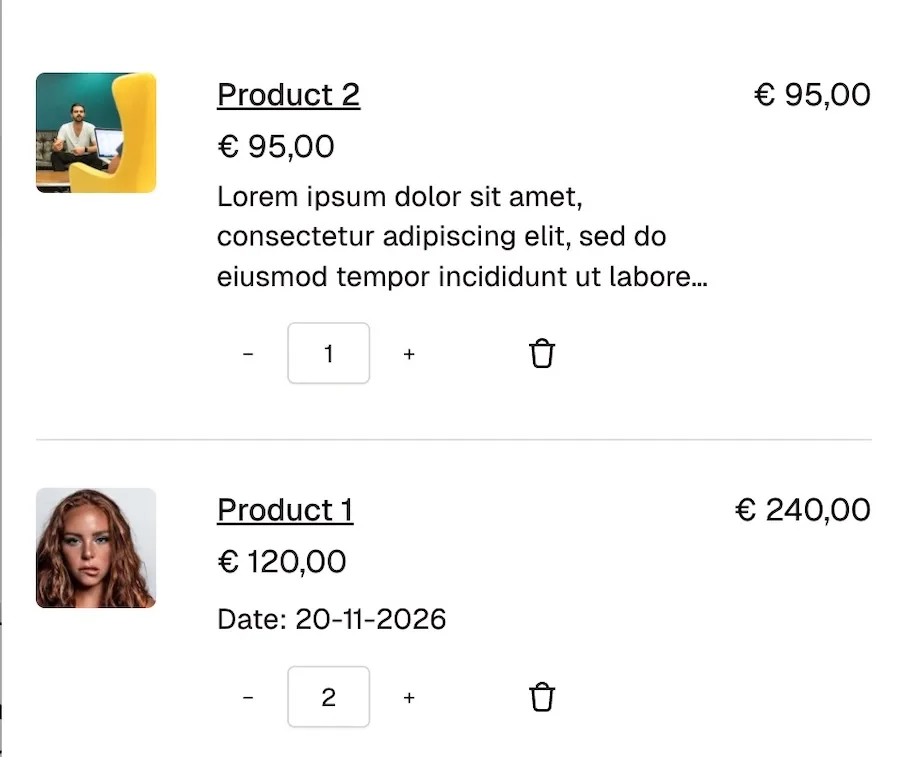
The side-cart is well designed and practical.
- They used icons instead of text for changing quantity and deleting items.
- Every label and button is customizable (in the template) and is not overwritten by language fields.
- Several items are removable and you can add blocks to your liking.
Note: In fact, the last two items are standard FSE qualities, but it is a fact that many FSE themes do not adhere to this 100% or do not integrate correctly. You then modify a label while a language file overwrites the frontend. I tested this intensively in Ollie and found no errors.
Checkout
On my test website the checkout template was displayed in English. But that might be because the site was set to English when I imported the Ollie templates. Front-end was correct in Dutch.
- Adjustments in the template were not overwritten by the Dutch translation files.
- ‘You are currently checking out as a guest’ is still there, but that is due to WooCommerce.
Shopping cart
- Perfectly adaptable
- Changed labels not overwritten by translations.
- Clear design.
Add to Cart block
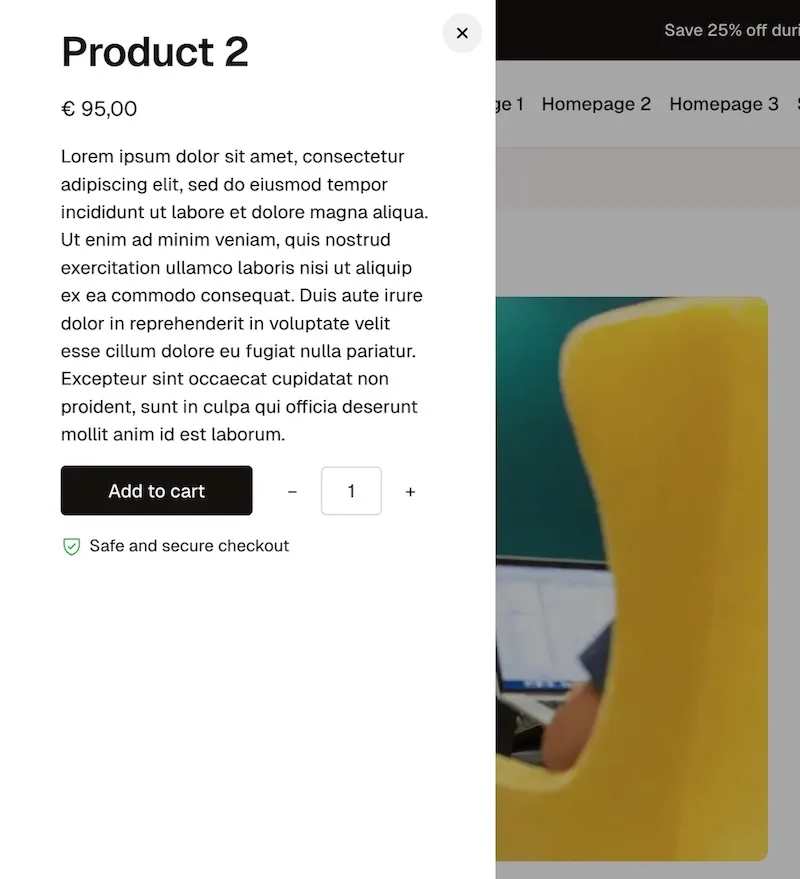
This is interesting.
- WooCommerce has its own add-to-cart block and some themes add their variation.
- Ollie Pro has an Add to Cart block. Officially, it’s still in beta I saw, but it’s remarkable. It behaves as it should (not all do) in a flyout, the layout remains intact and shows the product variations nicely.
- It’s one of the best add-to-cart blocks I have ever used or tested. Maybe even the best.
Preliminary conclusion
If you are not necessarily looking for a classic theme replacement, like Kadence or GeneratePress, but are in the market for a good, stable, beautifully crafted, and fast theme, go for Ollie. It is an incredibly beautiful and well-put-together theme. I haven’t found a single FSE theme that even comes close to it.
In the next part, I look at the possibility of using Ollie Pro as a replacement for the entire Kadence Pro suite.
Ollie as a Kadence replacement
or a replacement for any of the other premium classic theme – keep reading!
This is my secret checklist
I checked every one of them on my test website. The green items are already answered in the review-items before this chapter.
- Template customization (for pages, posts and products)
- Query of products
- Query of pages, like employees or…
- Columns block with breakpoints and URL target per column
- A decent grid with breakpoints
- Accordion
- Fly-out full-height, with a custom class trigger
- Popup, with a custom class trigger
- Form builder
- Responsive
- Ability to change WooCommerce lay-outs, labels and buttons
- Good and flexible add-to-cart block
- Video player block
- Tab block
- Map block (preferably without API)
- Everything must work with custom fields
- Extra fields for the checkout page
I am well aware that not every website needs all the features I discuss below. But this part is about Ollie Pro as a replacement for the entire Kadence suite, and a web developer usually prefers working with one favorite theme. In that case, these details are of great importance.
Accordion
- Gutenberg does have an accordion. For basic usage; works as it should fast and simple. However, this component is now being viewed with a Kadence replacement as the starting point. In that case, there is a chance that some users will desire a slightly more advanced accordion, with preset styles, FAQs schema and accordion items that can be opened with an ID.
- I use the Dynamic Accordion plugin for this. It’s ultralight, has presets, and both the title and the content also work with custom fields.
Flyout & Popups
- This is still missing from core Gutenberg . Lately, I haven’t created a single website that doesn’t have at least one flyout or popup. I you don’t use them, fine. If you are like me, there are several good plugins available.
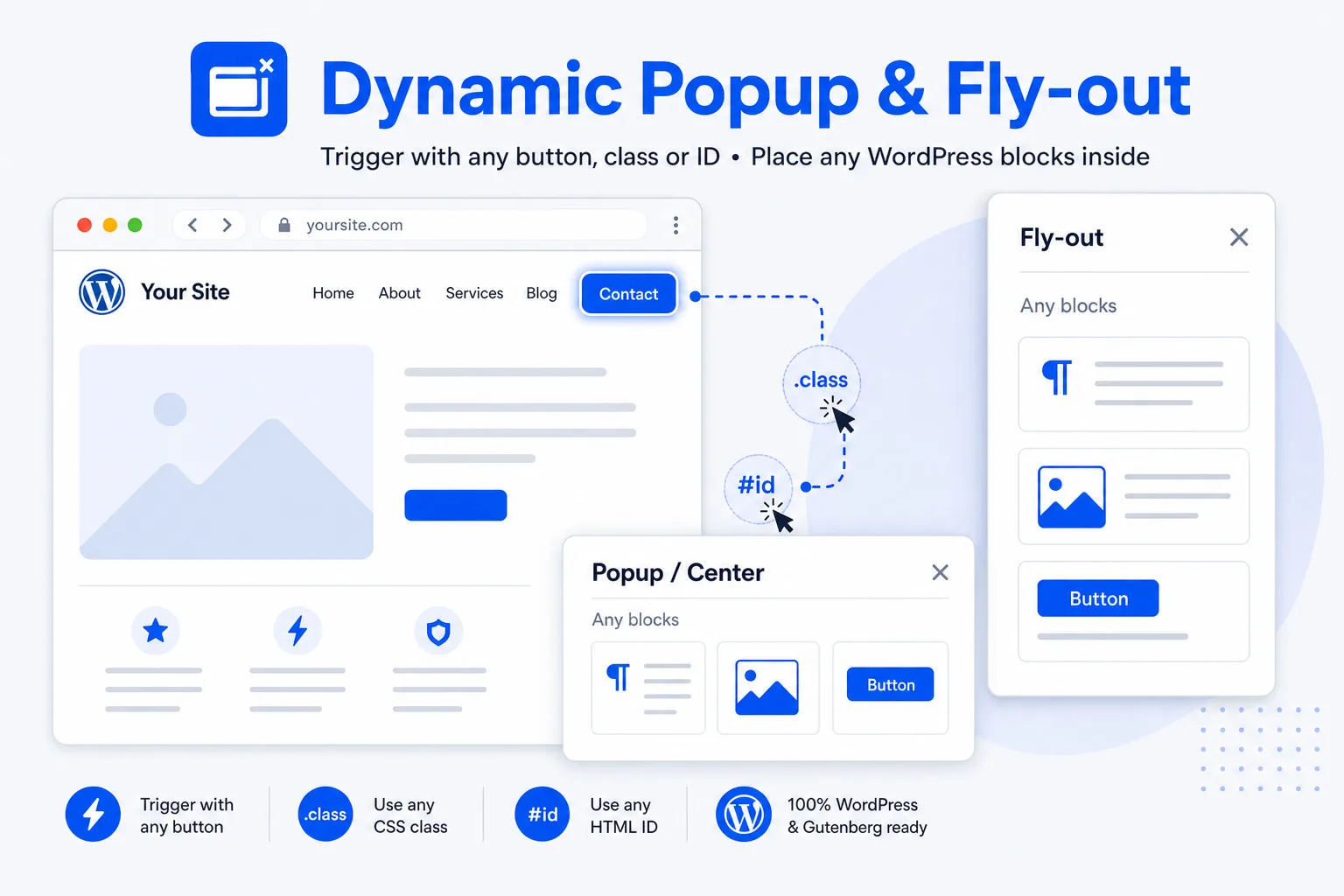
- I use Dynamic Popup and Flyout for my needs. It opens with every custom trigger (class or ID), is superfast and allows the placement of Gutenberg blocks.
Form builder
- Gutenberg has no form builder, and neither does Ollie. That is not an issue, because a pro rarely uses the included form builder, regardless of which builder.
- It’s nearly always best to work with a dedicated form builder. JetFormBuilder is perfect. Even the free version is remarkable and works with custom fields.
Video player
- In this case Ollie Pro offers you 2 choices! Gutenberg had the core video block, and Ollie Pro also offers the Video Modal.
- Ollie’s Video Modal lets you add video playback to the Cover and Button blocks. It has two source options: YouTube video or the media library. On click the video opens in a modal overlay.
- If you need more than this, need to show an MP4 from an external source or use custom fields, there are several good video plugins on the market. I work with the Dynamic Video player. It works with Bunny, Gumlet, Vimeo and YouTube, fetches its own video-posters and accepts all kinds of custom fields.
Tab block
- Not everyone requires a tab block nowadays. Most people use accordions instead. Because Ollie is builder-free and depends on the core Gutenberg blocks, there is only the (very basic) Gutenberg tab block present at this time.
- There are also numerous tab block plugins available on WordPress.org.
Map block
- Not everyone requires a map block. There are numerous map blocks available, although I only know a few good ones.
- I use the Dynamic OSM maps plugin. It works fast, you can disable the rendering backend and it accepts both addresses and coordinates in the editor or with custom fields.
Custom fields
By default Gutenberg blocks don’t work with custom fields. Most have binding capabilities, but most users, me included, don’t like writing code for every field to show the custom fields to the visitors.
- The recently launched Modern Fields plugin gives you custom fields and allows nearly all the Gutenberg core blocks to accept and show custom fields. Below is a list with the core blocks with ‘block bindings’ and work with custom fields.
- As a bonus; their pro version also connects with the core query block and allows filtering for values in custom fields and offers a repeater block, functionality that is not available otherwise in Gutenberg.
Those blocks are dynamic (usable with custom fields) with the Modern Fields plugin
Ollie’s weak spot: custom fields
OllieWP has made significant improvements to the core Gutenberg blocks. Building a website that incorporates a few custom fields using plugins such as Modern Fields, ACF, or Meta Box (all in block binding mode) can be easily achieved with the Ollie theme.
However, once a website becomes highly dynamic in its design—including columns with dynamically changing backgrounds, images filled in from content, and similar elements—you really start to miss an advanced builder.
Builders with good custom field capabilities
Gutenberg native blocks
- As mentioned before, the native blocks now support custom fields with the block binding capabilities. Modern Fields (free version), ACF (pro) and Meta Box (pro) offer the necessary block-binding feature. The combination of native Gutenberg blocks and the block binding feature is limited compared with the other builders with custom field capabilities, for basic usage it might be more than enough.
- You could also keep using core Gutenberg as the foundation, with Ollie’s Pro extensions, and add specific blocks from Greenshift or Greenlight, since both are especially strong when it comes to custom fields. That is the approach I’m most inclined to take.
Greenshift
- Greenshift is one of the Gutenberg builders that excels at working with custom fields and dynamic values. Its capabilities in this regard are limitless.
- You need the Pro version of Greenshift to work with custom fields.
Kadence blocks
- Kadence Blocks is another Gutenberg builder that excels at working with custom fields and dynamic values. It is less extensive than Greenshift but excellent.
- You need the Pro version of Kadence Blocks to work with custom fields.
- The downside, however, is that Kadence Blocks is precisely the builder many people are moving away from, due to the policies of the new owner, Liquid Web.
GenerateBlocks
- GenerateBlocks is also remarkable in working with custom fields and dynamic values. The only downside of GenerateBlocks is that the range of blocks is significantly smaller than that of comparable builders like Greenshift and Kadence. The blocks they do offer are of high quality, customizable down to the last detail, and ensure a super-fast website.
- I use a few WP INSIGHT plugins to get the functionality I’m missing (maps, opening a query-item in a flyout, and a customizable WooCommerce product template).
Stackable
- Stackable is also a great, user-friendly builder—perhaps the easiest of the lot, alongside Kadence. While Stackable is less comprehensive than, say, Kadence or Greenshift, it is more than sufficient for most users, and the workflow and handling of custom fields are excellent.
- You need the Pro version to work with custom fields.
Replacing your row/column block
** If you don’t like the row-block (section, columns, container) experience of a builder, there is a suitable alternative: the Flexible Layout Section block. The flexible layout section plugin is especially developed for situations like this.
Extra checkout fields
- Since my relationship with Kadence has cooled, I had to look for ShopKit alternatives. Most features are abundant because FSE themes are more flexible already. What I missed and needed were extra fields on the checkout page.
- The plugin ‘Checkout Fields for Blocks‘ (made by WPDESK) gives you exactly the extra blocks you might need.
Useful extras
- Assigning templates, header or footers: Dynamic Templates & Elements will do that.
- Read More plugin: There are several plugins on WordPress.org.
- Go to top: create an icon in the footer with a high anchor target or use a plugin from WordPress.org.
But I don’t want more plugins!
- I used to think that as well. That changed when I began building plugins myself and realized that a solid plugin is often just a bit of PHP code, and occasionally a JS script in a folder. It’s the same code you’d place inside a code snippet plugin.
- Let’s compare the Ollie Pro setup with a Kadence setup. If you were to handle everything with Kadence, for example, as I initially did, you would still be dealing with an entire set of plugins. They may all share the same branding, but it is still a bundle of 5+ plugins plus the theme itself.
- Or compare it with GeneratePress. That would mean 2 plugins and the theme as just the basic install, plus a popup, maps, a video player, and a checkout fields plugin. In total, that’s 6 plugins plus the theme itself.
- Ollie Pro just installs the theme and the Pro plugin, you don’t even need a builder plugin. The rest is optional – so it’s a very clean start.
- All plugins mentioned in this review are free or very affordable, and most even offer lifetime licenses.
Conclusion of Ollie Pro as a complete Kadence Pro replacement
Yes. Ollie Pro is not just a good replacement for Kadence; it is an excellent replacement. I spoke with some people who made the switch and they never looked back.
- For several days, I created everything with Ollie that I also asked of Kadence; not a single problem.
- Ollie A.I. (not in the review) can do remarkable things.
- You are not locked in: it’s all core. If you ever leave Ollie you lose some functionality, but the design and most of the elements should remain intact.
- Backend and frontend are both super-super fast. In my test I had to install numerous plugins just to test compatibility. The theme (and website) remained very responsive and fast and is a joy to work with.
- If you optimize your images and know what you are doing as a designer, you might not need cache at all.
- The theme is not cheap and there is no lifetime license. On the other hand, they seem to provide good support (I didn’t need any), and as a user you want to support the creators as well.
My personal process
I’ve been on the hunt for a replacement for Kadence ever since the unexpected developments at Liquid Web, the company behind Kadence. It turns out my search may have been misdirected. I was seeking both a theme and a builder to take Kadence’s place, as well as a new option for a Shop Kit. During my journey, I’ve tested a myriad of themes, both classic and full site editing, along with various builders. It never crossed my mind that a single product like Ollie Pro, combined with a few small plugins (that I often need with other builders as well), could provide everything I needed.
It is also a very annoying realization. I have a lifetime license for Kadence Pro for unlimited sites. Now I am finding out that:
- Kadence is making a mess of things.
- That my lifetime license is of no use to me anymore, except for the already existing websites.
- That I was actually looking for a copy for something that, in hindsight, did not quite meet expectations.
- Ollie might be my all-time favorite, as a real Kadence Pro replacement and as a theme in general.
A bit of harmless criticism
- Although Ollie provides a lot of information on their website, I missed information (besides the video) about the class manager. No big deal.
- OllieWP could be a little less timid, a little less ‘reserved’ about their product. When you read the documentation for a product like Kadence, it almost seems as if you have found nirvana. In that regard, Ollie is (in my opinion) too modest.
- If you enter the word Ollie into Google, you get many unwanted results on all kinds of unrelated topics. Ollie also sounds a bit young and jumpy. Given the maturity of the theme and the fact that it is definitely serious competition for the big boys in terms of features, it deserves to be a bit more serious; OllieWP covers the essence better than just Ollie.
- In the beginning I wondered what Ollie was. A theme? A theme with an included builder? Or a theme that extended the core features? I once learned from my publisher that a product must be so clear that the buyer doesn’t have to think about what its added value is. With Ollie, I had to think. The reason for this is basically partly their unique approach; a theme that offers a complete builder experience.
About Ollie
- By default the Ollie theme uses the Gutenberg core blocks, including the group block, columns and the query. Those are excellent blocks in themselves, but not exactly advanced for the demanding user. Ollie did enhance the core blocks a lot and has added exactly the features everyone was missing. The blocks now have a perfect balance between features and speed.
- Some classic themes, like Blocksy for example, rely to some extent on builders like Stackable and Greenshift to complement the theme; Ollie, to date, has not involved itself in such a way. Kadence theme relies on Kadence blocks, GeneratePress relies on GenerateBlocks, etc. Ollie has chosen to remain independent and works by default with Core blocks.
- OllieWP offers a unique approach, and I couldn’t find a single feature that wasn’t genuinely useful. I find it very impressive to strike such a successful balance between minimalism and functionality.
- It is quite unique that a theme is ideal for the professional and for someone who only builds their own website.
The WPinsight advice? Purchase the pro version of OllieWP or at least try it. You will be surprised!
Please note: this is not an affiliate article; it’s just a review of a wonderful theme I really like.