Block Visibility — Conditional Visibility Control for the Block Editor
Block Visibility — Conditional Visibility Control for the Block Editor
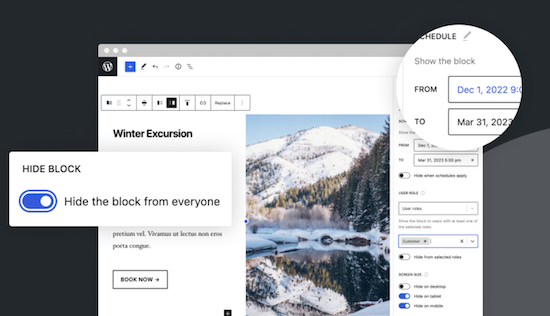
With this no-code solution you determine which blocks are visible on a website and who can see them. You can even show or hide blocks at a specific time. Show exclusive promotions to customers or members. Limit blocks to specific user roles, screen sizes, query series, WooCommerce products, EDD downloads, ACF fields, WPFUSion tags and more. Block Visibility is exclusively built for the WordPress editor (Gutenberg) and is designed to work with every WordPress block. This includes blocks that are supplied native by WordPress, but also blocks of third parties and even blocks -based widgets. This plug-in is ideal for making every submenu item in a Fse theme conditional! Note: To add conditions to Child menu items from a FSE theme, you must check ‘Full Control Mode’ in the plug-in settings. The plug-in has 30,000 users and was developed by Nick Diego.
Advantages of Block Visibility — Conditional Visibility Control for the Block Editor
There is no pro version. They do have a website for this plug-in, so it is possible that there will be a Pro version.
Conclusion about Block Visibility — Conditional Visibility Control for the Block Editor
If you work with an FSE theme (the future of WordPress) this is an absolute must-have. What the plug-in ‘If menu’ does for the classic themes does this plug-in (and more) for FSE Block themes. Note: Not yet tested with the Kadence Navigation (ADV) Block.
Affiliate statement
This post may contain affiliate links. If you click through and make a purchase, I may earn a commission at no extra cost to the buyer. If possible, you will even get an additional discount.