WP tools WordPress collectie + GS Filter block
Collectie belangrijke en vaak onmisbare WordPress plug-ins en online tools
-
Add to Cart Redirect for WooCommerce
Sends visitor after adding to cart directly to checkout, or to terms and conditions, or a mandatory form, or automatically adds a gift. Note: this plugin is, as far as I know, not suitable to send the visitor after adding to cart directly to an external product or checkout page.Voordelen Pro versie
It’s a pro plugin.
Conclusie
Handy plugin for WooCommerce
Prijs pro vanaf € 29
Meer informatie?
basbuis/21-05-2025Add to Cart Redirect for WooCommerce
Sends visitor to… after adding to cart
-
Autocomplete WooCommerce Orders
Improve the efficiency of your WooCommerce store with the plug-in autocomplete WooCommerce orders. Set orders automatically to “completed” upon confirmation of the payment, streamline your sales process and lower the administrative overhead. Ideal for stores that process virtual goods, subscriptions or physical products.Voordelen Pro versie
The premium version of the WooCommerce Autocomplete Orders Plug-in offers you a wide range of additional functions with which you have full control over the process of automatic supplement of orders. Replenes orders automatically for the direct bank transfer payment method – automatically supplement orders for payment method Check – Subscribe orders automatically for the payment method in cash on delivery – Automatic supplement of orders for braking ranks with downloadable products. They offer different licenses, including Lifetime.
Conclusie
Many WooCommerce websites handle the orders without using the WOO functionality. Then it is very nice that this plug-in (after receipt of the payment) sets the order completed. Also ideal when it comes to an affiliate system. Tip: The maker has many more (WooCommerce) plug-ins.
Prijs pro vanaf € 19
Meer informatie?
basbuis/21-05-2025Autocomplete WooCommerce Orders
Set WooCommerce orders automatically on “completed” when the payment is confirmed
-
Back In Stock Notifications for WooCommerce

A 100% free plugin for WooCommerce® with which your customers stay informed of the products they love. At the same time you get valuable insights into the demand for products or services. From an e-commerce perspective, products that are not in stock can lead to missing turnover and frustrated customers. Gives: More conversion: By inviting customers to register for reports, you put interest in action even when the stock levels fluctuate. – Insight into the question: the Bisn dashboard provides insight into the most sought after and most arrears, so that you can make data-based decisions about your inventory and marketing. – Customer-oriented involvement: Keep customers informed with a personalized e-mail when the product they love is available again.Voordelen Pro versie
This plug-in is completely free of charge.
Conclusie
If it occasionally happens that a product or service is not available in a WooCommerce store, this is an absolute must!
Meer informatie?
basbuis/21-05-2025Back In Stock Notifications for WooCommerce
Back In Stock Notifications for WooCommerce
-
Better Notifications for WP
Better Notifications for WP (BNFW) is a simple but powerful plug-in with which you can adjust the e-mail reports that WordPress sends using a WYSIWYG editor and shortcodes to insert data such as date, user, e-mail, etc. All standard WordPress e-mail notifications are available for adjusting, as well as a lot of new ones. You can choose to send notifications to individual users, multiple users, or all users in a user role.Voordelen Pro versie
You can also expand the notifications with the premium add-ons of BNFW. Think of having each user manage their own notifications, conditional notifications, use of ACF fields, grouping users, remembering when there is a response, use on a multisite, send to any e-mail address (even without WordPress account) and even more. You can purchase the add-ons separately, or as a bundle.
Conclusie
If you want to improve or expand the WordPress reports (even if you have already installed WooCommerce), this plug-in is actually indispensable.
Prijs pro vanaf € 59
Meer informatie?
basbuis/21-05-2025Better Notifications for WP
Improves the e-mails that WordPress sends
-
Block Visibility — Conditional Visibility Control for the Block Editor
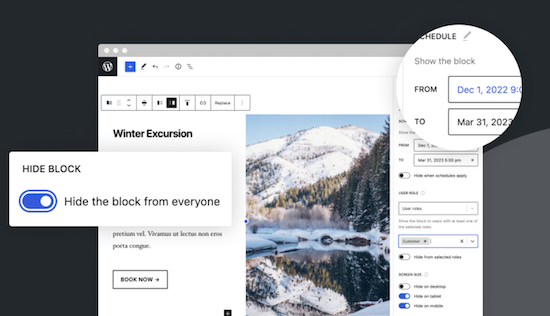
With this no-code solution you determine which blocks are visible on a website and who can see them. You can even show or hide blocks at a specific time. Show exclusive promotions to customers or members. Limit blocks to specific user roles, screen sizes, query series, WooCommerce products, EDD downloads, ACF fields, WPFUSion tags and more. Block Visibility is exclusively built for the WordPress editor (Gutenberg) and is designed to work with every WordPress block. This includes blocks that are supplied native by WordPress, but also blocks of third parties and even blocks -based widgets. This plug-in is ideal for making every submenu item in a Fse theme conditional! Note: To add conditions to Child menu items from a FSE theme, you must check ‘Full Control Mode’ in the plug-in settings. The plug-in has 30,000 users and was developed by Nick Diego.Voordelen Pro versie
There is no pro version. They do have a website for this plug-in, so it is possible that there will be a Pro version.
Conclusie
If you work with an FSE theme (the future of WordPress) this is an absolute must-have. What the plug-in ‘If menu’ does for the classic themes does this plug-in (and more) for FSE Block themes. Note: Not yet tested with the Kadence Navigation (ADV) Block.
Meer informatie?
basbuis/21-05-2025Block Visibility — Conditional Visibility Control
Conditional Visibility Blocks, also Child menu items
-
Checkout Field Editor for WooCommerce
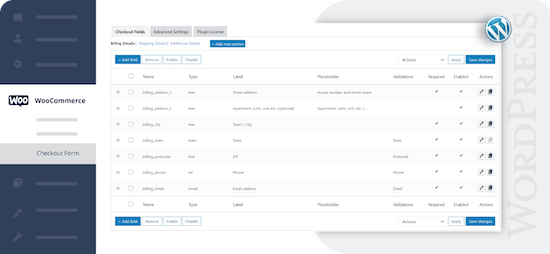
Check-out Field Editor for WooCommerce: This plug-in gives you the freedom to add, edit and remove fields on your check-out page, which ensures a tailor-made experience for customers. If you want to organize, rename or hide fields on your check-out page, this plug-in offers the flexibility you need. Speed up the checkout with a layout of one page and add adapted fields to streamline the process. 400.000 users.Voordelen Pro versie
Add custom fields and sections to your checkout page. Choose the price type for the fields from the list. View fields and sections based on specific conditions. Repeat fields and sections based on specific conditions. Manage the display of fields in e-mails and order display pages, and much more.
Conclusie
One of the best plug-ins to offer WooCommerce a more pleasant customer experience.
Prijs pro vanaf € 49
Meer informatie?
basbuis/21-05-2025Checkout Field Editor for WooCommerce
Adjust the Checkout page of WooCommerce.
-
Checkout Fields for Blocks
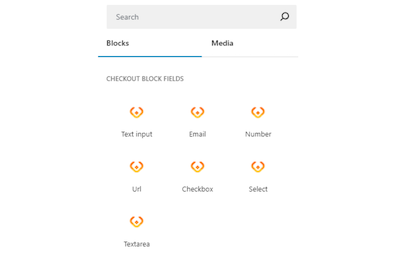
This plug-in adds extra custom fields to the WooCommerce Block Check-out (checkout form). It is not yet possible to adjust the names of existing fields, or target the invoice or address fields, but that depends on the restrictions imposed by WooCommerce. You can add a paragraph, image, or separation sign (the standard WooCommerce blocks). However, the plug-in is expanding the number of available options (fields) for the checkout form. Adding a new field is integrated in the block search bar. With Checkout Fields for Blocks, the following new fields (field types) are possible for the form. Text input – E -mail – number – URL address – Select – Select – Text box. You can also choose where you want to display the new checkout fields in WooCommerce: order confirmation, admin order, my account, order e-mail.Voordelen Pro versie
It is a free plug-in.
Conclusie
A very handy plug-in. Admittedly, it is not a Kadence Shop Kit, but this developer is one of the first to develop a good plug-in for the block version of the WooCommerce check-out page, while Shop-Kit still works on a Classic theme only. This recent plug-in therefore requires a block FSE theme. Highly recommended!
Meer informatie?
basbuis/21-05-2025Checkout Fields for Blocks
Adds extra fields to the WooCommerce Block Checkout
-
Coupon Affiliates – Affiliate Plugin for WooCommerce

With Coupon Affiliates you can easily set up an affiliate program for WooCommerce based on coupons, with which you generate more traffic and increase your sales. With this plug-in you also give your affiliates access to a user-friendly affiliate dashboard for their discount coupons. Here you can view statistics about the use of discount coupons, recent orders, deserved committee, referring URLs and more.Voordelen Pro versie
The Pro version includes: Multi-level affiliates, advanced management reports and analyzes, affiliate e-mail reports, advanced registration functions, creatives section again with downloadable banners, campaigns and much more! There is a pro version for 1 site and for 10 websites.
Conclusie
If you want to set up a simple and well-arranged affiliate program, which is not based on website links, but on WooCommerce coupons (often works better at business to private individual), this plug-in is ideal for WooCommerce coupons.
Prijs pro vanaf € 150
Meer informatie?
basbuis/21-05-2025Coupon Affiliates WooCommerce
An affiliate system based on WooCommerce coupons
-
Crocoblock plug-ins
Crocoblock is not one plug-in, but a whole family of super-powered plug-ins. Think of custom posts, fields, forms, menus, filters, grid builder, pop-ups, WooCommerce Builder, tabs, product gallery and much more. One of their well-known plug-ins is Jetengine, for custom fields.Voordelen Pro versie
It is a Pro Service. You can buy each plug-in separately, or suddenly the whole set.
Conclusie
A must. Solid and versatile.
Prijs pro vanaf € 43
Meer informatie?
basbuis/21-05-2025Crocoblock
A ‘family’ of useful plugins
-
ELEX WooCommerce Catalog Mode
We have made all functionalities related to catalog mode completely free! Not only that, you can replace the add-to-cart button with a custom button on the product page and store page. If you want to refer your customers to another site for specific products, you can set a custom URL for a custom button on the store page. Functions: WooCommerce Catalog mode – Remove the ‘Add to shopping cart’ button – Replace the ‘Add to shopping cart’ button with an adapted button – Hide product prices – Put your WooCommerce store in the catalog mode – Refer the product page to the products of third parties or partners by pointing to the store page. Note: You can also use this plug-in (the Premium version) to show individual products in catalog mode with a link to, for example, an external WooCommerce storeVoordelen Pro versie
WooCommerce Roll -based prices – WooCommerce Category Prices – WooCommerce Wholesale Prices – Customer -specific prices for WooCommerce – Request a quote – Roll -based WooCommerce Sales Tax options – Supports simple, variable and grouped products – WooComerce and remove it on Rollen – Prep on the – Suppose on Rollen – Set on on the Rollen – Suppose on the Rollen – Supples – Set on on the Rollen – Suppose on the Rollen – Supples – Suppose – Supples – Supples – Set on on Rollen on Rolls. – Option to apply discount/storage only on the selling price – Hide individual products for different user roles – More adjustment options on individual product pages – Support for WordPress Multilingual (WPML) – timely compatibility updates and bug fixes – Premium support!
Conclusie
Ideal plug-in to convert a WooCommerce as a catalog. You can also refer a product to an external store with the premium version.
Prijs pro vanaf € 79
Meer informatie?
basbuis/21-05-2025ELEX WooCommerce Catalog Mode
Offers an extensive solution to convert a WooCommerce store into catalog mode
-
Foo Events
Krijg volledige controle over uw ticket verkoopproces en klantgegevens met de veiligste en meest flexibele event- en ticketingoplossing die er is. Duizenden FooEvents-klanten hebben miljoenen WooCommerce tickets met een aangepast merk verkocht vanaf hun WordPress websites zonder dat ze ticketkosten of commissie hoefden te betalen. Krijg volledige controle over hoe uw tickets eruit zien, hoe ze worden verzonden, in welk formaat ze worden verzonden en hoe ze worden gebruikt door uw team en klanten of deelnemers. U kunt kiezen uit meer dan 20 gratis ticket thema’s of uw eigen thema ontwerpen met het starterthema als leidraad.Voordelen Pro versie
Het is een pro event plug-in voor WooCommerce.
Conclusie
Een heel handige, veel gebruikte plug-in. Niet echt goedkoop, maar de plug-in is efficiënt en kan ook grote events met vele duizenden bezoekers aan, zonder problemen.
Prijs pro vanaf € 139
Meer informatie?
basbuis/22-02-2025Foo Events
Beheer en verkoop evenementen, cursussen, tickets op uw jouw voorwaarden
-
FooConvert – Boost Conversions & Lead Generation
FooConvert is een WordPress-plug-in die is ontworpen om je te helpen een website te optimaliseren voor maximale conversies. Met widgets met hoge conversie en geavanceerde analyses helpt FooConvert je moeiteloos meer leads te genereren, de verkoop te stimuleren en de betrokkenheid van klanten te vergroten. Heeft ook integratie met WooCommerce.Voordelen Pro versie
Er komt ook een betaalde Pro versie van FooConvert!
Conclusie
Zeker een aanrader.
Meer informatie?
basbuis/13-01-2025FooConvert – Boost Conversions-Lead Generation
Optimaliseert je website voor maximale conversies
-
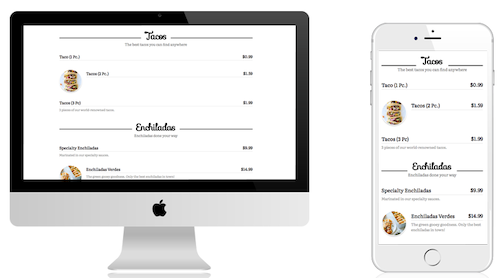
Great Restaurant Menu WP
Hiermee kun je snel een menu maken voor een restaurant of andere bedrijfsactiviteit (zoals salons, sportscholen, enz.). Er worden 5 sjablonen meegeleverd en je kunt aangepaste sjablonen maken. Standaardsjablonen zijn allemaal responsief en zien er geweldig uit op desktops, tablets en mobiele apparaten. Het menu ondersteunt groepen/categorieën, subgroepen/categorieën en items. Items kunnen de itemnaam, beschrijving, afbeelding en prijs bevatten. – Met de menu-editor kunt u eenvoudig groepen en items slepen en neerzetten om ze snel en eenvoudig opnieuw te organiseren – Biedt volledige ondersteuning voor netwerk-/multisitewebsites.Voordelen Pro versie
Er is geen Pro versie van te koop.
Conclusie
Aanrader!
Meer informatie?
basbuis/20-02-2025Great Restaurant Menu WP
Prijslijsten, menu’s, etc. – ook andere branches dan de horeca
-
Hollerbox Popups & Lead-Generation for WordPress
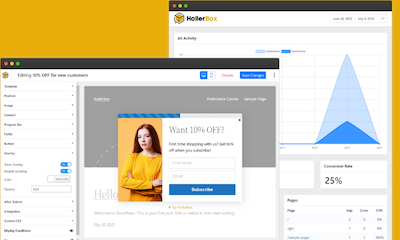
Met HollerBox Popups & Lead-Generation voor WordPress genereer je meer leads en verkopen, met eenvoudig te implementeren pop-ups! Onze pop-upb ouwer is het perfecte alternatief voor OptinMonster , PopupMaker , MailOptin en meer! HollerBox is volledig zelfgehost, wat betekent dat er geen limieten zijn op het aantal pop-ups, leads of impressies. Bent je een agentschap, e-commercewinkel of klein bedrijf dat zeer effectieve pop-ups nodig heeft? Dan is HollerBox de juiste keuze!Voordelen Pro versie
HollerBox Pro voegt meer pop-ups, triggers en integraties toe! – Pop-ups activeren op basis van inactiviteit – Lay-out van banner- en voettekstbalk – FOMO (verkoopmeldingen) – Zijbalk lay-out – Popup planning (datum planning) – CRM-integraties ActiveCampaign – ConvertKit – Drip – HubSpot – MailChimp – MailPoet – Groundhogg.
Conclusie
Ideaal voor WooCommerce en nog veel meer.
Prijs pro vanaf € 120
Meer informatie?
basbuis/28-01-2025Hollerbox Popups & Lead-Generation for WordPress
Genereer meer leads en verkopen, met eenvoudig te implementeren pop-ups!
-
If Menu – Visibility control for Menus

Bepaal welke menu-items bezoekers van uw site zien, met zichtbaarheidsregels. Hier zijn een paar voorbeelden: Geef een menu-item alleen weer als User is ingelogd. Verberg een menu-item op mobiel. Alleen menu’s weergeven voor Admins and Editors. Verberg Login of Registreer links voor ingelogde Users. Alleen menu’s weergeven voor Customers met een actief membership. Toon menu’s op basis van de taal van de bezoekers. Nadat de plug-in is ingeschakeld, krijgt menu-item een nieuwe optie ‘Menu-item zichtbaarheid wijzigen’ waarmee je zichtbaarheidsregels kunt selecteren. LET OP: deze plug-in is alleen geschikt voor de classic thema;s, dus werkt niet met FSE-thema’s. Voor deze functionaliteit met een FSE-thema, raad ik deze plug-in aan: https://wpinsight.eu/wp-tool/block-visibility-conditional-visibility-control/Voordelen Pro versie
Deze plug-in kent geen pro versie; de ontwikkelaar stelt een kleine donatie wel op prijs!
Conclusie
Als je een manier zoekt om bepaalde menu-items onder bepaalde voorwaarden wel of niet te tonen, is dit de ideale plug-in. Ik gebruik de If menu plug-in regelmatig voor bijvoorbeeld leden websites, of Learndash sites met speciale menu-items voor de beheerders en leraren.
Meer informatie?
basbuis/20-02-2025If Menu – Visibility control for Menus
Instellen welk menu item wanneer zichtbaar is
- Prev
- 1
- 2
- 3
- Next