Insight Maps plugin
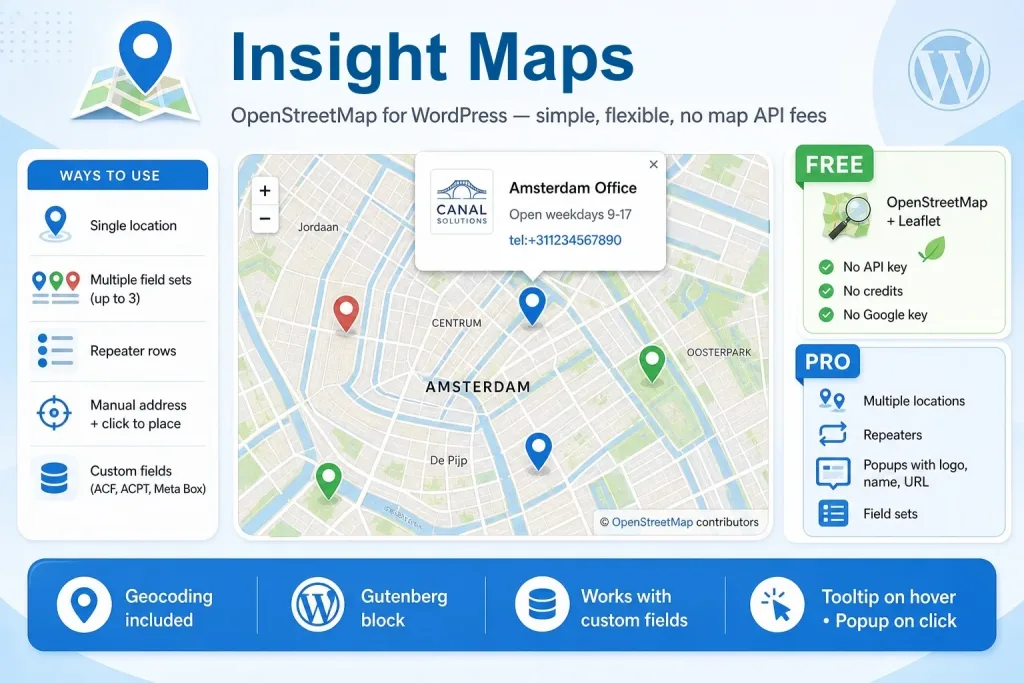
A unique and versatile WordPress Gutenberg Maps block: Insight Maps
The Insight Maps block is simple and advanced at the same time. It offers everything you need as a developer / web designer, without unnecessary features.
An excellent Gutenberg OpenStreetMap plugin with numerous options.
Insight Maps – Free version
- No Google API required; the plugin works completely with OpenStreetMaps and has unlimited free usage.
- No settings, memberships for map-data required.
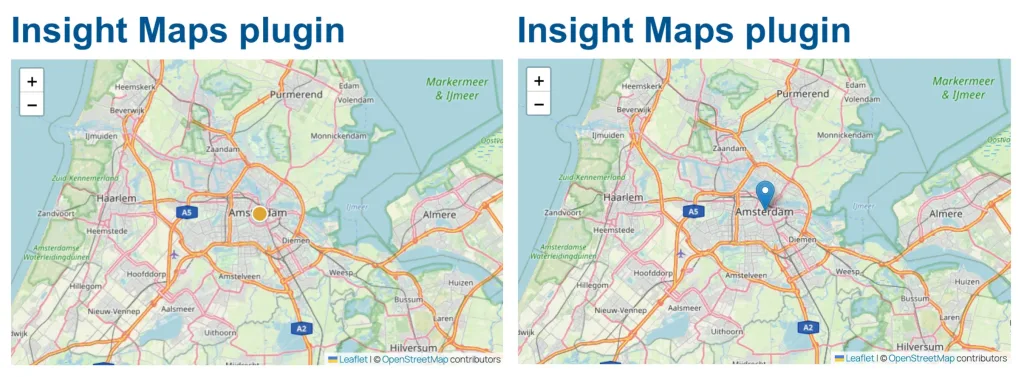
- Two types of markers (classic and dot)
- The dot marker is available in various colors.
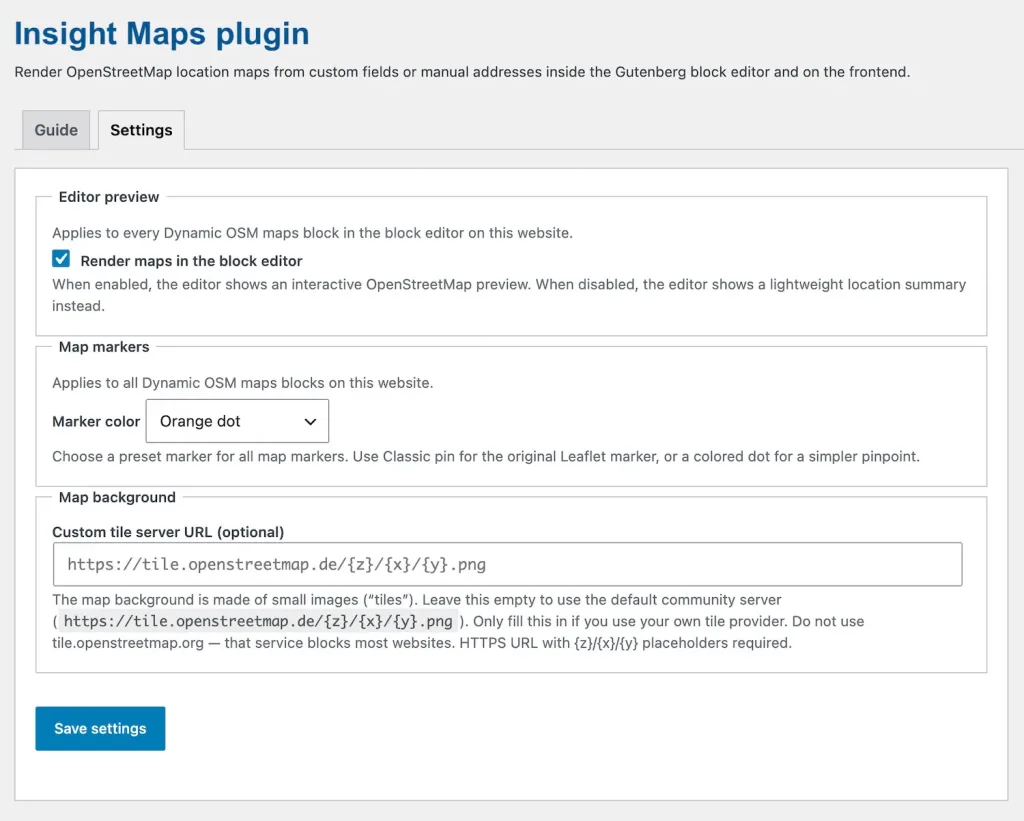
- Option to not render the maps in the editor to keep your pages superfast.
- Super light block; rendering is done by Leaflet.
- Unlimited map blocks, with single location mode and manual address only.
- Show one marker on each map.
- You can update anytime by purchasing a license.
- Use the CSS provided to customize the appearance of the front-end.
Insight Maps – Pro version
- No Google API required; the plugin works completely with OpenStreetMap and has unlimited free usage.
- No settings, memberships for map-data required.
- Two types of markers (classic and dot)
- The dot marker is available in several colors.
- Option to not render the maps in the editor to keep your pages superfast.
- Super light block; rendering is done by Leaflet.
- Use the CSS provided to customize the appearance of the front-end.
- Show one or multiple markers on the map.
- Works with a simple ‘set in the block‘ value, with custom fields and yes, also with repeaters.
- With simple custom fields (address in a text field) you can show up to 3 markers on a map.
- When using a repeater, the nr of markers on a map is endless.
- Popups (tooltip style) with location name, location extras info, location logo, and URL (https:// or tel:+)
- Works with custom fields from ACF, SCF, ACPT, Meta Box, and Modern Fields.
- Type of data accepted: custom field coordinates, custom field address text, multiple locations (field sets and repeaters).
- When using a custom field as the source, every map with an empty field is automatically hidden on the front-end.
Cache
- The plugin is built in such a way that no exceptions for scripts and URLs are required for commonly used cache plugins, such as LiteSpeed, WPCompress, FlyingPress, and others. The plugin takes into account placement in accordions, popups, and deferred scripts.
Limitations
- You can display locations from a query item (for example, in a flyout, popup, or on the post itself).
- However, the plugin is not intended to display all locations of all posts in a query on a map.
- The block can show multiple locations in a repeater on a map (unlimited).
Documentation
- Both the plugin itself (Settings / Guide) and the documentation page on our website offer documentation.
- The documentation also provides ready-to-use CSS snippets to customize the appearance of the map’s front-end.
FAQs Insight Maps plugin
Is it really posible to show all my maps with Google API and without recurring costs?
Yes, the Insight Maps plugin is using OpenStreetMaps and you don’t need a Google API or any other API at all. Just install the plugin, set a map and you are done.
The Pro version of Insight Maps works with repeaters. You can use as many locations as you want. Theoretically, the number is unlimited, but in our opinion, the map becomes unusable if you add too many.
Well, you are in luck. The Insight Maps (OpenStreetMaps) plugin is especially built for WordPress Gutenberg. A good fully dynamic map block is missing in most Gutenberg builder collections, and if they have one it’s usually very limited.
If you edit a page, especially with more maps and slow hosting, rendering slows you down while the shown maps have no use at all, while you are editing. Professionals like to work with a fast and clean workflow.
Oh yes. It’s the best way to show more markers on a map.
The easiest way is using text fields for the address (the plugin translates the address to coordinates), name of the location, extra info and the url. For showing the image you’ll need an image field.
If you don’t need those extra fields in the popup, just skip them: an text field for the address and a text field for the location name will do.
Work with all custom field plugin is too big of a promise… We built and tested the plugin with text, textarea en image fields from the following custom fields plugins:
- ACF (Advanced Custom Fields)
- SCF (Secure Custom Fields)
- ACPT
- Meta Box
- Modern Fields
Of-course. That’s why we created the plugin. It works perfect with the WordPress Gutenebrg core blocks and with builders like Kadence, GenerateBlocks, Stackable, aBlocks, GutenKit, PostX, etc.
The Insight Maps plugin has two versions; free and pro. Just purchase the license (see this page), download and install the pro version (keep the free also) and enter the key on the settings page: all Pro functionality is activated.
Insight Maps examples
Standard, with just a set address in the block
With repeaters and popups
Shown in greyscale; hover and click on the markers
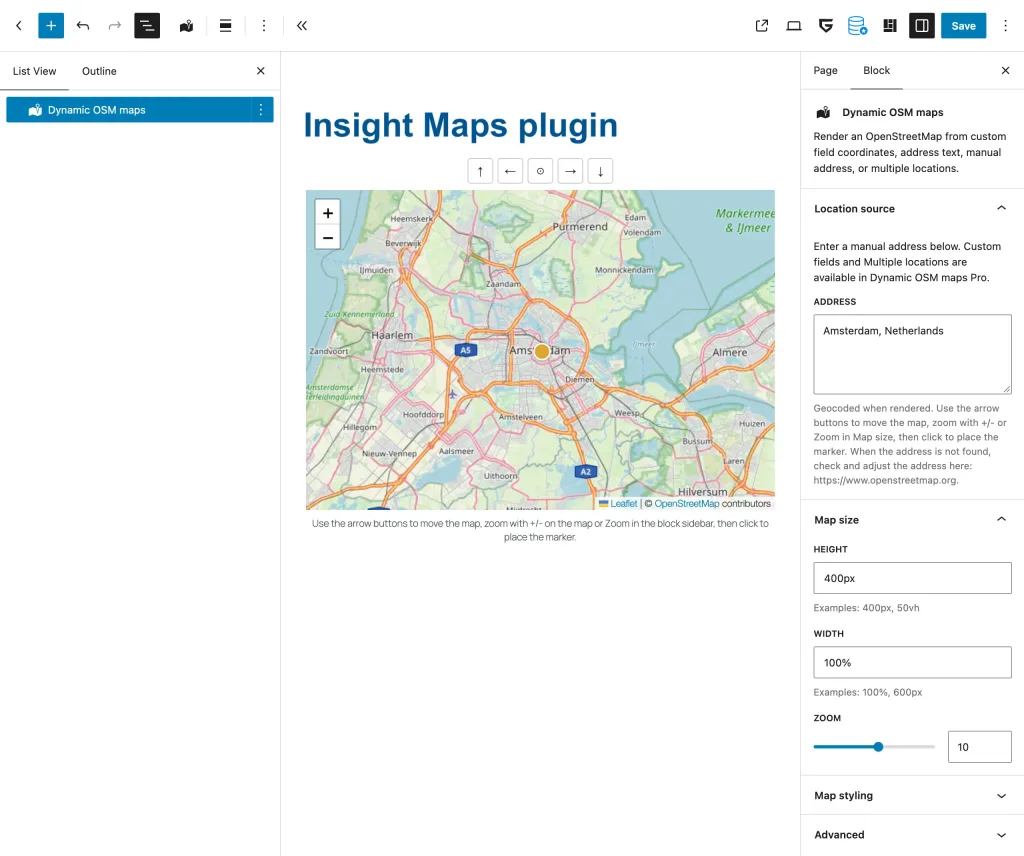
Map backend and settings – free version
Different markers; default or dot in different colors
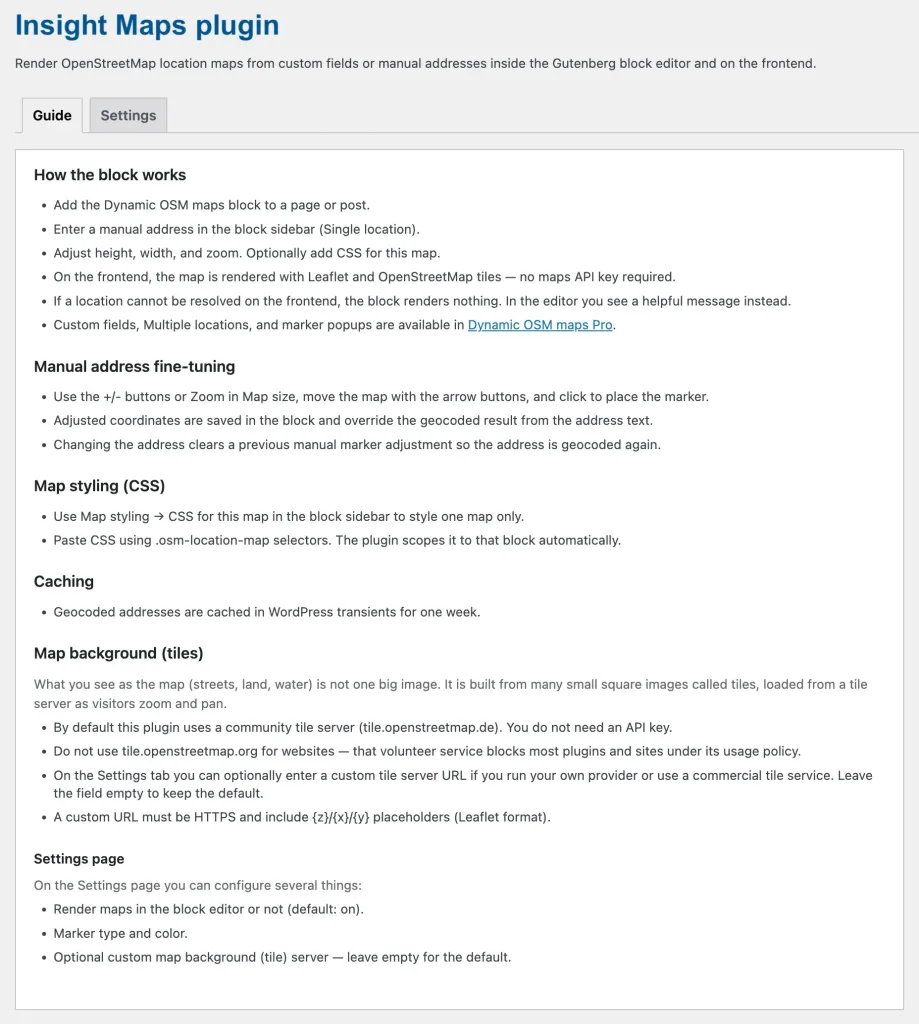
Admin / Settings – free version
Dynamic OSM Maps – Settings / Guide
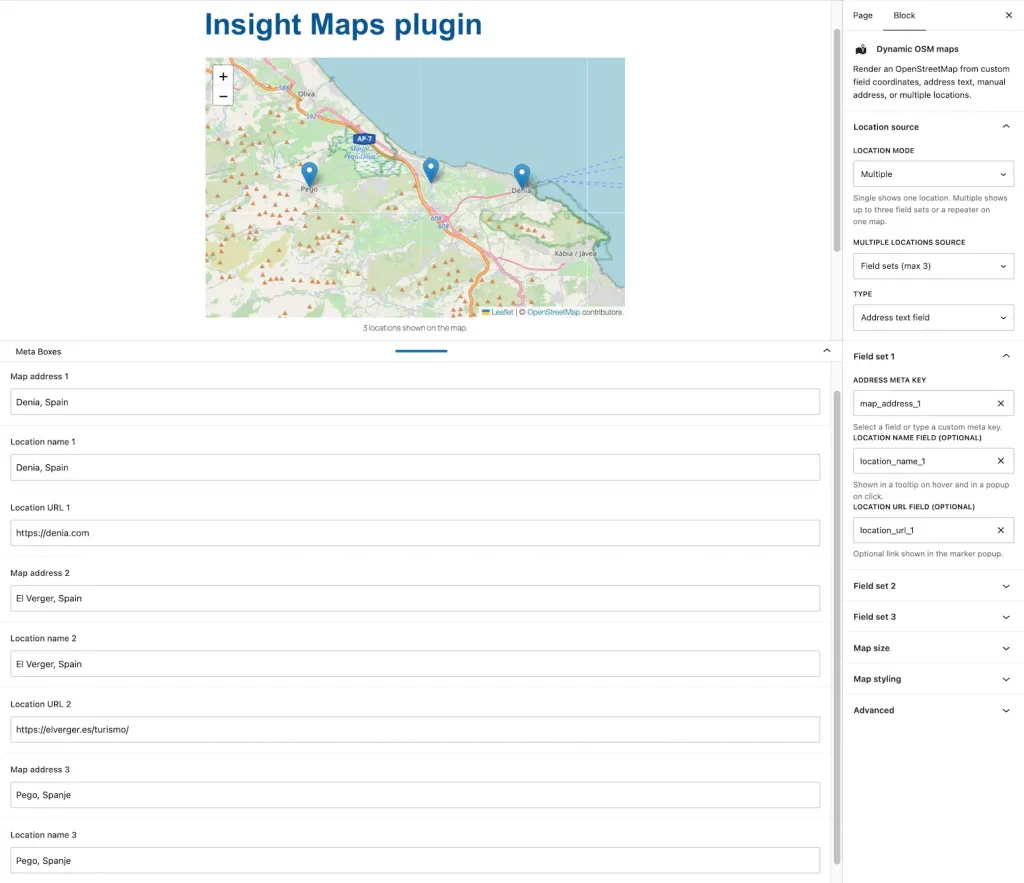
Map with 3 locations through custom fields – Pro version (custom fields, including repeaters)
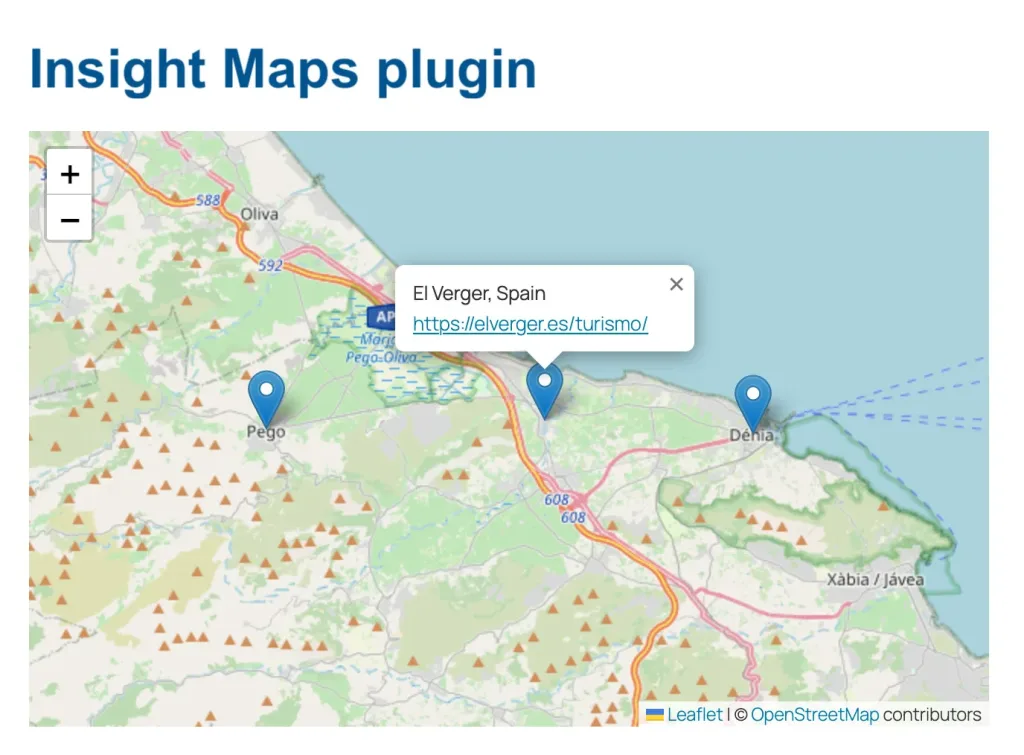
Pro version with 3 custom field front-end – hover and click makes a popup appear. With a repeater you can include a logo (any image)
Insight Maps
Free version
Conclusion: good for basics
- Activation on unlimited websites.
- No Google API required.
- Choose marker and colors.
- Block backend map rendering.
- Super light block; rendering is done by Leaflet.
- Create unlimited maps.
- Single location mode and Manual address only.
- Free; no costs ever.
You are missing:
- Multiple markers on a map.
- Multiple markers without custom fields.
- Using repeaters.
- Using custom fields.
- Automatic translation of addresses in a custom field to coordinates.
- Popup on each marker.
- Unlimited maps.
- Support for the developer

InsightMaps
$ 29 one-time
Conclusion: good choice
- Activation on 5 websites.
- No Google API required.
- Choose marker and colors.
- Block backend map rendering.
- Super light block; rendering is done by Leaflet.
- Unlimited maps.
- Show one or multiple markers,
- Works with a simple ‘set in the block’ value, with custom fields and yes, also with repeaters.
- Without custom field plugin you can show up to three markers on a map. With repeater unlimited.
- Popups (tooltip style) with location name, location extras info, location logo, and URL (https:// or tel:+).
- Works with custom fields from ACF, SCF, ACPT, Meta Box, and Modern Fields.
- Data accepted: custom field coordinates, custom field address text, multiple locations (field sets and repeaters).
Insight Maps
$ 49 one-time
Conclusion: excellent choice
- Activation on 25 websites.
- No Google API required.
- Choose marker and colors.
- Block backend map rendering.
- Super light block; rendering is done by Leaflet.
- Unlimited maps.
- Show one or multiple markers.
- Works with a simple ‘set in the block’ value, with custom fields and yes, also with repeaters.
- Without custom field plugin you can show up to three markers on a map. With repeater unlimited.
- Popups (tooltip style) with location name, location extras info, location logo, and URL (https:// or tel:+).
- Works with custom fields from ACF, SCF, ACPT, Meta Box, and Modern Fields.
- Data accepted: custom field coordinates, custom field address text, multiple locations (field sets and repeaters).
All-in plugin pack
50% Discount
Conclusion: best choice
- Purchase several plugins for a good price
- Professional features
- Most plugins are FSE and classic theme compatible, some are FSE only
Select from these plugins
Pro versions:
- Insight Popup & Flyout
- Insight Maps
- Insight Menu Block
- Insight pricelist
- Dynamic Accordion
- Dynamic Video Player
- Flexible Layout Section
- Dynamic Templates & Elements
- Double opt-in Kadence forms
Discount:
- Add plugins totaling at least $245 and apply the 50% discount coupon (ALL-IN-PLAN) for half off your purchase.