Double opt-in for Kadence forms
Double opt-in for Kadence forms – plugin
The form issue the plugin solves
Unfortunately, it has become ‘normal’ nowadays for forms to be filled out by robots, spammers, and other entities with questionable intentions. Even if it causes no actual ‘harm,’ it is extremely annoying. Your email inbox gets cluttered, and while sorting through it, you might accidentally discard a legitimate submission. Your mailing list fills up, and you end up paying more and more for marketing and SMTP credits.
The worst thing, however, is an unhappy client.
Solution
An advanced yet simple-looking plugin that performs the following:
- Works with all Kadence forms (Kadence Adv).
- With this plugin every Kadence form has an extra optional feature: double opt-in.
- Kadence handles the double opt-in process itself, independently of the mailing list or email provider.
- After submission, the visitor receives a visual notification confirming that a confirmation email has been sent to them.
- The confirmation email features custom text and a custom button.
- Once the confirmation button is clicked, Kadence executes all configured actions as intended.
Double opt-in for Kadence forms in more detail
How it works
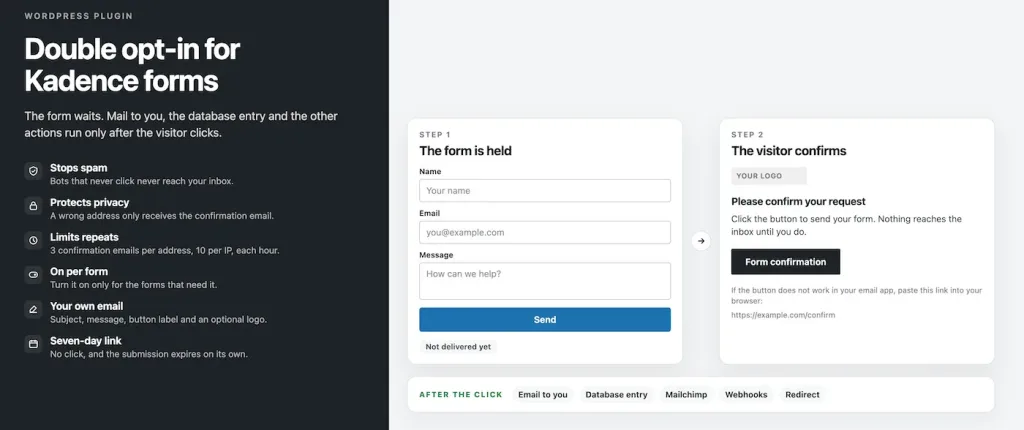
Someone fills in the form. The email, the database entry and the other configured actions do not run yet. The submission is stored temporarily, with a unique link. That link is sent to the email address entered in the form. Only after the click are the configured actions carried out and the submission saved. Without a click it stays pending and then expires.
Note: the plugin is in English and Dutch and follows the language of the WordPress installation.
Setup
The Kadence actions continue only after a click: the email to you, the database entry, Mailchimp, Brevo (and others), webhooks and an optional redirect. The link stays valid for 7 days.
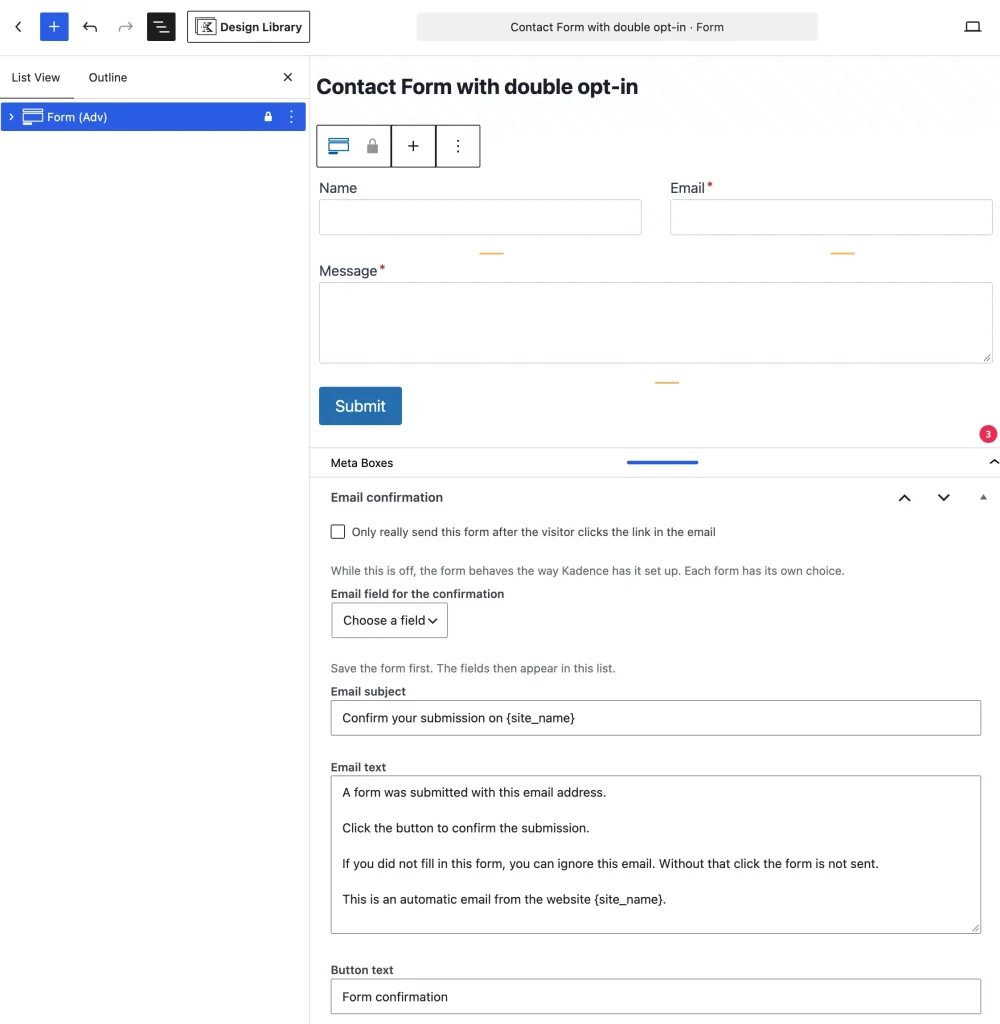
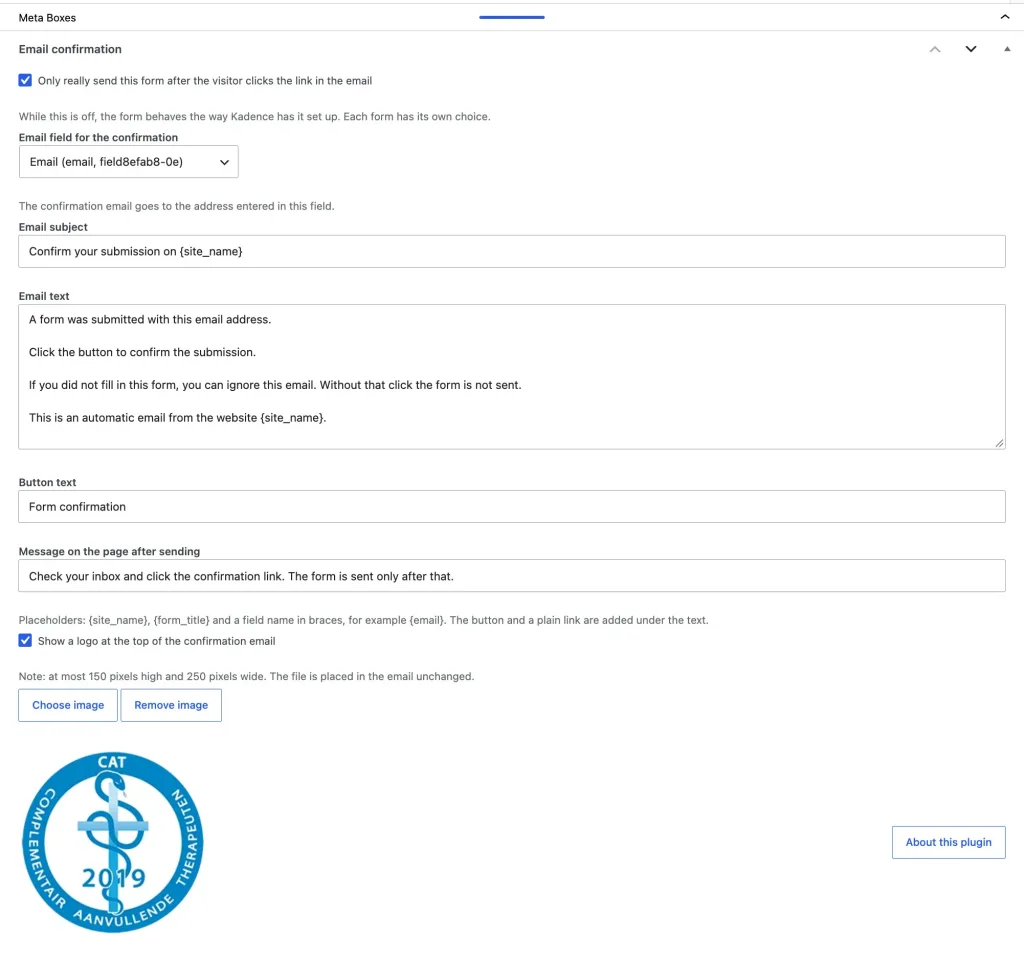
You choose this per form. Open the form under Kadence, Forms. At the bottom is the email confirmation box. The checkbox applies only to that form. In the forms list you see the Confirmation column: On or Off.
You set the subject and the text of that email in the same box, per form. Those texts are fully editable. Without {confirm_url} in the text, the link is added at the bottom of the email. You can also use {site_name}, {form_title} and a field name, for example {email}.
In the same box you select the field that holds the visitor’s address. After you save the form, the fields appear in the list. Email fields are listed first.
There is also a line for the message on the page after sending, so the visitor knows they still need to open the email.
Security
For a visitor who is not logged in, per form:
- at most 3 confirmation emails per email address
- at most 10 confirmation emails per IP address
The count runs for one hour after the last confirmation that was sent. After that, the visitor sees a message that a confirmation email was just sent, and no new confirmation is sent. A logged-in visitor does not have this limit. Logged-in use is free of these restrictions, including while you are testing.
Data storage
The texts and the logo choice are stored as extra fields on the Kadence form itself, in the wp_postmeta table. Per form, these keys are:
_kdoi_messageis the confirmation email text_kdoi_subjectis the subject_kdoi_page_messageis the message on the page after sending_kdoi_email_fieldis the chosen email field_kdoi_enabledand_kdoi_show_logoare the checkboxes_kdoi_logo_idis only the ID of the image in the media library
The image file itself is in the media library, under Uploads. Submissions that are still waiting for a click are stored separately in the wp_kdoi_pending table. If the database prefix is not wp_, that prefix is used instead.
Deactivation
Deactivating leaves everything in place. After you activate the plugin again, the texts, the checkbox and the logo are back.
Removal
Deleting the plugin via Plugins → Delete cleans it up. The meta box fields and the table of pending submissions are then removed. The logo file stays in the media library, but the form no longer knows which image it was. A reinstall therefore starts empty.
Update
Installing a new version over the old one, as with an update, is not a deletion. The texts and the logo are kept.
Filter details
The filters used are kadence_blocks_advanced_form_actions (decides which actions run) and kadence_blocks_advanced_form_submission_reject (holds a submission back). Added to that is a short step of our own: store the submission, send the confirmation email, and send it for real after the click.
Bots that do not click never reach the inbox. If they fill in someone else’s address, that person does receive the confirmation email.
Plugins plans
It’s a pro plugin for Kadence block users. It’s a one-time payment for 25 installs.
Double opt-in Kadence forms
- Plugin created by WPinsight
How to get the plugin
Is has a Pro version only. The plugin is available for purchase on this page.
Insight Pricelist plugin single column
Insight Pricelist plugin 2-column layout
Double opt-in Kadence forms
$ 39 one-time
For 25 websites
- 25 websites Agency plan.
- Third party Kadence blocks add-on.
- Hold a form submission untill confirmed.
- All text is customizable per form.
- Conform button text in the email is customizable
- Limits repeats – 3 confirmation emails per address, 10 per IP, each hour.
- Logged in users have no repeat limits.
- On/off per form – Turn it on only for the forms that need it.
- Your own email – Subject, message, button label and an optional logo.
- Seven-day link – No click, and the submission expires on its own.
- Automatic update notifications.
- Note: this is a specialized Kadence add-on; it doesn’t work with any other form builder.

All-in plugin pack
50% Discount
- Purchase several plugins for a good price
- Professional features
- Most plugins are FSE and classic theme compatible, some are FSE only
Choose from these plugins
Pro versions:
- Insight Popup & Flyout
- Insight Maps
- Insight Menu Block
- Insight pricelist
- Dynamic Accordion
- Dynamic Video Player
- Flexible Layout Section
- Dynamic Templates & Elements
- Double opt-in Kadence forms
Discount:
- Add plugins totaling at least $245 and apply the 50% discount coupon (ALL-IN-PLAN) for half off your purchase.